
Adobe Premiere Pro CC has released a new remix feature in 2022 which allows you to automatically, and quickly, change the length of any piece of music.
If you use Adobe Audition you may be aware that Remix has been in for quite a while. The great news is that now you can use it if you’re a video editor too!
In the past, you’d have to find a piece of music exactly the same length as the piece you needed for your video, or perhaps a longer track and edit it down. Now you can do it automatically, using Adobe Sensei.
How Does It Work?
First, go into the Audio tab in Adobe Premiere Pro. You’ll see under the browse section you get access to Adobe’s stock audio. Next, you can drag in any piece of audio, and it will work on that too. Press play, and it’ll show you how the music looks with your video.
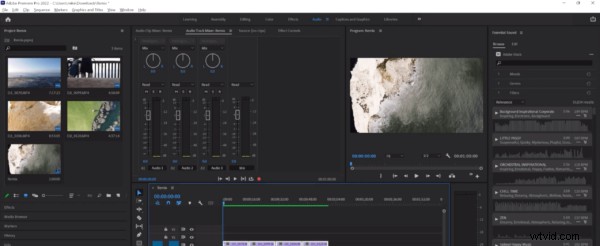
Rather than spend time editing the audio to fit, you can simply press CTRL/CMD + Z in your audio track in Premiere Pro. Next, select the Ripple Edit Tool, click and hold, and select Remix Tool.
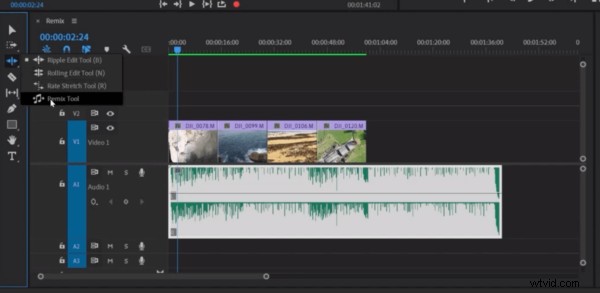
Now, you can simply drag the end of the audio to fit your video. Rather than just clip the track, it automatically adds seamless edits (shown by the zigzags in the audio) to adjust your track perfectly to fit.
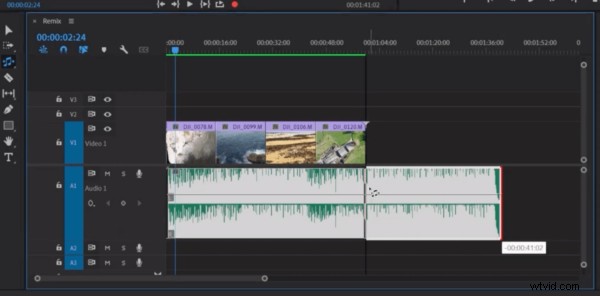
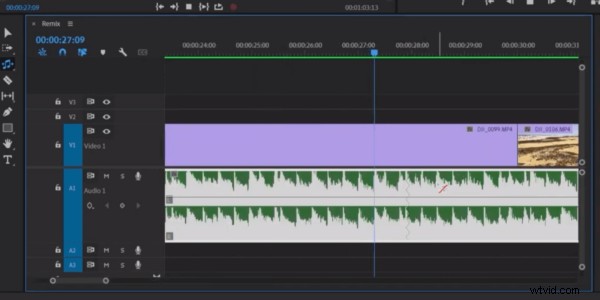
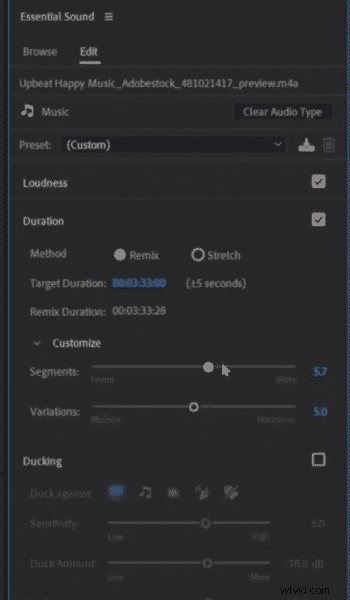
If you decide to extend the length of your audio and feel the edits are perhaps too repetitive, you can then change the target duration of the audio as well as customise the loops/segments and variations . This is really useful to get just the effect you’re looking for.
It really is an excellent, easy-to-use feature and it’s great to have it now included within Adobe Premiere Pro for video editors. Go give it a go and save yourself a lot of time with video editing!
Learn More About Editing Audio In Adobe Premiere Pro CC
- How To Fade Out Audio in Premiere Pro
- Make Dialogue Sound Better in Premiere Pro
- How to Remove Background Noise in Premiere Pro
- Durin Gleaves: Merging Audio with Video, Music Algorithms and Adobe Audition Remix
Audio Production Course
If you are looking to develop your audio production skills, check out this course here!