
You might often watch some funny reaction videos that can make you laugh. But do you want to make a reaction video about yourself or other persons? Luckily, this article will show you how to make reaction videos with MiniTool MovieMaker and other excellent reaction video makers.
In modern society, since sharing video has become increasingly popular for people of all ages to express their feelings, thoughts, and emotions about everything, making a reaction video also becomes more and more fashionable because people desire to share their ideas with others. However, the question is how to make a reaction video. In this article, you will find it easy to create a reaction video. Let’s continue to read this post.
What is Reaction Video?
You may wonder what exactly is reaction video? From Wikipedia, a reaction video is the video in which people react to some events. More specifically, it is the video that shows people’s emotions about what they see and hear, for instance, TV series, shows, music videos, and so on.
Personally, reaction video is the clip that presents your feelings to anything. For example, if you have some clips that record the moment you received some surprising gifts or you were tricked, you can make a reaction video with these clips.
Why people love reaction videos so much? Reaction video is to see what other persons think of the same thing. When you watch someone’s reaction to a funny video, and find them laughing or dancing, you also want to laugh and dance. At this moment, you’ll feel that you have the same emotion with others.
Top 6 Best Reaction Video Ideas
No matter what you’re going to do, you’re supposed to come up with some ideas before taking action. Similarly, to make a wonderful reaction video, you must drop out some creative ideas in advance. Choosing a reaction video idea is very important because it determines whether the video will be successful. To help you make a fantastic reaction video, this part will render you 6 best reaction video ideals.
1. React to music videos
Music videos are greatly popular in social media, so make reactions to them is a perfect choice. You can give comments on the latest music videos. For example, you can share what makes you love or dislike this video, or unforgettable memories this video reminds you of. Meanwhile, you should give the appropriate expressions.
Warning: You have to get the copyright of the video that you want to give opinions about, or you’ll be required to delete your reaction video.
2. React to makeup tutorial video
In recent years, more bloggers love to post makeup tutorial videos on social platforms and draw much attention. Therefore, if you can make good suggestions for some details, your video might attract many viewers.
3. React to TV shows
Everyone enjoys watching TV series and reality shows. There’s no doubt that commenting on TV shows is also an excellent idea to make a reaction video.
4. React to video comments
After your viewers comment on your video, it’s a nice choice to make a reaction video to their comments. Firstly, you can enhance the interaction with your audiences. Secondly, you might find other creative video ideas.
5. React to say no to kids
Kids are innocent and lovely. Imagine what will happen if you say no to them. So, you can make a reaction video to record their reactions when they’re refused. And when they grow up, you can also share this interesting reaction video with them.
6. React to different challenges
Most people might be afraid of the unknown things because of the human instinct. If you want to make a funny reaction video, reaction to different challenges should be taken into consideration.
After having a creative reaction video idea, you may wonder how to make a reaction video on the computer and phone? Just check out the following part.
How to Make a Reaction Video on the Computer?
Solution 1 – MiniTool MovieMaker, an Excellent Reaction Video Maker on Desktop
How to make a reaction video? MiniTool MovieMaker, an excellent video maker, is recommended here for Windows users. It is a free, clean, no ads, no bundle, and watermark-free video maker and editor. With it, you can create videos from images, clips, and music. What’s more, you can edit your videos easily to make it more perfect.
Main features:
- It’s easy to use and requires no special skills.
- It offers several nice Hollywood-style movie templates.
- It allows you to add audio, titles, and subtitles to video.
- It helps you trim, rotate, cut, merge, and split video, etc.
- It can also cut, split, combine, and rotate GIF, etc.
- It can slow down or speed up a video or GIF.
- It’s also an audio trimmer, splitter, merger, and MP3 cutter, etc.
- It can extract audio from MP4 and remove audio from video.
- It offers various video transitions and effects.
- It can export videos in any popular format.
The following will show you how to make a reaction video to different challenges. Sometimes, you may try to do some challenges. Do you want to know your reactions? Making a reaction video about yourself can solve the problem.
Therefore, when you join some challenging games, you must take some pictures or videos with the help of your friends. You can make a reaction video from these pictures and video clips.
Here’s the clear steps on how to make a reaction video on the computer with MiniTool MovieMaker.
Step 1. Download and install this reaction video maker.
1. Download and install MiniTool MovieMaker on your computer according to the instructions.
2. Open it, shut down the pop-up-window, and enter its interface.
Step 2. Import your files.
1. Click Import Media Files, choose the pictures and video clips, and then tap on Open to upload your files.
2. Drag and drop these files to the timeline.
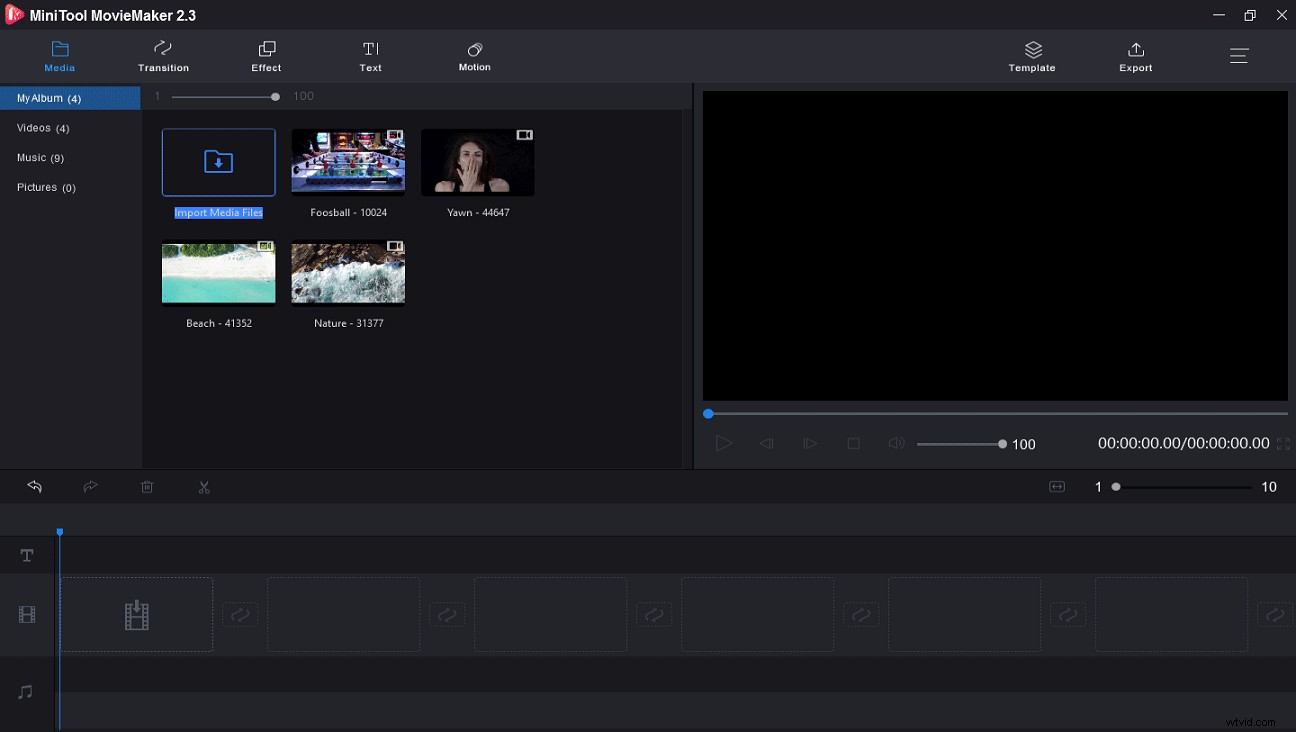
Step 3. Edit the reaction video.
To make a funny reaction video, you can edit the clips as following.
1. Rearrange clips: Drag and drop it to a new location in the timeline.
2. Split video: Choose the clip you want to split, click the scissor icon, and choose Full Split. And then choose SPLITor TRIM to trim or split the clip. Finally, click OK to save settings.
3. Add music to video: To make an interesting reaction video, you can add some funny music. Click Import Media Files to import your background music, and add it to the timeline. And you’re also allowed to edit the music, such as Fade in and Fade out effect, and mute music, etc.
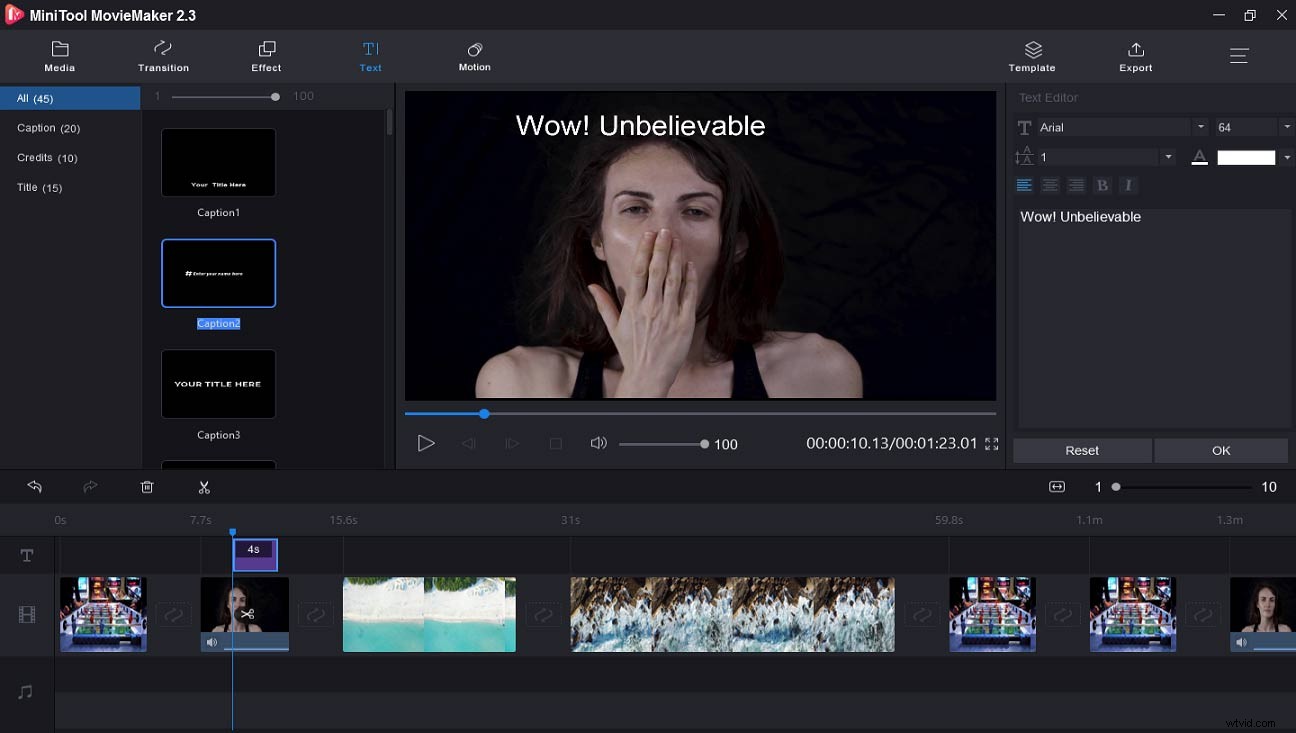
4. Add text to video: You can add some text to express your emotions at that time, and this text can make your viewer understand the reaction video better. Just click Text, select a template, delete the sample text, and type your text. Then adjust the text color, size, and font.
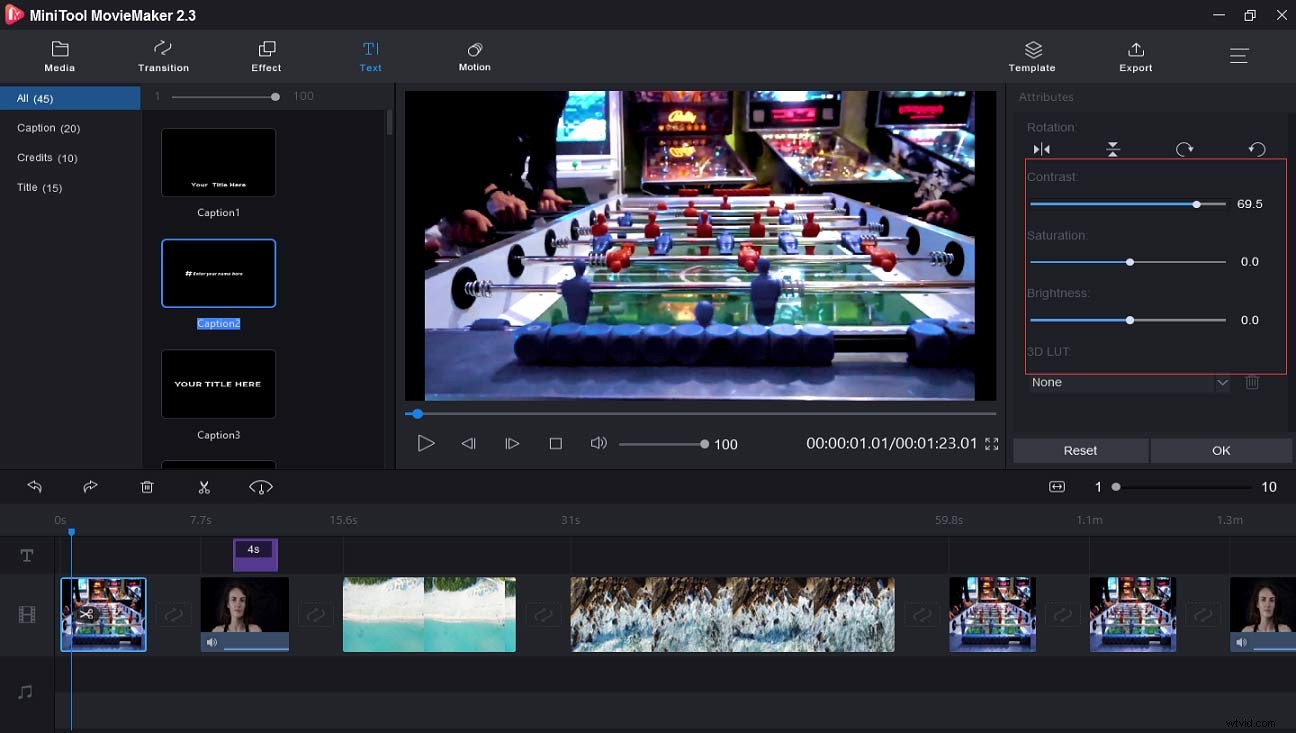
5. Do color correction: Double-click the chip, choose Edit to open the pop-up window. And then you can change the contrast, saturation, brightness, and 3D LUT of the video.
Step 4. Export the reaction video.
1. Click Export, and then you can choose the video format. The default video format is MP4. If you want to save the video in another format, you can click the Format box to change it.
2. Click Export to save the reaction video on the computer.
Related article: Top 7 Free Video Splitters – How to Split Video 2020
Click to Tweet
Solution 2 – Kapwing, the Best Online Reaction Video Maker
If you want to do a reaction overlay, Kawping should be a good option.
Kapwing is also a versatile video maker that enables you to create a video with ease. Besides, it’s a free video editor, meme generator, video converter, and photo editor. For example, it’s available to add audio to video or GIF, trim, crop, and resize videos, remove background from image, and create a video montage, etc.
Here’s the guide about how to make a reaction video with Kawping.
Step 1. Record your reaction to a video or another event.
Step 2. Search for Kawping and enter the website.
Step 3. Find Explore, find reaction video template, and click MAKE IT.
Step 4. Firstly, upload the source video as background. Secondly, add the video that records your reaction.
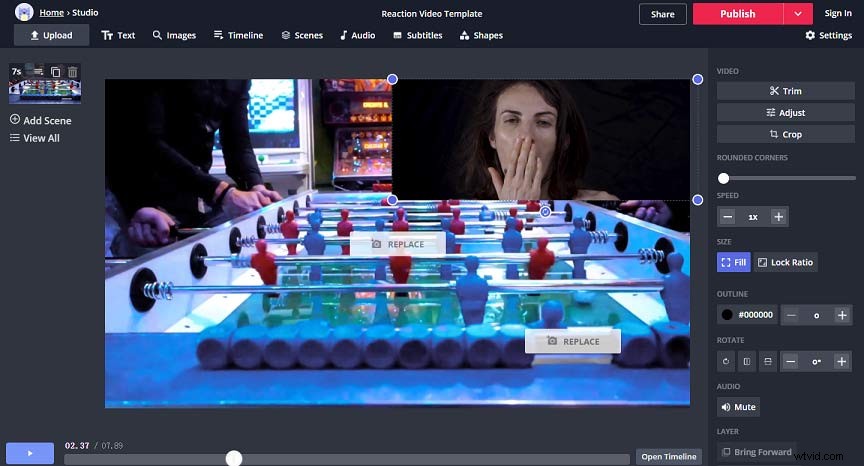
Step 5. Edit the reaction video. You can trim or crop the video, add text and audio to the reaction video, etc. And then click Done to save your changes.
Step 5. Publish or share your reaction video.
How to Make a Reaction Video on the Phone?
You already have learned how to make a reaction video on the computer. Now, let’s continue to focus on how to make a reaction video on iPhone and Android.
iPhone Solution – iMovie, the Best Reaction Video Maker for iPhone
iMovie might be the best video maker for iPhone users. With it, you can simply make a video and optimize it, like cropping or rotating vides, changing video speed, and applying video effects and transitions, etc. Undoubtedly, it’s also the best reaction video app. Here’re the steps about how to make a reaction video on iPhone.
Step 1. Record yourself to a video.
Step 2. Download and install iMovie on your iPhone.
Step 3. Launch it, click + button to import the source video and the video records your reaction.
Step 4. Choose the picture-in-picture icon.
Step 5. Edit it as you wish and save the reaction video.
Android Solution – PowerDirector, the Best Reaction Video App for Android
PowerDirector is a professional video maker and editor loaded with various features. Also, it permits you to make a reaction video in simple steps.
Step 1. Download and launch it.
Step 2. Select New Project to upload your source videos.
Step 3. Click Layer to import the video recording your reactions.
Step 4. Tap on Back to go back to the interface, and your reaction video is finished.
Step 5. Edit the reaction video according to your needs and save it.
The Best Reaction Video Maker for the Mobile
Until now, this article gives 4 reaction video makers, MiniTool MovieMaker, Kawping, iMovie, and PowerDirector, and also shows you how to make a reaction video with them. Next, you’ll be given another 3 reaction video makers.
Top 7 Reaction Video Makers
- MiniTool MovieMaker
- Kawping
- iMovie
- PowerDirector
- iReact
- Reaction Cam
- Reactoo
1. iReact
Compatibility: Android and iOS
It’s one of the best reaction video apps for mobiles to create reaction videos. It features recording your reaction and add comments while watching videos. Besides, it can record an intro before starting the reaction video and record an outro to end the reaction video. And it can also resize, trim the videos, and exchange places of the two picture-in-picture clips.
2. Reaction Cam
Compatibility: iOS
Reaction Cam is also considered as one of the best reaction video apps. It is easy to make you react to YouTube videos, Facebook videos, etc. Except for making reaction videos, it allows you to edit the video with its built-in video editor.
3. Reactoo
Compatibility: iOS
It’s another best reaction video app. It allows you to export your reaction videos to Instagram, Facebook, and YouTube, etc. What’s more, you can earn money by sharing your videos.
Bottom Line
Now, it’s time to practice. Choose one way to make your reaction videos. And then share your reaction videos with friends. If you have any question, please contact us via admin@wtvid.com.
Reaction Video FAQ
How do you usually create a reaction video?TikTok is an excellent reaction video maker for Android and iOS users. Here’re the clear steps.
- Download and install TikTok.
- Open it, play the video you want to react to, and then tap Share to record your reaction.
- Add filters to the video and add background music.
- Publish and save the reaction video.
If you want to edit the video on the phone easily, InShot is recommended here.
- Download and launch this app.
- Upload your reaction videos.
- Add music, text, and stickers, etc.
- Select a video resolution.
- Save and share your reaction video.
To make a good reaction video, what you need is as follows.
- A video camera or a smartphone.
- Microphone to record audio.
- A quiet environment.
- A video to react.
- A video editor.