
Lyric videos have always been a trend on YouTube. Initially starting as fan-made videos, several artists have also hopped in on the trend, releasing separate videos dedicated to the lyrics. Lyric videos are a good strategy to keep your fans engaged in your content, and hence it is important to make lyric videos that are unique and captivating.
Want to know how to make a lyric video? You can learn an easy method to do so using Filmora X in the article below. Also, discover some great effects and templates by Filmstock to make your music video stand apart.
- Part 1: Why Lyric Video is So Popular?
- Part 2: How to Make a Lyric Video in Filmora X?
- Part 3: 7 Music Theme Video Effects to Help You Create Lyric Videos
Part 1: Why Lyric Video is So Popular?
Lyric videos are music videos that feature a song's lyrics along with its audio. The display of lyrics to a song as it is being played was a major hit when it first emerged. The lyric video format has risen significantly, and major record labels can now be seen producing them. But what makes lyric videos so popular? Here are a few points explaining the success of lyric videos:
- Social Media Friendly
Lyric videos are great for promotional social media content. Social media users like the idea of a short video displaying the lyrics of their favorite song on an aesthetic background. Word spread fasts on social media, and your content can quickly gain popularity.
- Increases Engagement
When fans can view your lyrics and understand the meaning better, it helps to boost engagement. Making a lyrics video has proven to increase people's engagement in your content.
- Easy to Make
The process of making lyrics videos is easier than you might imagine. As opposed to music videos, lyric videos require less effort and pay more.
- Low-Budget Alternative
Lyric videos are great low-budget alternatives for rising artists. If you are on a tight budget, a full-fledged music video can cost more than you'd like. But with a well-made lyric video, you can save both time and effort yet still gain the fame and success you were rooting for.
- Boost Recognition
Posting a lyric video on YouTube is a shortcut to fame and recognition. With millions of users worldwide gaining access to your content, there is a higher chance to boost your popularity.
Part 2: How to Make a Lyric Video in Filmora X?
Wondering how to make a lyric video? Making music lyric videos is not a hard task and can be done via simple video editing software. But the best way to make lyric videos is using Wondershare Filmora.
Filmora is undoubtedly the best video editing tool out there. The software offers creative tools to edit videos so that minimal effort is required. With stunning effects and a vast library of assets, Filmora helps you create professional-quality content at a quick pace. It also offers advanced video editing features and supports several file formats.


The following steps indicate how to make a lyric video using the latest version of Filmora, Filmora X:
Step 1: Getting Started
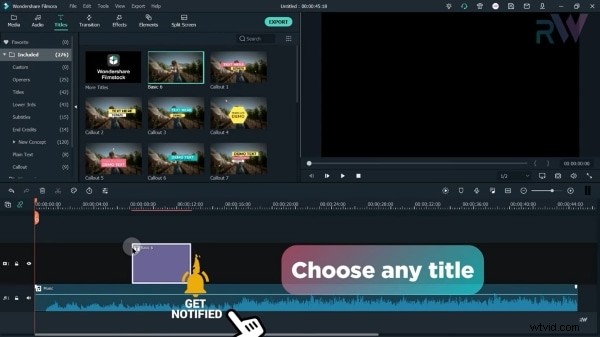
Launch Filmora X on your device. Go to "Title," choose any that you like, and drag it to the timeline.
Step 2: Add Text
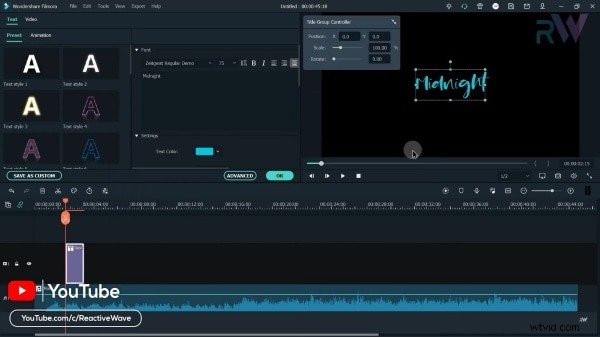
Right-click on the timeline and select "Show Properties." Now go to "Advanced" and write your lyrics in the text box. You can change the font style and size from the top. Now go to "Animation" at the top and apply an animation of your choice. You can also change the color of the text.
Step 3: Add Transitions
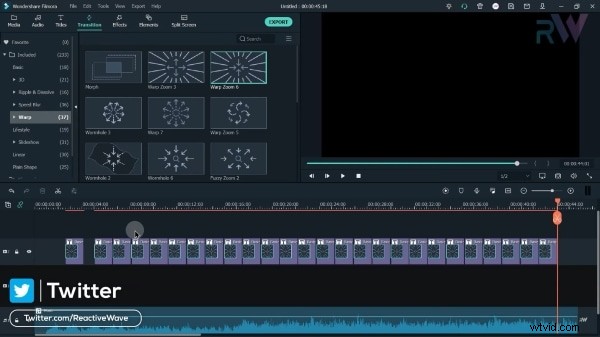
Now go to the "Transitions" tab and drag a transition that you want on your lyrics to the timeline. Right-click, select "Show Properties," and decrease the duration to 1second. Click on OK and check the preview. Now copy and paste this effect to the rest of the keyframes on the timeline. Select all and drag them on to layer 2.
Step 4: Add Background Layer
Now apply another title to layer 1 and expand it to the rest of the timeline. From "Advanced Properties," add a rectangle shape to fill the screen, deselect "Text Fill," "Text Border," and "Text Shadow," and choose a color fill of code "191919".
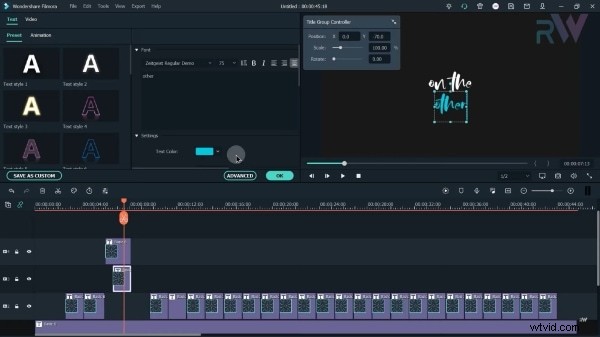
Now you can move keyframes on the second layer and type in the rest of the lyrics. You can drag the effects on different layers to apply different transitions.
Step 5: Add Effects
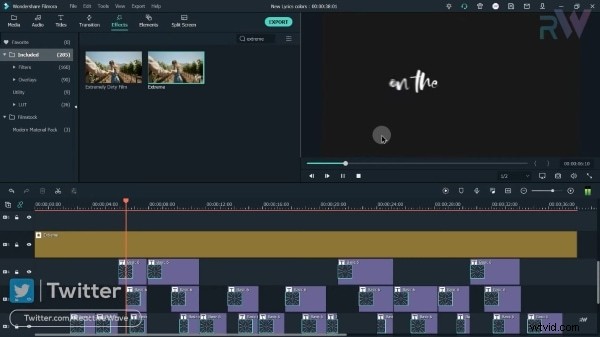
Now head over to the "Effects" tab, select the one you like, and drag it onto a new layer on the timeline. Expand it till the end, right-click and tap on "Show Properties." From here, set the "Frequency" to 100, "Position X" as 0.01, and "Position Y" as 0.01 too. Click on "OK" to save changes.
Step 6: Apply Audio
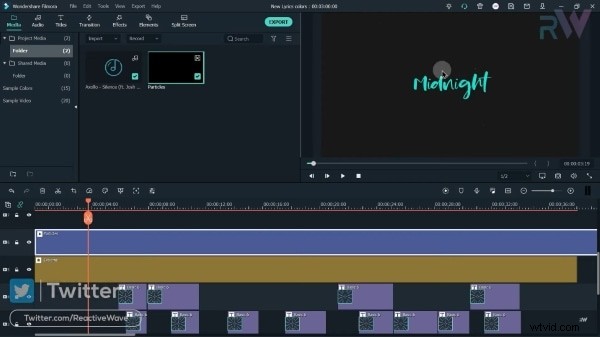
To apply audio sound, click on "Media" and import the audio file. Right-click on the timeline layer and select "Split."
Step 7: Add Overlays
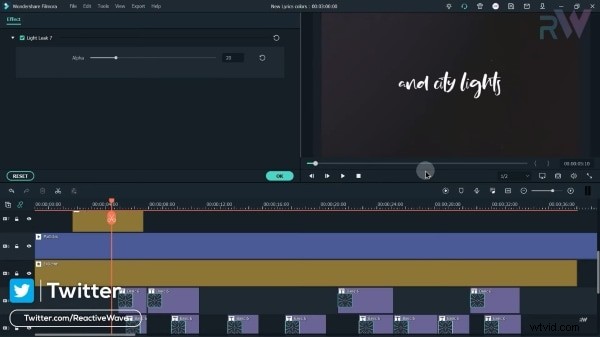
Go to "Effects," and from "Overlay," drag and drop one of your choices onto the timeline. Right-click to open properties and decrease the "Alpha" by moving the slider to adjust it to your requirements.
Step 8: Export File
Finally, export your file to the device. Your lyric video is all set to take over the world!
Part 3: 7 Music Theme Video Effects to Help You Create Lyric Videos
Looking for ways to take your music video to the next level? With Wondershare Filmstock, you have to search no more.
Filmstock acts as a resource library for Filmora. The tool contains some creative digital assets and templates which can be used to enhance your videos greatly. You can try some of Filmstock's music-themed effects mentioned below to create remarkable lyric videos.
1. Lyrics for Music Video
Filmstock offers its Lyrics for Music Video pack, which can be used with Filmora 9.6 or above. It includes 16 title templates, 17 elements, and 4 graceful transitions to help you create lyric videos that stand out. The elements and interface are all related to the music theme and carry a retro and artistic vibe that you can easily incorporate in your music videos.
2. Concert Stickers Pack
The Concert Stickers Pack of Filmstock contains multiple templates and elements, which revolve around a vintage music theme. Discover music instruments, concert tickets, stages, and lower thirds to help you make an amazing music lyric video. From open-mics to jazz, the pack can be used in almost any kind of music video.
3. Music Artist Pack
With over 100 million downloads, the Music Artist Pack by Filmstock is quite popular among users. The pack includes 7 title templates, 8 elements, and 2 transitions that can be used with Filmora's 9.2 or above versions. The Music Artist Pack offers some modern and sleek effects and elements, featuring musical elements, mics, and much more.
4. Electronic Space Music Pack
Filmstock's Electronic Space Music Pack is at your service if you want to add a heavy electronic effect to your music video. The pack is perfect for electronic and heavy music, featuring 8 title templates, 26 elements revolving around cosmic space, and 4 overlays and transitions. From a spacecraft to dancing dogs and speakers, this pack has it all.
5. DJ Music Party Pack
Looking for video elements to match your upbeat and catchy music videos? With Filmstock's DJ Music Party Pack, you can do just that. The pack contains multiple elements and transitions for sound waves, radios, mics, and much more. You can add the DJ Music Party Pack elements to videos of live performances, festivals, and video openers.
6. Music Pack
With 20 elements, 14 overlays, and multiple title templates, the Music Pack of Filmstock is everything you need to make a lyric video perfect. The pack includes various bright and colorful elements to add some vivacity to your lyric videos. You can also see some modern and elegantly designed title templates, as well as moving audio graphs, and more.
7. Jazz Festival Pack
The Jazz Festival Pack by Wondershare Filmstock is the perfect template set for making lyrics videos. Specifically aimed at music festivals, the pack features some good and fun-filled effects. The elements include everything from drums to saxophones, providing you with a great variety of colorful instruments to play with.
Wrapping Up
The music industry is no stranger to lyric videos. Using Filmora's wonderful services, you can make a lyric video of your own without breaking a sweat. As mentioned earlier, if you are looking for some wonderful effects and templates for your music videos, you can head over to Filmstock to try their amazing resource packs.