
Is there any convenient method to extract text from images? How to quickly convert image to text? Luckily, this post will introduce the 4 best methods to extract text from images for free. (Try MiniTool MovieMaker to insert an image into a video!)
For some reason, you need to copy text from an image, so you spend much time typing everything out. Do you want to quickly extract text from images? If yes, let’s dive into this post and learn how to capture text from images effortlessly!
Method 1. Convert Image to Text with Online OCR
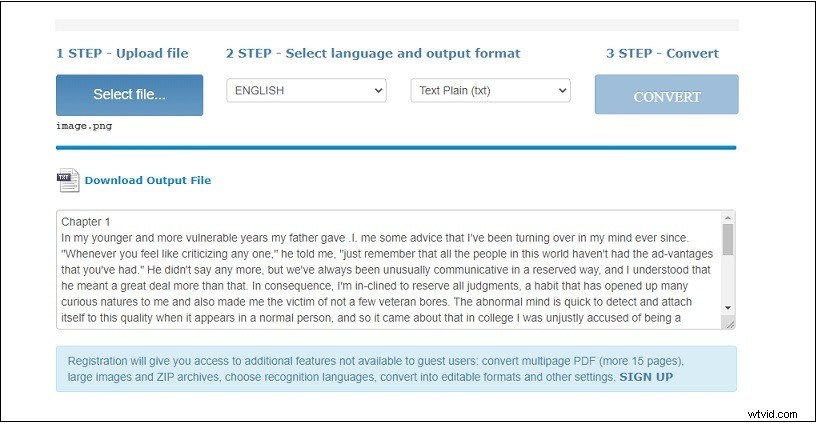
Online OCR is a free online OCR service that supports 46 languages including English, Japanese, Korean and Chinese. It can extract text from PDFs and images like JPG, BMP, TIFF, GIF and convert them into Word, Excel, and Text. The maximum file size is limited to 15 MB.
Step 1. Go to the website: https://www.onlineocr.net
Step 2. Tap on Select file… to load the image you want to extract text from.
Step 3. Select the language of the text and choose Text Plain (txt) as the output format.
Step 4. Press the CONVERT button to convert the image to text.
Step 5. After the process finishes, you can preview the text and click on Download Output File to save the text document.
Method 2. Convert Image to Text with OCR2EDIT
OCR2EDIT has a set of tools that lets you convert image to text, PDF to text, PDF to Word, JPG to PDF, and so on. It helps you extract text from PNG, JPG, GIF, and other image formats.
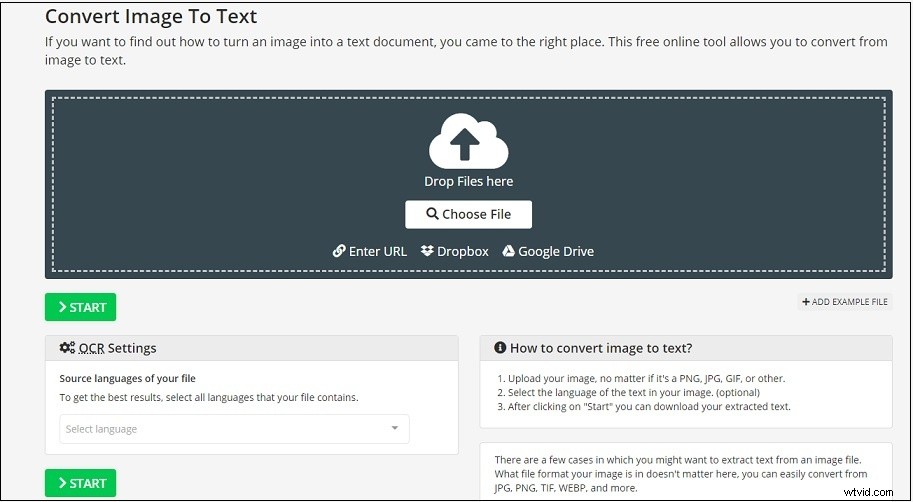
Step 1. Open the OCR2EDIT website: https://www.ocr2edit.com and tap on Image to text.
Step 2. Upload the image from your computer, Google Drive, Dropbox, or by entering the image URL, and select the language that the image contains.
Step 3. Click the START button to extract text from the image. Once done, the text document will be downloaded in a few seconds.
Related article: How to Convert Word to JPG? 2 Ways!
Method 3. Convert Image to Text with Brandfolder
This is another free online image to text converter that converts from image and PDF to text. No registration is required!
Step 1. Visit the website: https://brandfolder.com/workbench/extract-text-from-image
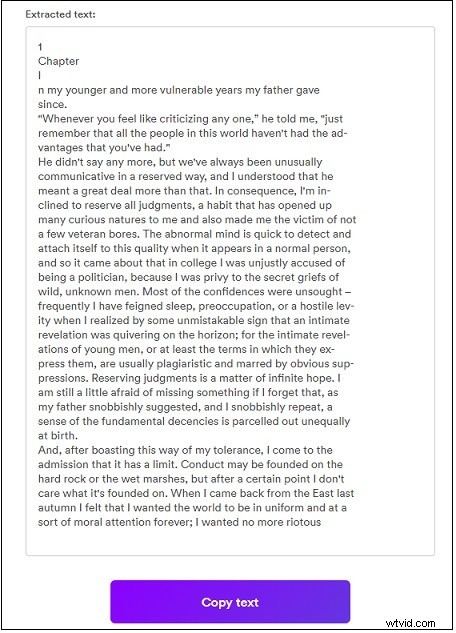
Step 2. Click the + and upload the image that you wish to pull text from. Click Upload.
Step 3. Then it will start converting image to text. After the conversion completes, you will get the extracted text. Click Copy text, create a text document and paste it into the document.
Method 4. Convert Image to Text with OCRSpace
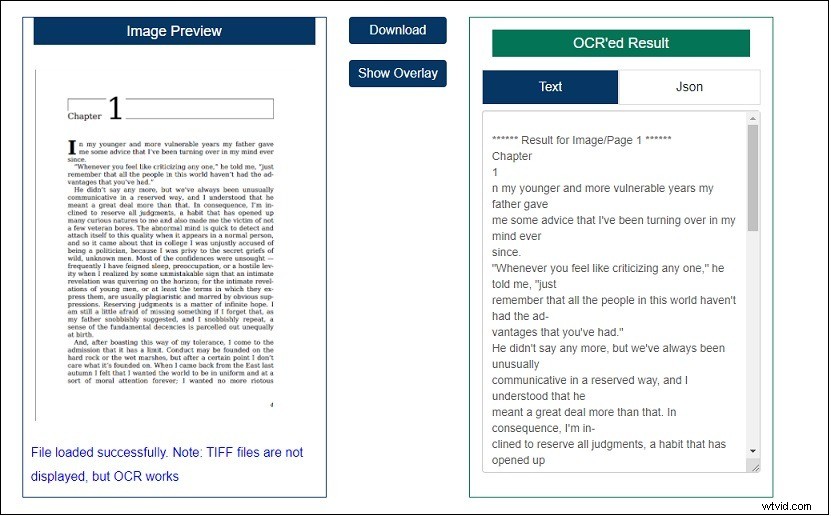
OCRSpace is an excellent text extractor that supports converting images and PDF to text. It’s free and web-based without registration required. The only drawback is that the upload file size must be smaller than 5MB.
Step 1. Visit the OCRSpace website: https://ocr.space
Step 2. Click Choose File to load your image and select the language of the text in the image. Then click on Start OCR to extract text from the image.
Step 3. Click the Download button to save the extracted text.
Conclusion
Do not waste time typing! Try online image to text converters to extract text from images quickly and easily!