
REC

Recommended: Video Production, Editing & Gear Maintenance Guide

 WTVID >> WTVID >  >> video >> Video clip

Clipchamp Phone Import: Seamlessly Transfer Smartphone Videos to Your Editor

Clipchamp Phone Import: Seamlessly Transfer Smartphone Videos to Your Editor

Smartphones – where would we be without them? There are currently 3.5 billion smartphone users around the world turning to their devices for almost everything. Smartphones are our GPS, our phone book, and more often than not, our camera. 

The gap in image and video quality between smartphones and traditional cameras is quickly closing. This means phones are now our preferred tool to capture content – the kind of content we edit into videos. 

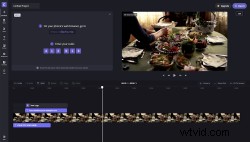
We think it should be easy to import your content into Clipchamp, so our team has enabled a new function: phone import. Let’s jump into how it works. 
Clipchamp Phone Import: Seamlessly Transfer Smartphone Videos to Your Editor

A new Media Library option

Clipchamp Phone Import: Seamlessly Transfer Smartphone Videos to Your Editor

Now, when you start a new video project and go to your empty Media Library, you’ll see a new option: import from phone. Select this to get started.

Connecting your phone to Clipchamp

Clipchamp Phone Import: Seamlessly Transfer Smartphone Videos to Your EditorClipchamp Phone Import: Seamlessly Transfer Smartphone Videos to Your Editor

So, how do you connect your phone to Clipchamp? It’s simple. When you select the import from phone option in the Media Library, you’ll be provided with a web address and unique code. Visit this web address on your phone and you’ll be prompted to enter your code. 

Once you’ve entered your code correctly, you can select media from your phone’s camera roll or another storage area. 

When you’re done, you can import your media into Clipchamp. It will appear in your Media Library just like files imported from your computer or the Stock Library. From here, you can start editing your video.


  1. Ulead MediaStudio Pro 6.0: Expert Test Bench Review

  2. Essential Best Practices for Secure Media Storage & Backup

  3. Discover Freehand 2.0: Effortless Video Cropping and Repositioning in Clipchamp

  4. Clipchamp Phone Import: Seamlessly Transfer Smartphone Videos to Your Editor

  5. Clipchamp Introduces Powerful Screen & Camera Recording

Video clip
  1. Test Bench Review: Media 100i 7.5 LEDV – Pioneering Affordable Mac Video Editing

  2. How to Rotate Videos on Phone, PC, or Mac: Easy Step-by-Step Guide

  3. Master Vertical Phone Footage in Post-Production: Pro Tips and Techniques

  4. How to Edit Videos in Windows Media Player: Step-by-Step Guide with Transitions & Effects

  5. How to Convert CUE+APE Files to MP3: Easy Step-by-Step Guide

  6. Clipchamp Video Speed Controller Guide: Easily Speed Up or Slow Down Videos Online

  7. Discover Freehand: Clipchamp's Powerful Freehand Video Editing Tool

  8. Celebrate Pride Month: Create Stunning Videos with Clipchamp