
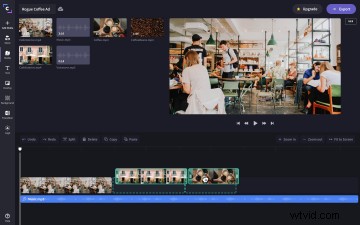
Sequels can be hit and miss – sometimes they’re a total flop (don’t even bother with Grease 2) but other times, they’re spectacular and make a good thing even better. Great sequels include The Godfather Part II, The Dark Knight, and now Clipchamp Timeline 2.0.
Yes, our trusty video editor timeline has had an update. We’ve heard your feedback, tested out changes, and created Timeline 2.0. It’s the even more user-friendly, super intuitive sequel to our original.
Check out Timeline 2.0’s new features in detail below and discover how they’ll make your editing experience even easier.
Timeline guidance

Even first-time editors will feel at home in the editor thanks to our new timeline guidance. New empty states (aka the empty timeline) offer more direction for where to start. Drag and drop media to the timeline and guides will now appear to help you drag and drop text and audio to the correct place.
Improved transitions

With timeline 2.0, transitions are easier to add than ever. Drag and drop transitions between two clips and a new, bold transition icon will appear. Additionally, the transition icon now expands in the timeline to show the actual duration of the transition.
Multi-drag and drop/copy and paste
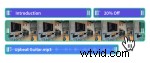
Users can now select multiple items on the timeline by holding down shift or command and selecting the items. You can then drag them all anywhere on the timeline or use copy and paste commands to multi-copy and paste.
Keyboard shortcuts

Keyboard shortcuts are now available on all devices. If you’re in the editor on a Windows or Chromebook device, hit Ctrl / to open the OS keyboard shortcuts menu. If you’re on a Mac, simply hit Command /.
Plus, performance improvements
We’ve also made a few smaller tweaks to the timeline to improve your experience. You’ll notice better playback smoothness and better thumbnail generation in the timeline.