
StudioBinder’s new online calendars for photographers and videographers bring production scheduling into the digital age.
We’ve all been on those big shoots. The ones where there seem to be a million moving parts, tricky set-ups, and not enough hours in the day to get everything done. When you get those first emails, it feels like you have hundreds of documents to go through just to find your call time. It gets overwhelming — especially when you need to print everything out yourself.
Thankfully, StudioBinder’s new online calendars are bringing production scheduling into the digital age. So let’s check out the new offering (and be sure to grab the exclusive discount code at the bottom of the article).
Intuitive Design
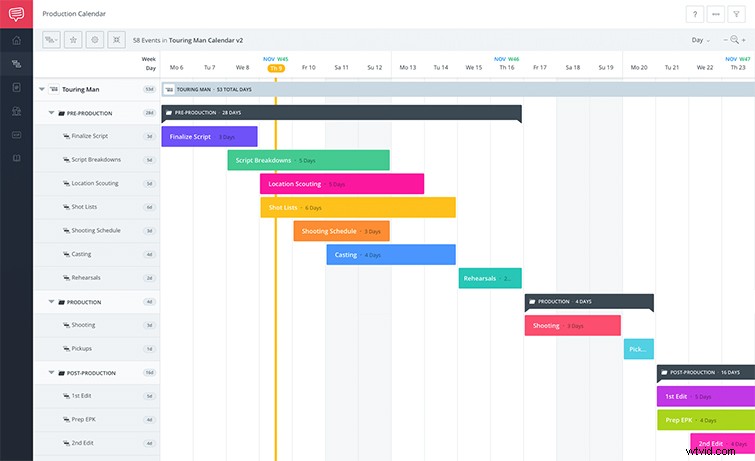
StudioBinder’s production calendars are intuitively designed for film and video professionals on the run. In their design, everything operates off of one main page (where you can even track multiple projects at once). Once you’re on the job, everything from creating and finding tasks, assigning teammates, updating statuses, and leaving comments is all on the same page. StudioBinder’s colorful layout lets you add filters and color codes to keep everything coordinated, organized, and fun.
Collaborative Sharing
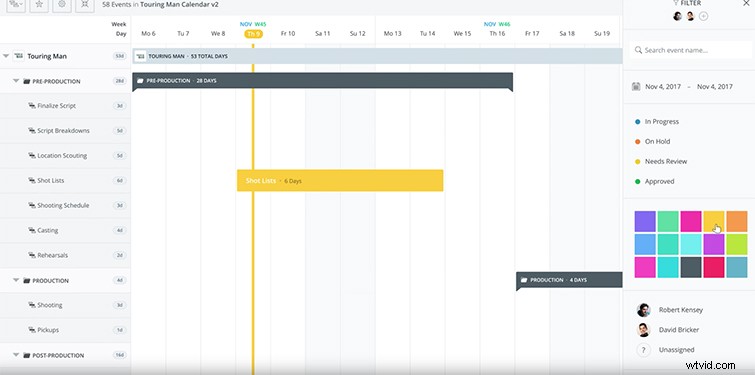
For those of us who have grown up in the Google Docs cloud-based world of collaborative sharing, StudioBinder’s production calendars are fully integrated so multiple users can share, update, and review instantly. Whether you’re physically on set or on the other side of the world, updates happen in real time, allowing you to monitor event statuses closely, resolve dependencies and conflicts, and even share updates and drafts.
Savable Templates
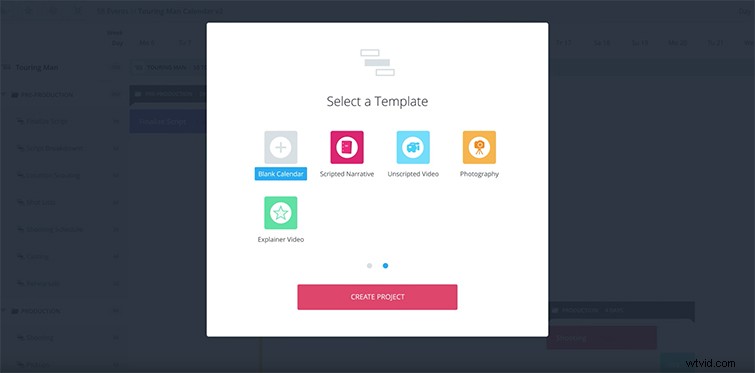
Finally, whether you’re working on scripted narratives, unscripted documentaries, or corporate explainer videos, StudioBinder’s production calendars allow you to save templates for each type of project. Never create the same calendar twice! You can also choose from several of their pre-made calendars to get started. Savable templates are available for any of your team members to access on the fly.
Bonus: PremiumBeat Discount Code
To get started, anyone can create their first StudioBinder production calendar for free. From there, rates for additional projects and storage tier up through Scheduler ($19 a month), Indie ($29 a month), Professional ($49 a month) and Studio ($85 a month), with greater discounts for yearly options. But, as a bonus to our loyal readers here at The Beat, PremiumBeat fans can get 25% off their first month by using the promo code below.
Promo Code: THEBEAT25