
When you're converting a DVD movie, you're most likely to convert the complete movie into separate VOB files. At this time, you may want to join them together into a new one. To merge VOB files together, you have to ask a reliable VOB joiner for help. Wondershare Filmora (originally Wondershare Video Editor), can be your best choice. It can quickly and easily merge VOB files in one VOB, WMV, MOV, AVI files without any video and audio quality loss. Or when you get some separate VOB clips from the Internet, and want to burn them to a DVD, this excellent VOB file joiner also gives you the ability to directly join and burn VOB files together to a DVD disk. Powerful, right? Now, let me show you the detailed steps about joining VOB files.
Download and install this smart VOB joiner first. After running it, just click 16:9 or 4:3 ratio option to enter into the main interface of this app. Note that the guide is right for Windows users. For Mac users, you can click here: The Guide of Filmora for Mac.
Step 1: Import VOB files to this VOB file joiner
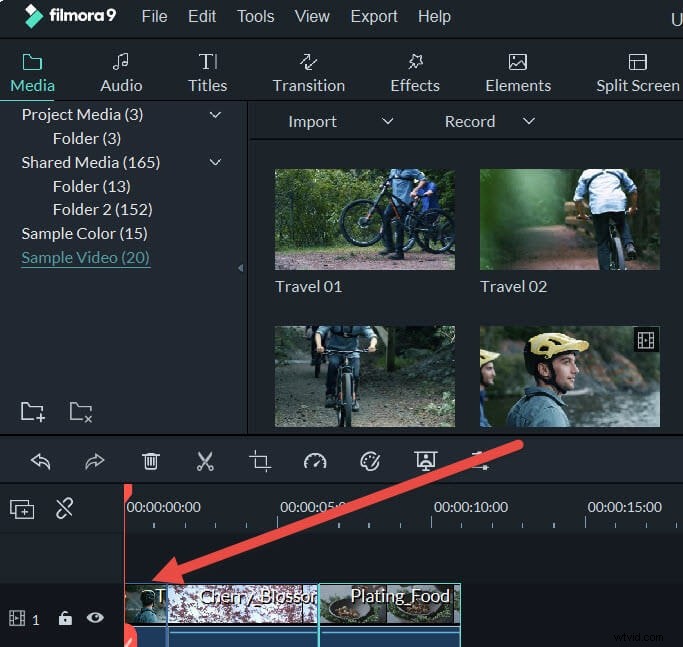
Click "Import" option to import all VOB clips you want to join from the computer to the User's album. Also, you can drag and drop these target VOB files from your hard disk to the album.
Step 2: Join VOB clips
Directly drag these imported VOB files from your album to your Timeline one by one. Make sure these VOB clips are arranged according to the play order. In order to better arrange all VOB files without overlapping, you can move the slider bar to arrange them one by one.
Step 3: Export a complete VOB video or burn to DVD
Click the "Create" button to open the output window. Here, you have the option to continue to save the new video in VOB format by selecting "Format">"VOB". If you want to burn to DVD, click "DVD" tab to finish DVD burning.