
REC

Recommended: Video Production, Editing & Gear Maintenance Guide

 WTVID >> WTVID >  >> Filming equipment >> Cell phones

How to Switch Your Instagram Feed to Chronological Order: Easy Steps

How to Switch Your Instagram Feed to Chronological Order: Easy Steps

Instagram now offers an option to view your feed in chronological order, meaning that you will see posts from people you follow that are the most recent, rather than based on the Instagram algorithm.

To use the chronological feed on Instagram, you will want to update the Instagram app to the latest version. The rest is super easy.

How to See the Chronological Feed on Instagram

  1. Open Instagram if you have not done so already
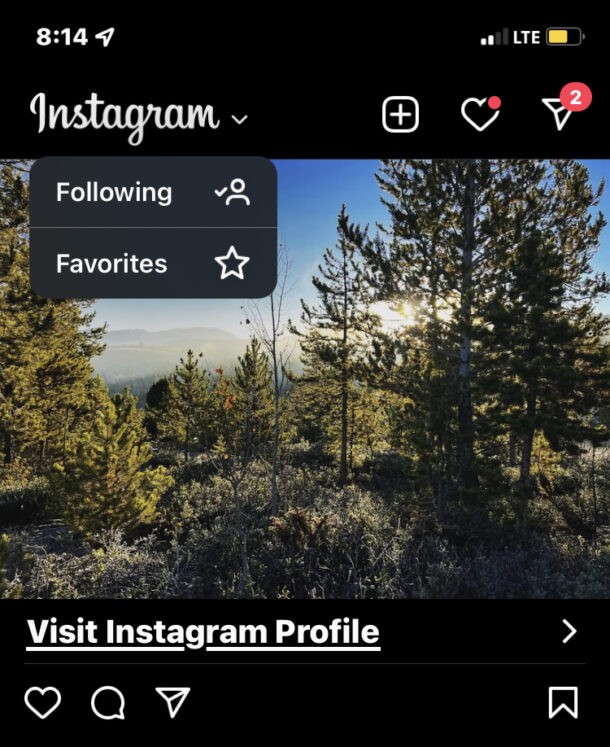
  2. Tap on the Instagram logo in the upper left corner of the feed screen
  3. How to Switch Your Instagram Feed to Chronological Order: Easy Steps

  4. Choose “Following” to switch the feed to chronological, based on the accounts you’re following
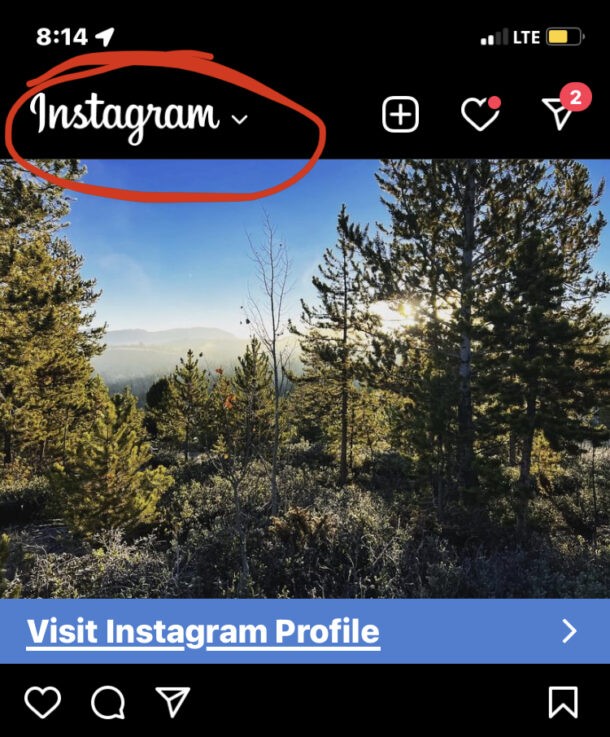
  5. How to Switch Your Instagram Feed to Chronological Order: Easy Steps

Now you’re seeing your follow feed chronologically, similar to how Instagram used to be years ago before the introduction of the algorithms that intend to optimize engagement and time in the app.

Whatever is posted most recently by accounts or people you follow will appear at the top of the feed, even if it’s boring or not optimized by the algorithm.

You can tap back at any time to return to the default algorithm feed.

Check out some more Instagram tips if you’re interested. One of the more interesting is downloading all your Instagram data, pictures, videos, stories, posts, and comments if you’d like a local backup of all your stuff, or if you plan on disabling or deleting your account.


  1. How to View TikTok Watch History: Easy Steps to Find Watched Videos

  2. Instagram 'Couldn't Refresh Feed' Error: Quick Fixes & Proven Solutions

  3. Master Instagram Reels: Elevate Your Marketing Strategy with Short-Form Videos

  4. How to Unsend Instagram Messages: Step-by-Step Guide for iPhone & Android

  5. How to Mirror iPhone to LG TV: Easy Wireless Screen Sharing Guide

Cell phones
  1. Infographic: Optimal Video Lengths for Social Media Success

  2. Proven Strategies to Boost Your Podcast on Instagram with Video

  3. How to View Your Facebook Profile as Others See It: Step-by-Step Guide

  4. How to Get Your Instagram QR Code: Instant Profile Access Guide

  5. How to View Your Liked Posts on Instagram: Easy Step-by-Step Guide

  6. Step-by-Step Guide: Download Your Instagram Data Archive & Delete Your Account Securely

  7. How to Check Who Viewed Your Instagram Posts, Stories, Videos & Profile (Guide)

  8. How to View and Revoke Third-Party App Access to Your Apple Music Library