
TikTok does not have a Watch History button. Sometimes, you may want to watch an exciting video on TikTok again. At this time, you may wonder how to see TikTok watch history and how to find a video you watched on TikTok. This post will show you how to view TikTok watch history.
In this post, we’ll cover how to see your entire TikTok watch history and how to find a certain video you watched on TikTok. If you want to edit a TikTok video before uploading it on PC, try MiniTool MovieMaker.
How to See TikTok Watch History on the Phone
If you want to see your entire watch history on TikTok like watched videos, comment history, login history, settings, and more, you can request your data from the TikTok app. Below are detailed steps on how to request the data file from TikTok on Android and iPhone.
Step 1. Open the TikTok app on your Android or iPhone, and click the Profile tab at the bottom right corner.
Step 2. Tap the three lines icon at the top right, then click Settings and privacy and tap Privacy on Android, or click Privacy on iPhone.
Step 3. Next, click the Personalization and data and then Download your data, then choose the file format TXT or JSON.
Step 4. Click the Request data button, then you’ll receive a message that says your request has been received. Once the file is ready, the Pending button will turn into Download.
Step 5. Click the Download and follow the instructions provided to save your TikTok data. Once done, you’ll get a ZIP file that includes your video browsing history, and you can see all the videos you watched on TikTok.
Want to add transition on TikTok? Read this post - A Simple Guide on How to Do Transitions on TikTok.
How to Find a TikTok Video You Watched
The above section illustrates how to how to view TikTok watch history by requesting and downloading data files from the TikTok app. And in this part, we’ll show you how to find a video you watched on TikTok or how to see recently viewed TikToks.
Step 1. Open the TikTok app, click the Discover tab, tap the Search box, type your keyword, and click Search.
Step 2. Click the Filter icon at the left side of the Search bar, then tap the switch labeled Watched videos, and press Apply.
Step 3. Then you’ll get the results of the videos related to your search query.
How to See Liked Videos on TikTok
When you find an interesting video on TikTok, you may click the Heart icon on the right panel to like the video. How to find the liked videos you’ve already seen on TikTok. Here’s how to see liked videos on TikTok.
On the TikTok Mobile App:
- Open the TikTok app, tap Profile in the bottom right.
- Then click the Heart on the right side of the panel to see your liked videos.
By default, video likes are hidden and only you can see your liked video, but you can change your Like settings. To show or hide your liked videos, tap the Profile > three lines icon, click Privacy and tap the Who can view videos I liked, then choose Everyone or Only me.
On PC:
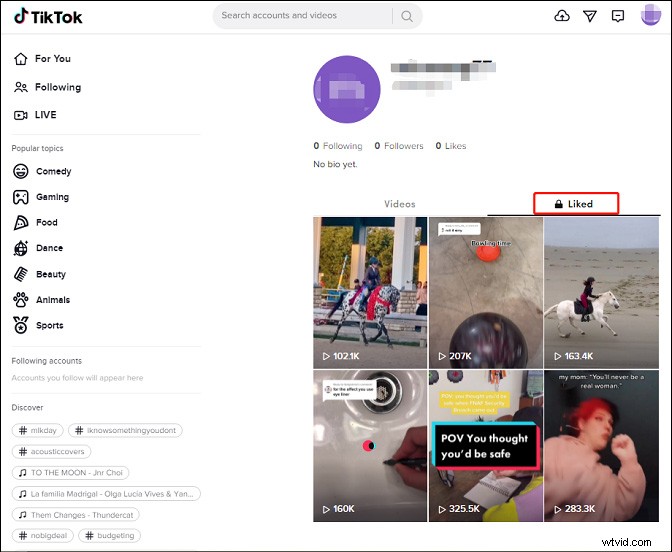
- Open the Tiktok desktop app or go to the TikTok website (https://www.tiktok.com/).
- Click your profile picture and select the View profile.
- Go to the Liked tab to show your liked videos. Click a video to watch it again.
Conclusion
After this post, you can easily download TikTok data and view your entire TikTik watch history or find a video you watched. And if you want to make amazing TikTok videos and grow following, you can check TikTok stitch or slow motion on TikTok to create impressive or funny videos.