

Want an added privacy boost for all of your WhatsApp messages, texts, conversation threads, and chats? You can set WhatsApp so that all messages will disappearing automatically, by default. Whether you want all messages to disappear after 24 hours, 7 days, 90 days, or not at all, you have that option. It doesn’t matter if you’re using WhatsApp on iPhone or Android either, the setting is available in every WhatsApp app.
Note this is a setting that will universally apply to all messages in WhatsApp, effectively setting the default for all chats to disappear automatically. That is what makes this setting different from turning on disappearing messages for a specific chat thread, which is also possible.
Making WhatsApp Messages Disappear by Default
Ready for all your messages in WhatsApp to disappear automatically, by default? Here’s how to make that setting change:
- Open WhatsApp and go to “Settings” in the bottom right corner
- Choose “Account”
- Go to “Privacy”
- Tap on “Default Message Timer” under Disappearing Messages
- Choose how long you want to wait for the messages to disappear: 24 hours, 7 days, 90 days, off
- Leave Settings in WhatsApp and return to chatting as normal
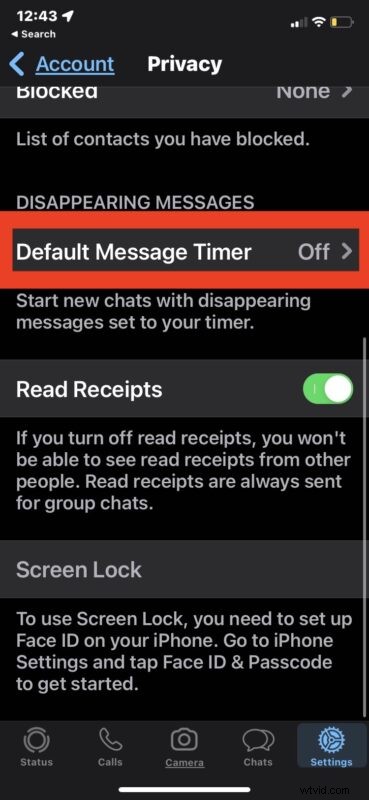
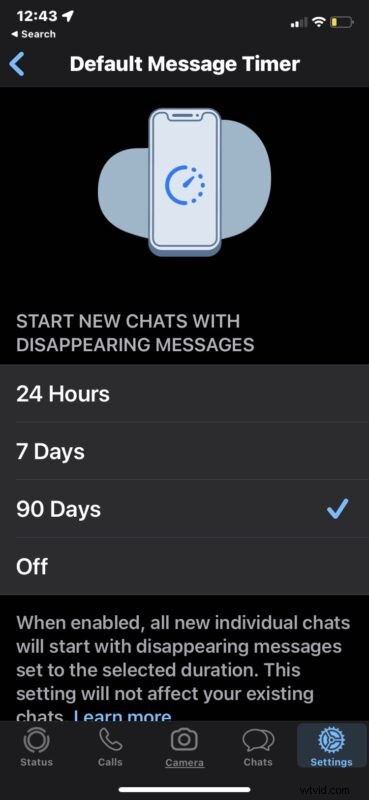
Any new message will be set to disappear automatically as defined by the time setting you chose.
Again, this is different from simply enabling disappearing messages for a particular WhatsApp conversation, because it applies universally to all conversations.
Remember, disappearing conversations aren’t foolproof and are not guaranteed to mean the message will never resurface somewhere, particularly if someone copied it, took a screenshot, forwarded the message, or otherwise preserved the message. And who knows whether or not they are actually deleted from WhatsApp servers, or anywhere else they may be stored, but it’s probably best to assume that, like anything else on the internet, it’s not completely private. So if you’re planning on spilling some serious secret beans over WhatsApp, you might want to reconsider and do it in person instead.
What do you think of having all your WhatsApp chats disappear the messages by default? Do you use this feature?