
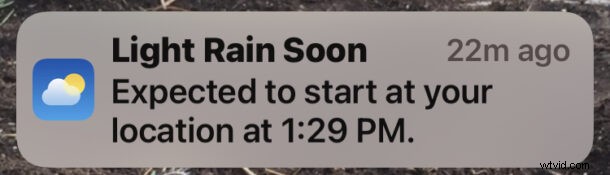
Ever wished you had advance notice that it’s going to rain or snow? Thanks to the Weather app for iPhone, you can now get weather notifications pushed to your iPhone, letting you know if it’s going to rain or snow soon.
This is a useful feature as the weather turns, particularly for those in areas where weather can be a significant factor in decisions. Now you’ll know whether you need to grab a rain jacket, umbrella, snow coat, or whatever else you feel like gearing up in to endure the inclement weather.
How to Turn On Rain and Snow Notifications on iPhone
To get rain and snow notifications on iPhone, you will need to make sure Weather has “Always” location access enabled via Settings > Weather > Location > Always. You’ll also need to make sure you’re using a modern iOS version.
- Open the “Weather” app on iPhone
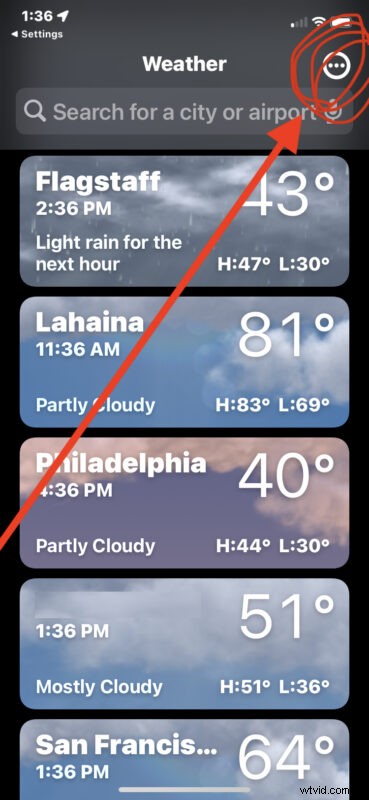
- Tap the (…) triple dot button in the upper right corner of the main weather list screen
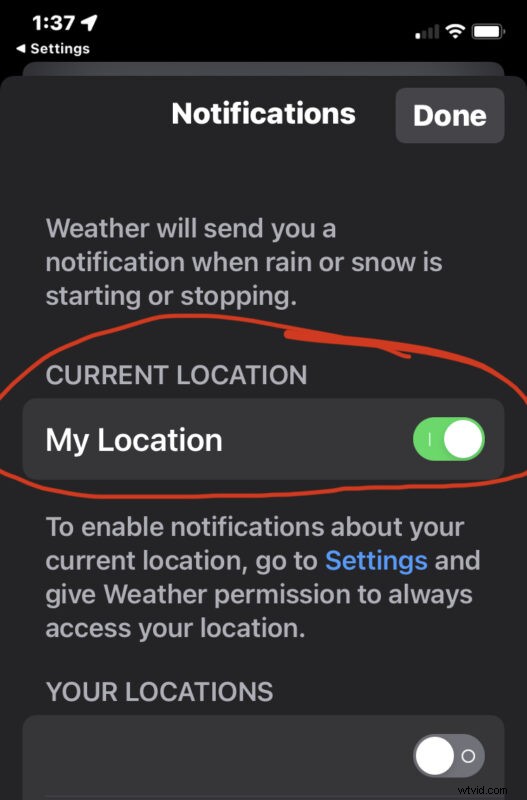
- Toggle the switch for “My Location” to the ON position to get live rain and snow notifications for where ever you are
With this feature enabled, you’ll get a push notification to your iPhone, with message like “Heavy Rain Soon”, “Light Rain Soon”, or “Snow Soon” with an expected start time for the weather.
You can also toggle the weather notifications for specific locations if you feel like going that route, or getting rain and snow updates for places you are not currently located.
Assuming your iPhone Weather app has constant location access, the weather updates will change as you drive and travel between locations for example.
This is a handy feature, so give it a try on your iPhone.
And by the way, this is completely different from the government emergency alerts from the FCC and FEMA, which may also include severe weather alerts like flash flood and tornado warnings.