
iOS 15.1 and iPadOS 15.1 have been released for iPhone and iPad, the updates include SharePlay screen sharing through FaceTime, the addition of Live Text support in the iPad camera app, ProRes video capture for iPhone 13 Pro users, the inclusion of Covid-19 vaccination card pass in the Wallet app, along with bug fixes and security enhancements for the iPhone and iPad.
Separately, Apple has also released macOS Monterey for Mac, macOS Big Sur 11.6.1, tvOS 15.1 for Apple TV, and watchOS 8.1.
All iPhone and iPad users are recommended to install the software updates, as the bug fixes and security updates may help to resolves problems with iOS 15 or iPadOS 15 if you’ve been experiencing any.
How to Download & Install iOS 15.1 / iPadOS 15.1 on iPhone or iPad
Always backup your iPhone or iPad to iCloud, Finder, or iTunes before proceeding with a software update.
- Open the “Settings” app on iPhone or iPad
- Go to “General”, then choose “Software Update”
- Choose to “Download and Install” iOS 15.1 or iPadOS 15.1
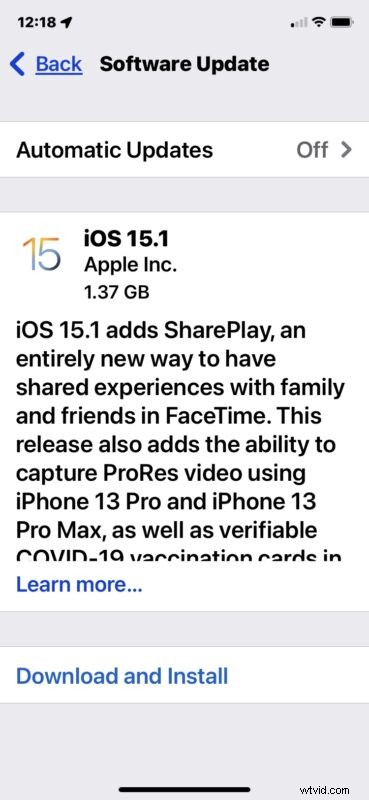
The installation of iOS 15.1 and iPadOS 15.1 requires the iPhone or iPad to reboot.
iOS 15.1 & iPadOS 15.1 IPSW Download Links
iOS 15.1 IPSW Direct Download Links
- iPhone 13 Pro Max
- iPhone 13 Pro
- iPhone 13 mini
- iPhone 13
- iPhone 12
- iPhone 12 Pro
- iPhone 12 mini
- iPhone 12 Pro Max
- iPhone 11 Pro Max
- iPhone 11 Pro
- iPhone 11
- iPhone XS Max
- iPhone XS
- iPhone XR
- iPhone X
- iPhone 8
- iPhone 8 Plus
- iPhone 7
- iPhone 7 Plus
- iPhone SE – 2nd Generation
- iPhone SE
- iPhone 6s
- iPhone 6s Plus
- iPod touch – 7th generation
iPadOS 15.1 IPSW Direct Download Links
- 12.9 inch iPad Pro – M1 2021 – 5th generation
- 12.9 inch iPad Pro – 2020 – 4th generation
- 12.9 inch iPad Pro – 2018 – 3rd generation
- 12.9 inch iPad Pro – 2nd generation
- 12.9 inch iPad Pro – 1st generation
- 11 inch iPad Pro – M1 2021 – 3rd generation
- 11 inch iPad Pro – 2020 – 2nd generation
- 11 inch iPad Pro – 2018 – 1st generation
- 10.5 inch iPad Pro
- 9.7 inch iPad Pro
- iPad – 5th generation
- iPad – 6th generation
- 10.2 inch iPad – 7th generation
- 10.2 inch iPad – 8th generation
- 10.2 inch iPad – 9th generation
- iPad mini – 6th generation
- iPad mini – 5th generation
- iPad mini – 4th generation
- iPad Air – 2020 4th generation
- iPad Air – 2019 3rd generation
- iPad Air – 2nd generation
iOS 15.1 & iPadOS 15.1 Release Notes
Release notes with iOS 15.1 and iPadOS 15.1 are as follows:
iOS 15.1 release notes:
iPadOS 15.1 release notes:
Apple also released macOS Monterey 12, macOS Big Sur 11.6.1, tvOS 15.1 for Apple TV, and watchOS 8.1.
Apple TV and Apple Watch users can download their respective software updates through their Settings apps. Mac users can find the latest software updates available via the Software Update system preference panel.
Did you install iOS 15.1 or iPadOS 15.1 right away? How did it go? Have any thoughts or opinions on the latest update? Share with us your experiences in the comments.