

Spotify users may be wondering how to download a single song from Spotify. Maybe you just want to download a single song off a particular album, or perhaps you want to download an individual song from a playlist, or just download one song from anywhere else on Spotify. Even if you have Spotify premium, you may have noticed there’s not an obvious mechanism to download a single song from Spotify the way it is easy to download an entire album, but nonetheless downloading one song can be done if you know how, as we’ll demonstrate here.
This article will show you how to download a single song from Spotify on iPhone, iPad, and Android.
How to Download a Single Song from Spotify
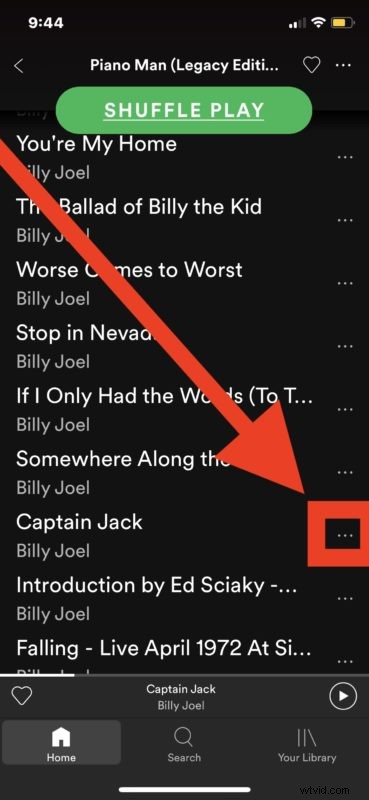
- Open the Spotify app and search for the song you want to download
- Tap on the little dots button “…” next to the song name
- Choose “Add to playlist” from the menu
- Select “New Playlist” to create a new playlist, naming it whatever you want
- Click on the “Download” button in the playlist to download the single song in the playlist
- Repeat with other songs to download them individually


You may wish to change the Spotify downloaded music quality to be higher if you want the best sounding music on your device, but do be aware that higher quality audio files are larger so therefore they’ll take more storage on your device and also will consume more of the bandwidth of your data plan.
Because of this playlist approach being how you can download individual songs from Spotify, you may want to just create a playlist of other single songs you want to download too and download them all into a single playlist. And yes, I know what you’re thinking – surely there’s another way to directly download an individual song, but this is currently the only method available to download a single song from Spotify. So create a playlist for the single song, or create a playlist comprised of multiple single songs you want to download to your device, and enjoy your music.
Whether you stream individual songs or download individual songs on Spotify, Spotify will create a cache of music that is stored on your device so that music can be played when the device is not in range of an Internet connection. That’s generally a good thing, but if you’re tight on storage space you may want to delete the Spotify cache on iPhone or iPad (and likely the same on Android too) to clear up some space on the device.
The aforementioned approach to clearing Spotify cache will also delete the individual song(s) you downloaded, but you can also directly delete the downloaded song by choosing it from the playlist and then selecting to “Remove from Playlist”.
If you know of another method to download an individual song or single from Spotify, whether on iPhone, Android, iPad, iPod touch, the web, or any other Spotify client, share it with us in the comments below!