

Have you ever had a phone call come in which you couldn’t answer right away, but it’s important enough that you don’t want to forget to call back? The iPhone has a great solution to this common scenario, with the iPhone phone apps “Remind Me” feature.
This “Remind Me” about a phone call feature is available only when a phone call is coming into the iPhone, it’s quite easy to use and it’s intuitive too, here’s what you’ll want to do:
How to Remind Yourself About a Phone Call on iPhone
- When a phone call comes into the iPhone that you can’t answer at the moment…
- Tap the “Remind Me” button, it looks like a little alarm clock
- Choose when you want the iPhone to remind you about this phone call so that you can call them back
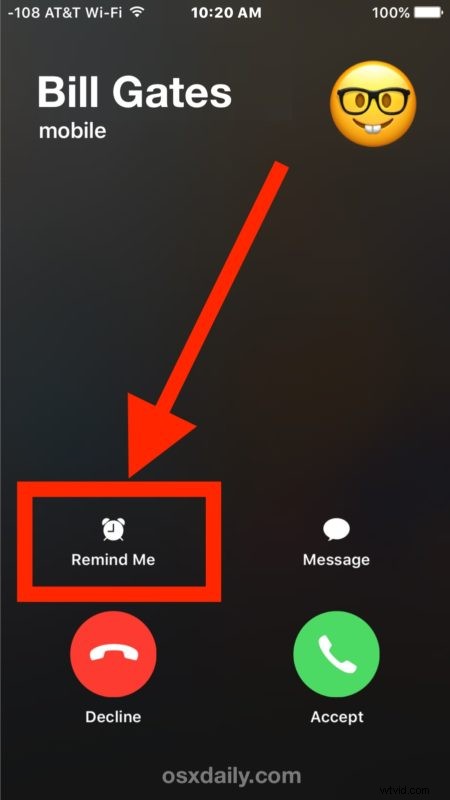
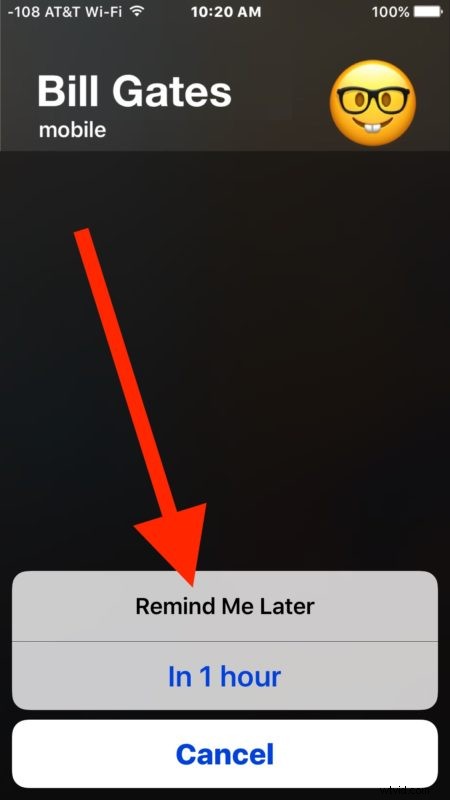
The iPhone will offer an option to remind you in one hour about the phone call, or when you leave work or home if you have the various location services turned on for that ability.
This is essentially just a phone front end to the reminder app and remind service, which you can also access manually from the Reminders app or by telling Siri to remind you about something, but since it comes from the phone app and is available when a phone call comes in, it’s perhaps one of the most useful ways to trigger the function.
Another option is to use the message responder for incoming calls to iPhone which will send the caller a text message or iMessage from an approved auto-response message list.
You can always just send a call to voicemail on iPhone too and then use the visual voicemail transcription service to read a voice mail if it’s left, but the reminder feature is really quite handy if you’re forgetful or just want to emphasize returning a particular phone call.