
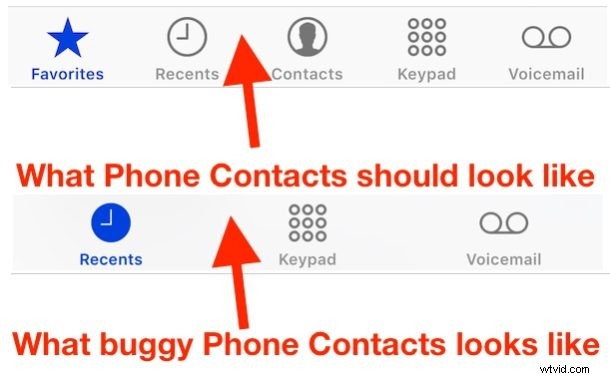
A strange bug that continues to persist in iOS for iPhone mysteriously causes all phone contacts to suddenly disappear from the Phone app on the device. Most users will never experience the missing contacts bug, but it can be disconcerting if encountered.
This missing contacts bug is not subtle and seems to happen at random, with the Phone app losing the “Favorites” and “Contacts” tabs, as well as the Phone app losing all identifying contact information for existing phone numbers, making every phone number in the recents list appear as unrecognized with no attached contact name, picture, or any other details.
Obviously if you suddenly lose all of your iPhone contacts it can be a fairly alarming experience, since so many of us depend on the iPhone for basically holding onto our address books of colleagues and loved ones.
But don’t freak out quite yet, the good news is the missing contacts bug is usually really easy to fix for iPhone users.

How to Fix Disappeared iPhone Contacts & Favorites
Did your contacts disappear from iPhone? This usually fixes the issue:
- Open the “Settings” app and go to iCloud, be sure that “Contacts” is set to the ON position, if it is not enabled turn that setting ON again
- Force reboot the iPhone by holding down the Home button and Power button concurrently until you see the Apple logo appear on screen, then release both buttons
- Once booted, return to the Phone app, Contacts and Favorites should be visible again as usual
For any instance where the missing iPhone contacts bug is encountered, the above steps alone should fix the problem. This is because it is rare that the iPhone contacts are actually gone, it’s just that a bug has prevented them from showing up, and the associations from iCloud need to be intact and the phone rebooted to get things to show properly again. There are some exceedingly rare scenarios where the contacts may be gone completely, usually by deliberate action by a user, and if you run into that type of scenario then you can recover deleted contacts by following this guide.
This strange iPhone bug has been around for years, though many users tend to experience it after updating iOS it can also happen out of the blue. Perhaps because it is so random and thus difficult to replicate in any reliable fashion is why such a bug persists and has not yet been resolved in the latest versions of iOS (iOS 9.3.3 included). Fortunately, the fix is straight forward, so if you find your contacts are missing, favorites are gone, and the Phone app in iPhone is blank, reboot the iPhone and flip iCloud Contacts back on again, and you should be back to normal in no time at all.