
 FaceTime is the lovely video chat service that is available for iPhone, iPad, iPod touch, and Mac OS X, and while it’s a lot of fun to use and helps keep people in touch, something to keep in mind is that FaceTime can use quite a bit of data as it’s essentially streaming and uploading video simultaneously. If you just use FaceTime on a wi-fi connection then this likely won’t matter much, but for cellular users it can be good to keep track of that sort of thing.
You may also just be curious how much data gets used during a FaceTime video call or audio chat, and fortunately iOS makes that really easy to find out on a per call basis.
How to Check FaceTime Data Usage Per FaceTime Call in iOS
- Open the Phone app and go to the “Recents” section followed by the “All” tab
- Locate the contact and FaceTime call you wish to check the data usage for then tap on the (i) info button next to their name in the recent calls list
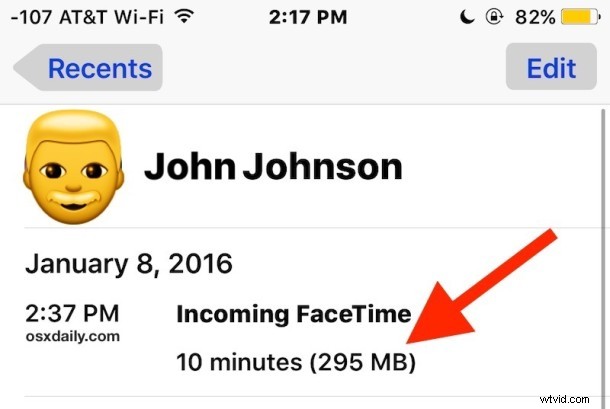
- At the top of the of the call info panel, you’ll find details about the date and time of FaceTime calls, including whether the FaceTime call was incoming or outgoing, how long the conversation was, and, what we’re looking for here, the FaceTime data usage for that call
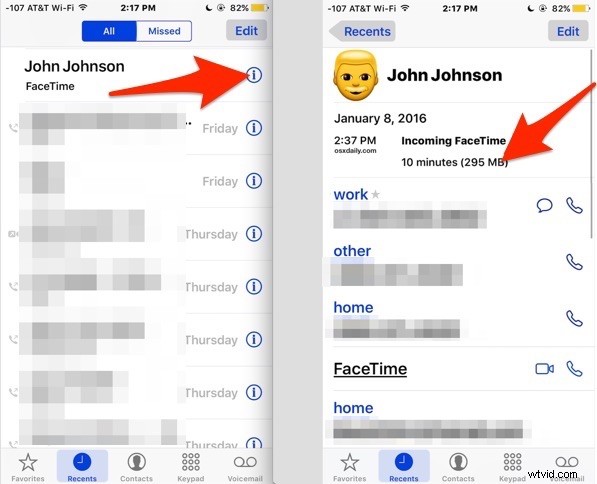
On new iPhones with better front and rear cameras, you’ll find the HD FaceTime video call can be pretty heavy on data usage, and it’s not unusual for a 10 minute video call to reach 150MB and a 30 minute FaceTime video call to eat up about 500MB of data. This number can be lower or higher depending on a variety of things, but expect a reasonable amount of data use.
This probably doesn’t matter much to most wi-fi connections without strict bandwidth caps, but for users on throttled or capped cellular connections, knowing how much data is used in a Facetime call can be important, and can help you avoid data overage charges from the cellular carrier. If you’ve discovered you’re going over your cellular phone data bill and FaceTime calls are taking up a large portion of that, consider disabling cell data usage for the app within cellular settings on the iPhone.
Similarly, iOS users can check iMessage data usage as well, but given that it’s primarily text based, iMessage generally uses way less data than FaceTime video or audio would, unless you’re sending and receiving tons of video and pictures.