
This page is the complete CapCut template download guide for you to learn from the detailed guide on how to download CapCut templates with/without the Template button, get trending CapCut templates free downloads, and learn how to resolve the CapCut template missing issue.
CapCut Template Download
While CapCut has earned a solid place on the list of best video editing apps with its ease of use, many users, those who are inexperienced especially, may have trouble getting started with it. But CapCut app supports the upload and use of external templates, allowing users to take advantage of third-party CapCut templates.
Are you having trouble downloading and using CapCut templates? Learn from the following guide on how to download templates onto your CapCut video editing app.
The tutorials in this post are based on CapCut on mobile, yet CapCut now does have an official desktop version. Please check our guide on how to use CapCut on a PC.
What is a CapCut Template?
CapCut templates are ready-made video editing projects (by users) and usually contain editing presets, filters, audio tracks, added effects, transitions, etc. They allow you to insert your own image or footage for quick editing. With CapCut templates, video editing beginners can easily make their own video without doing many editings yourself.
How to Download CapCut Templates Using the Template Button
The CapCut app has an inbuilt template category allowing users to discover their fancied template from a huge dialog, and use it for their own video editing in CapCut.
If you have trouble finding the right template for you, scroll down to the ‘Which CapCut Templates Should I Go for’ section where you’ll find links to top trending CapCut free download links.
The following tutorial shows you how to download and use the CapCut templates using the template button in CapCut.
Step 1. Launch the CapCut app on your device and tap on the Template tab from the lower panel.
Step 2. Browse for a desired CapCut template from the For you category, and tap on it.
Step 3. Hit the Use template button from the lower-right side.
Step 4. Now it’s time to add your own media for editing
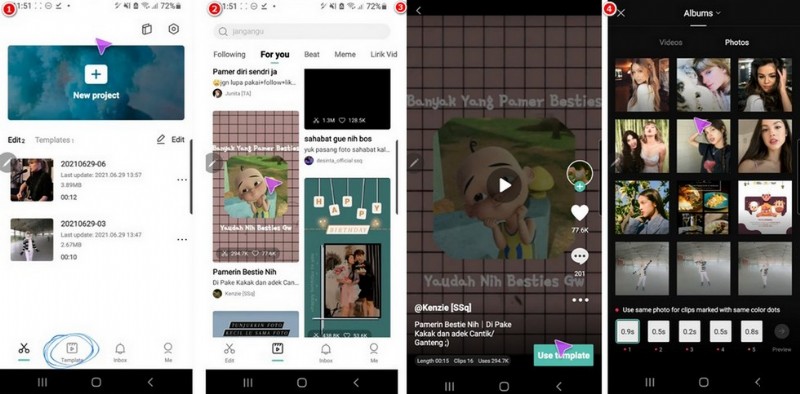
Download CapCut Template with Button
How to Download CapCut Templates without the Template Button
What to do if my CapCut doesn’t have a template button? The thing is, the CapCut template category (shown in the Template button) is only available for users in some countries such as Japan, Philippines, Indonesia, etc. and we don’t have it in the United States.
But that doesn’t mean that people outside the available countries can’t access the CapCut template for video editing.
The following tutorial shows you how to download and use CapCut templates without the template button in CapCut.
Step 1. Search for CapCut Template in TikTok
Go to TikTok and search for CapCut template, then you’ll see the recommended CapCut templates in the search result.
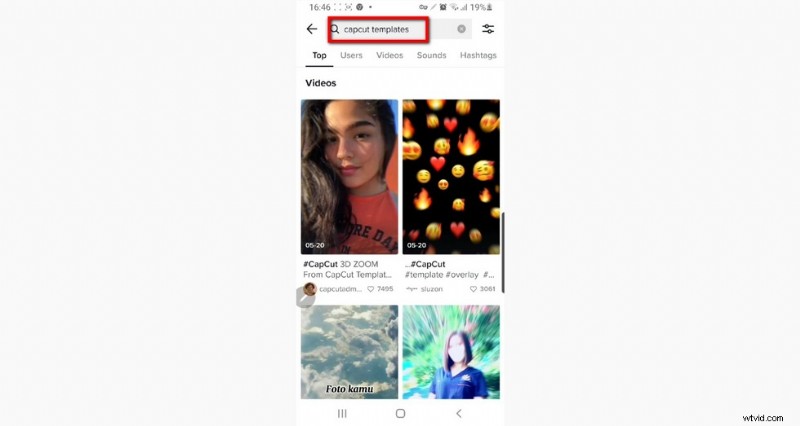
Search CapCut Template in TikTok
Step 2. Hit the CapCut Logo
Select a preferred CapCut template video in TikTok, and hit the CapCut logo from the left side.
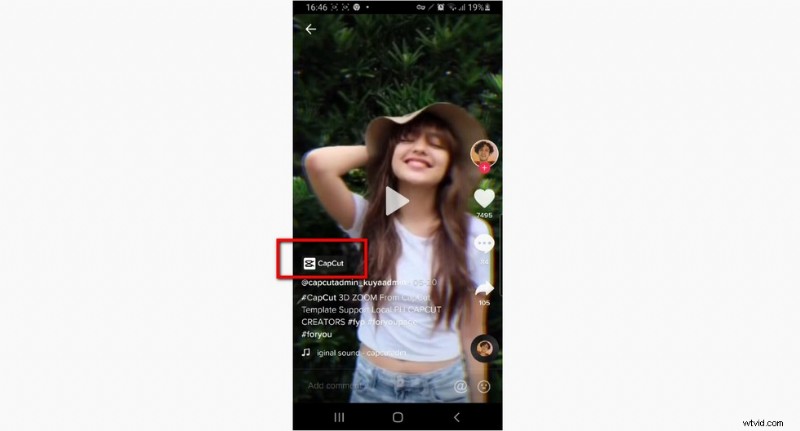
Hit the CapCut Logo
Step 3. Use Template in CapCut
On the pop-up web browser screen of your favored CapCut template, hit the Use Template in CapCut button.
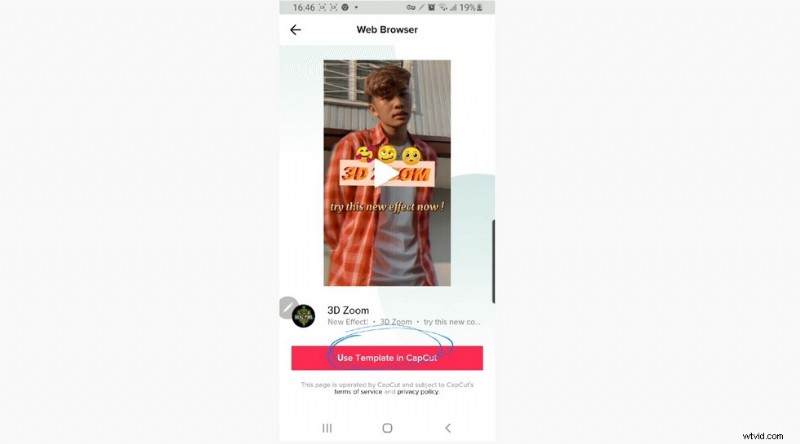
Hit Use Template in CapCut
Step 4. Add Your Own Image or Footage
Then TikTok will take you to the CapCut app to use the template. What comes up next may differ in different templates, and this template is used for demonstration. Select the images you intend to use with the template, and hit the Preview button.
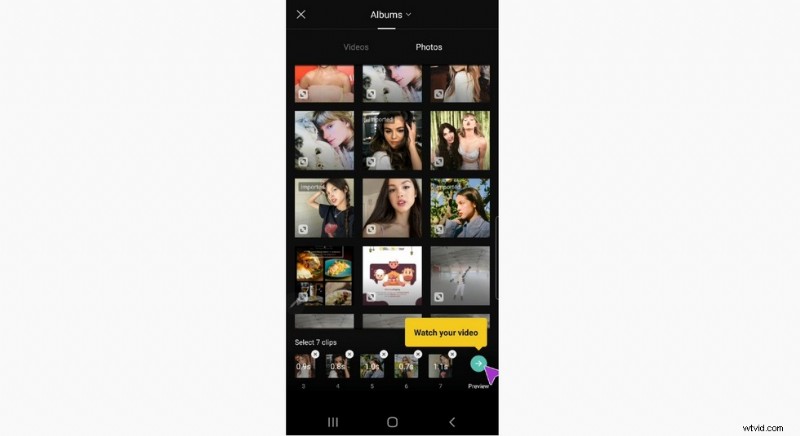
Add Your Own Media to Template
Step 5. Export Your Own Editing
And now you can see your new video in the preview window. And if you’re satisfied with your video, hit the upper-right Export button to save your new CapCut video editing!
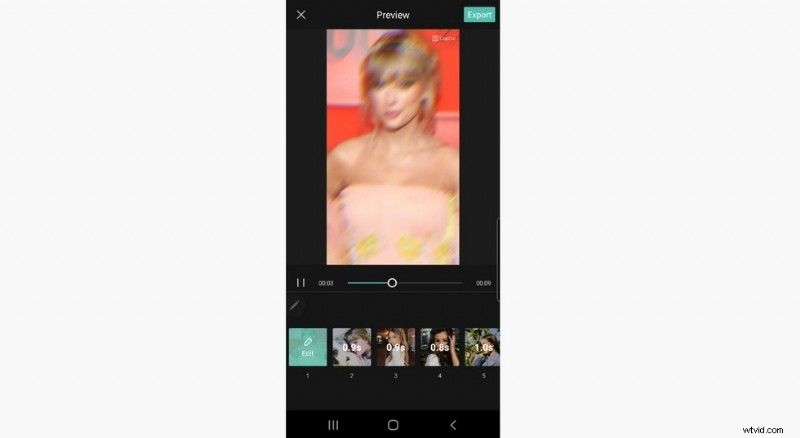
Export Your Editing from CapCut
How to Fix CapCut Template Not Showing Issue
CapCut template not showing issue can generally boil down to that you’re in the wrong region; your mobile region setting is incorrect; or you have an incorrect proxy setting on your phone.
In the following tutorial, you’ll learn how to fix the CapCut template not showing issue on iOS and Android.
Step 1. Go to your mobile phone Settings menu, and go to the General settings.
Step 2. Go to Language & Region to change your Region to Vietnam.
Step 3. Get back to the General settings and go to the VPN settings.
Step 4. Tap Add VPN configuration.
Step 5. Change your Proxy setting from Manual to Off. And it’s done!
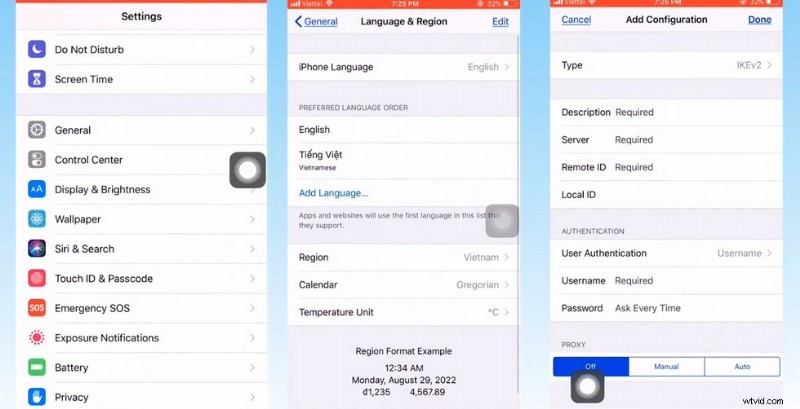
Fix CapCut Template Not Showing
Which CapCut Templates Should I Go for?
And here following are links to some popular CapCut templates for you to download directly. More trending options can be found on our list of 12 Best CapCut Templates.
CapCut Template Free Download [Updated]
- Free Download JJBerjalan keceh CapCut Template
- Free Download Mẫu beat 2 ảnh CapCut Template
- Free Download ini yang viral CapCut Template
- Free Download #JJBerjalan CapCut Template
- Free Download SayaBerjanjiAkan CapCut Template
Related Video: Top 10 Trending CapCut Templates Revealed
Wrap-up
As you can see, this guide covers the complete solution to downloading and using third-party created templates in the CapCut video editing app. No matter what country you’re in, if the template button is shown or missing, you can follow this guide to get your desired templates.
So I do hope that you find this post helpful and have benefited from it, please share the post if so! And if there’s anything we’re missing, please share your thoughts with us in the comment section below.