
How to crop video to remove unwanted content, such as watermarks, without installing any software? Check out this article to learn about the 4 best online video croppers and how to crop video online. If you need more advanced video-editing features, try MiniTool software.
How to crop video online? There are various online croppers on the Internet, but not all of them work well under any circumstances. Therefore, this article will list 4 free and practical online video croppers to help you crop video online.
1. Video Toolbox
Video Toolbox is a completely free online video cropper. Its interface is simple, without any extra decoration. This program runs fast and is fully functional. Aside from cropping video, you can easily trim video, add effect, add text, add audio, and even replace the audio track entirely.
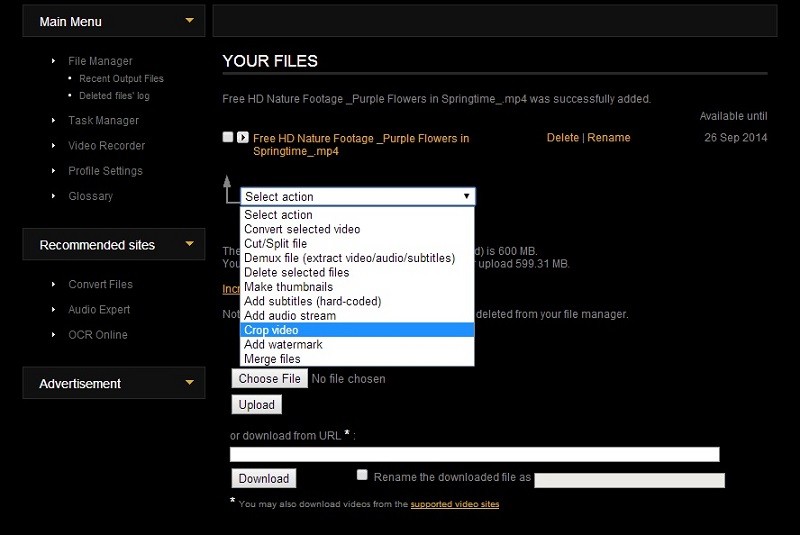
- Go to videotoolbox.com and log in to your account or sign up for a new account.
- Click Choose Files to locate the video in the computer, and then click the Upload Alternatively, you can choose to enter the URL of the online video.
- Select Crop video from the Select action drop-down list.
- Then a cropped box graphic will appear that you can move, stretch and contract it until you have the exact crop you want.
- Click the Crop button to apply all changes. After that, you can download the cropped video.
Related article: Video Overlay – Make a Picture in Picture Effect at Ease
2. Video-Crop
With a clean and tidy user interface, Video-Crop brings convenience for those who want to crop video online. During the cropping process, you can match the width with the height in perfect synchronization with its Keep Aspect Ratio option.
- Visit video-crop.com on your web browser.
- Drag and drop your video file onto the blank box or upload it from your local folder, Dropbox, Google Drive, and OneDrive.
- Choose the area you want to crop using the white markers and then click the Transform Video button.
- After cropping, hit the Download Result button and save it on your device.
You might be interested in: How to Make a Video Collage
3. Kawping
Unlike the first two video croppers, Kapwing specializes in cropping video for further sharing on different social platforms. You can crop video manually or select a suitable platform to crop video automatically. And it allows you to preview the video after cropping.
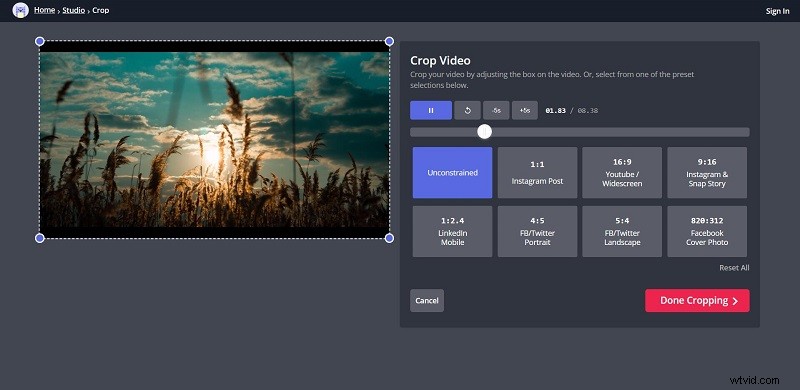
- Navigate to kawping.com on your browser.
- Click Tools on the upper right and select Crop Video from the list.
- Add your video file to the main interface.
- Crop your video by adjusting the box on the video, or you can choose a platform and then the tool will automatically crop the video.
- Tap on the Done Cropping option.
- Now, you can directly share or download the cropped video.
4. Clideo
Clideo is a powerful platform that makes it easy to crop video online. You can use the tool to make your video any size you want and delete the unwanted parts. Additionally, it also has presets for YouTube Cover, Facebook, Instagram Stories, etc.
- Go to clideo.com and select Crop from its tools.
- Upload the video to the program through the approach you prefer.
- Adjusting the blue box on the video to crop it, or you can choose to use any preset it offered.
- When you’re happy with the result, tap on the Crop button.
- Now, click Download to export it.
Bottom Line
Have you mastered how to crop a video online after reading this post? Maybe you can have a practice. If you have any questions or suggestions about it, please let us know via admin@wtvid.com or share them in the comments section below.