
To make videos catchy, you may speed up video to create a special effect. Besides, when watching a long video or tutorial video, you may also want to play the video at double speed. If you truly want to learn how to speed up video online for free, don’t miss this post. Need more video-editing features, try MiniTool MovieMaker.
What do you do when you want your video to play faster? Actually, there are several online video tools that can help. In this article, we’ll describe how to speed up a video online. You can select one tool to speed up your video online according to your requirement.
How to Speed up Video Online
FlexClip
The simplest way to speed up video online is to use FlexClip. It’s a free online video editor with no watermark that is designed to help users creates marketing videos and family stories in minutes with its built-in free templates. To speed up a video with this free tool, there is no professional knowledge required. All you need to do is to follow the steps below.
Step 1. Visit FlexClip on your browser and click Make a Free Video to start.
Step 2. Click the + Start From Scratch button. Or you can choose a video template and customize it.
Step 3. Go to + Storyboard > Add Local Media > Trim Video to import the video that you’d like to speed up.
Step 4. Then click the Speed button to change the video speed to 1.25x, 2x, or 3x.
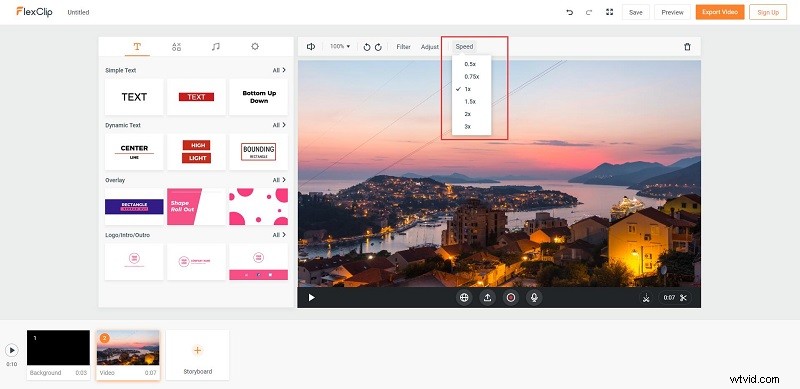
Step 5. Click the shutdown icon on the thumbnail of the first video clip to delete the video clip added by default.
Step 6. Hit Export Video to save it on your device.
Movie Maker Online
For the purpose of speeding up video online for free, Movie Maker Online is exactly what you need. It’s another free online video editor that is capable of making wonderful videos by adding video transitions, filters, and crossfades. However, when using this online tool, you will find numerous disturbing ads that may distract your focus.
Step 1. Click the Add files button to add your video file. Or you can simply drag and drop the video onto the page.
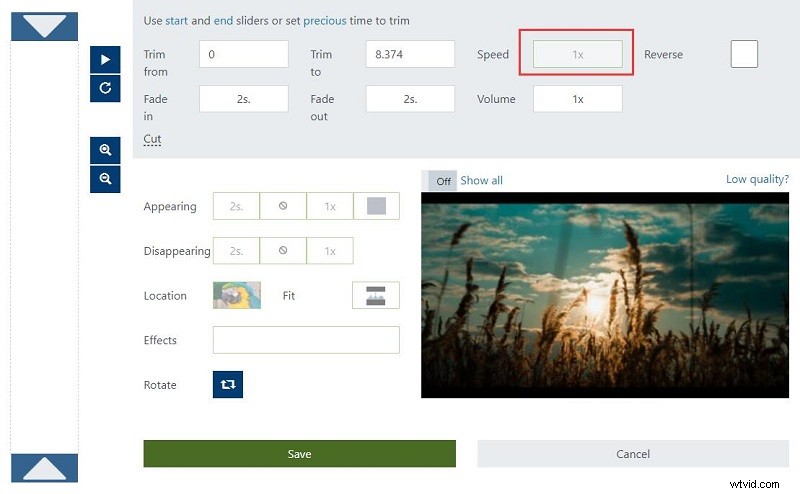
Step 2. Select the uploaded video and click the picture icon to open the properties editor.
Step 3. Set the Speed parameter greater than 1x and then click Save to apply your change.
Step 4. Tap on Make video in the main editor to export the video that has just been accelerated.
Step 5. After a while, click Watch the movie, followed by Download to save it.
Other Online Video Speed Controllers
Apart from the above two excellent methods to speed up video online, you can also try the following useful tools.
1. Kapwing
Kapwing is an online platform for creating images, videos, and GIFs. Meanwhile, it is an online video speed controller that allows you to upload local videos or paste online URLs. To speed up a video, you have an option that ranges between 1.25x to 4x. The main disadvantage is that the maximum file size of the video is limited to 300 MB and cannot exceed 30 minutes.
2. Clipchamp
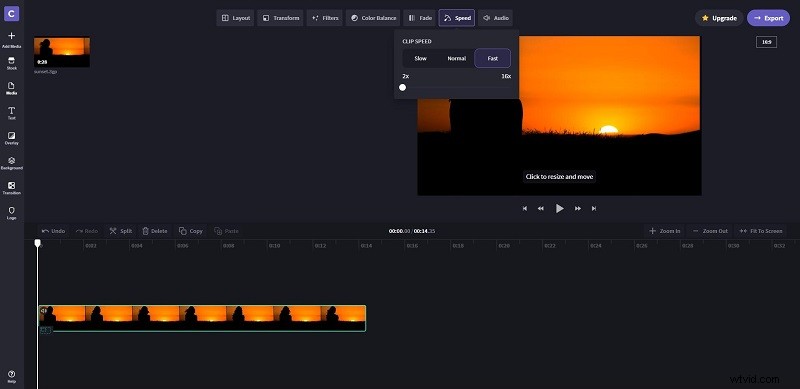
Clipchamp is another free online video speed controller that allows you to speed up any video you uploaded, ranging from 2x to 16x. Apart from this, you can use this web-based tool you can trim, crop, split and merge videos, add text, transitions, and sound effects, enhance video quality, and much more.
3. Clideo
When it comes to speeding up videos online, how can we miss Clideo? It is very easy to use. Upload video clips from your computer, mobile device, Google Drive, or Dropbox. If you want, you can also paste the online URL to add any online resources. Speed up or slow down any video by choosing the speed from 0.25x to 4x. Then, mute its sound and change the output format as needed.
Bottom Line
That’s all about how to speed up video online. Hope this post is useful for you. If you have any questions or suggestions about it, please let us know via admin@wtvid.com or share them in the comments section below.