
Spotify offers you two play modes: Shuffle play mode and Sequential play mode. You can play music randomly or sequentially on Spotify. You can also put the song you like on repeat. Read this post and learn how to loop a song on Spotify on desktop or mobile.
Do you like listening to the same song over and over again? If yes, you’ve come to the right place. This post will show you how to loop a song on Spotify on desktop or mobile and how to view play counts on Spotify.
Some of you may want to add music to a video or extract your favorite song from a video, try MiniTool MovieMaker! It’s a free video editor that you can use to edit videos with no watermarks!
How to Loop a Song on Spotify
How to put a song on repeat on Spotify on Computer
Spotify web player lets you play a song repeatedly for free. Here’s how to do it.
Step 1. Open the Spotify web player and log in to your Spotify account.
Step 2. Find the song you would like to loop on Spotify and play it.
Step 3. Click the Repeat button on the Now Playing bar at the bottom of your screen. The Repeat button turns green and the playlist will loop continuously.
Click the Repeat button again and a 1 icon will appear on it. Then you can listen to the song repeatedly on Spotify.

How to put a song on repeat on Spotify on Phone
If you want to loop a song on Spotify on your phone, you’ll need to subscribe to Premium because the Repeat feature on the Spotify app is only available for Premium users.
Here’s how to loop a song on Spotify on mobile.
Step 1. Open the Spotify app.
Step 2. Play the song you want to loop.
Step 3. Tap the Repeat button twice to turn it green and display the 1 icon. Then Spotify will put the song on repeat.
So how to view the song lyrics while listening to it? See this post: How to Show Song Lyrics on Spotify (Desktop, Mobile and TV)
How to View Play Counts on Spotify
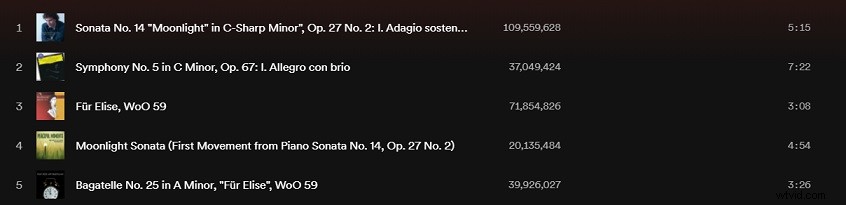
How to check the total play counts of your favorite song on Spotify? Follow the steps below:
Step 1. Go to the Spotify website on your computer and log in to your account.
Step 2. Find the song you want to know its play counts.
Step 3. Click the artist’s name and you will see all the songs of the artist. Scroll down the list and find the song. Then the play counts will display next to the song title.
Conclusion
How to loop a song on Spotify? Follow this guide to loop the song you like on Spotify right now! Do you know any other ways to loop music on Spotify? Share them in the comments section!