
Instagram Live allows you to watch video streams from the users you follow in real-time, and you can watch Instagram Liv videos on the computer, mobile phone, and even on TV. But how to find and watch Instagram Live on computer, phone, and TV? Here we offer some solutions.
With the Instagram Live feature, you can watch live videos on Instagram. And this post will describe how to watch Instagram Live on computer, phone, and TV. If you’d like to create an awesome Instagram video, try MiniTool MovieMaker.
How to Watch Instagram Live on Computer?
How to watch Instagram Live on computer? You just need to open a web browser and go to Instagram.com. And you can watch Instagram Live on computer via Instagram.com on almost all operating systems (Windows and Mac) and popular web browsers. Here’s the guide.
Step 1. Open your web browser and navigate to Instagram.com, then log in with your account.
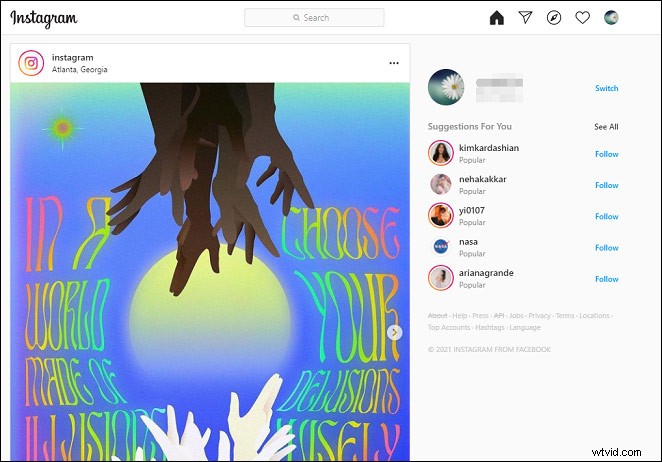
Step 2. When the user you follow is live streaming video, the profile picture will appear at the top of the Feed with a LIVE icon.
Step 3. Tap on the profile picture with the LIVE icon to view the live broadcast.
Step 4. Then you’ll enter the live room and watch the live video. While viewing live broadcasts, you can click the Add a comment at the bottom right of the screen to leave your comment.
Step 5. If you want to stop the live broadcast, click the X in the top right corner.
Need to download Instagram Live videos? Check out this post - How to Download Instagram Live Videos – Ultimate Guide.
How to Watch Instagram Live on Phone?
Step 1. Open Instagram app on your phone and sign in with your Instagram account.
Step 2. In the Stories section, find the users you follow whose profile picture has a LIVE icon and choose one Live stream you’d like to watch.
Step 3. Click the profile picture to watch the Live. If you want to leave a comment, click the Comment and then type your words.
Note: If some people have shared their live broadcast to the IGTV, you can see it in their IGTV videos on the profile.How to Watch Instagram Live on TV?
If you want to watch Instagram Live with a large screen, you can use a casting or screen mirroring device to enjoy it on TV. You can cast Instagram Live videos to TV using Chromecast on Windows, Mac, Android, and iOS, or use the Airplay on Mac and iOS with Apple TV, or cast Instagram Live to Roku.
How to Start a Live Broadcast on Instagram?
This part will show how to start an Instagram Live from the Instagram app.
Step 1. Open the Instagram app, click your profile picture, or swipe right anywhere in Feed to make the camera icon appear.
Step 2. At bottom of the screen, click the LIVE or swipe right to switch to a live video stream.
Step 3. Click the gear icon in the upper left corner of the Live screen to complete some settings for the live broadcast.
Step 4. After the settings are done, go back to the Live screen. Tap on Go Live to start your Instagram Live.
Step 5. Once the broadcast is done, click the End. Then you can save the video to the camera roll or share it to IGTV.
Conclusion
That’s all about how to watch Instagram Live. Now you can try the above solutions to enjoy Instagram Live videos on computer, phone, and TV. Also, you can follow the above steps to go live on Instagram.