
Instagram Reels is one of the best features available on Instagram. It lets you share short-form videos just like TikTok. How to download Instagram Reels? Read this post to know how to save Instagram Reels, what are Instagram Reels and how to create them.
What Are Instagram Reels
Reels is the newly-added feature of Instagram that allows you to upload a video of up to 60 seconds. Instagram Reels offers transitions, effects, slow-down and speed-up options. Unlike Stories and feed videos, you can directly download Instagram Reels to your device without any third-party software. (To make an Instagram video, you can use MiniTool MovieMaker.)
How to Create Instagram Reels
Do you want to create Instagram Reels? Here’s how to find the Reels feature and make an Instagram Reels video.
Step 1. Open the Instagram app and click the camera icon in the top left corner.
Step 2. Tap on REELS at the bottom of the screen. If you don’t see the Reels option, update your Instagram app to the latest version.
Step 3. Tap on the music icon to select a song as your background music. Besides that, you can also apply an effect and adjust the video speed.
Step 4. Then hit the Record button to record your video. Or, click the timer icon to decide how long your Reels video will be and tap on Set Timer to start recording.
Step 5. After recording the video, you can add text or stickers to the video and preview the video. If you’re happy with the result, click the right arrow at the bottom of the screen.
Step 6. Add a caption and click on Share to post the video.
How to Download Instagram Reels
Some of you may encounter the problem all Instagram Reels disappeared. To avoid this problem, you can download Reels from Instagram.
Option 1. Download Instagram Reels without third-party tools
Here’s how to directly download Instagram Reels
Step 1. Launch the Instagram app.
Step 2. Click on your profile picture at the bottom and click the Reels icon next to IGTV. If you want to save other’s Reels, click the search button, browse videos and click the Reels video you’d like to save.
Step 3. Open the Reels video you want to download.
Step 4. Then click the three dots and select Save to download the Reels video.
To find the saved Reels, tap on your profile picture and click the menu icon. Then go to Settings > Account > Saved to find the saved Reels.
Related article: 4 Best Free Instagram Private Video Downloaders
Option 2. Download Instagram Reels with Instagram Reel Downloader
Another option is to use an online Instagram Reel downloader. Here recommend iGram. It’s an Instagram downloader that can help you download Instagram Reels, videos, IGTV, and photos.
Here’s how to download Instagram Reels online.
Step 1. Visit the iGram website and paste the copied link of the desired Instagram Reels video.
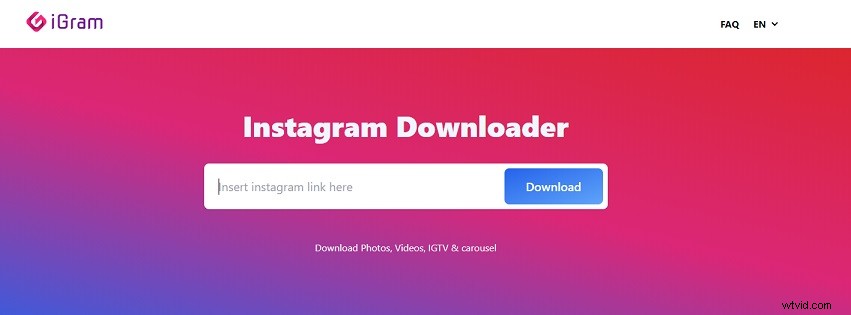
Step 2. Click the Download button to analyze the URL. Once done, choose the wanted quality option and save the Reels video to your device.
Conclusion
Now, you must know how to create and download Instagram Reels. Follow the above guides and have a try!