
REC

Recommended: Video Production, Editing & Gear Maintenance Guide

 WTVID >> WTVID >  >> video >> Video production

Fix Jumpy Audio in Premiere Pro: Quick WAV Conversion in Adobe Audition

Have you encountered a jumpy audio track in your Premiere Pro video editing workflow? Convert it to a WAV file in Adobe Audition!

There are few situations more frustrating than throwing an audio file into your Premiere Pro timeline only to discover that the track simply does not work. The audio jumps. It skips. It’s a total workflow interruption encountered by many Premiere Pro users.

Why does it happen? One of the possible problems with the file could be that MP3s are sometimes compressed as variable bit rates, whereas Premiere exclusively works with constant bit rates. Fortunately, there is an easy fix if you have access to the often underappreciated Adobe Audition.


1. Open Track in Audition
Fix Jumpy Audio in Premiere Pro: Quick WAV Conversion in Adobe Audition

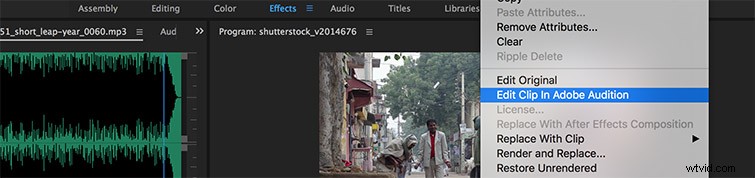
Moving the clip over is a two-click process. Right-click on the track, then select Edit Clip In Adobe Audition from the drop-down menu. This will open up Audition with the track automatically set on the timeline.

2. Convert Track to WAV
Fix Jumpy Audio in Premiere Pro: Quick WAV Conversion in Adobe Audition

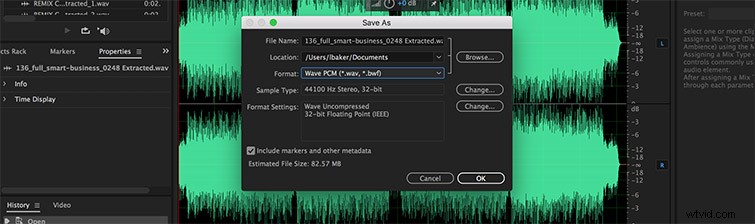
Once you’re in Audition, hit Save As and  simply change the format from MP3 to WAVE PCM (*.wav, *bwf). Hit OK and import the converted track back into Premiere Pro. The breaks, blips, and jumps should now be gone, sparing you the hassle of recording new audio or purchasing a new track.


Got any tips for saving glitchy audio? Share your secrets in the comments below!


  1. Master Audio Perfection: Clean and Enhance Sound in Premiere Pro with Adobe Audition

  2. Master Audio Track Effects in Premiere Pro: Elevate Your Video Edits

  3. Eliminate Unwanted Noise: Enhance Voice Recordings in Premiere Pro

  4. Master Audio Automation in Premiere Pro: Save Hours on Editing

  5. How to Easily Add Audio in Adobe Premiere Pro: Step-by-Step Guide

Video production
  1. Straighten Crooked Horizons in Adobe Premiere Pro: Quick Pro Tips

  2. Master Audio Editing in Adobe Premiere Pro: Pro Tips & Step-by-Step Tutorials

  3. How to Fix Clipped Audio in Adobe Audition: Quick Step-by-Step Guide

  4. 6 Essential Adobe Audition Tools to Streamline Premiere Pro Workflows

  5. Seamlessly Crossfade Audio Tracks in Premiere Pro & Final Cut Pro X: Quick Guide

  6. Master Multichannel Audio Export in Premiere Pro: Step-by-Step Video Tutorial

  7. Quickly Fix 'No Audio Streams' Error Importing Videos into Adobe Premiere Pro

  8. Eliminate Audio Noise Like a Pro: Adobe Audition & Premiere Pro Tutorial