
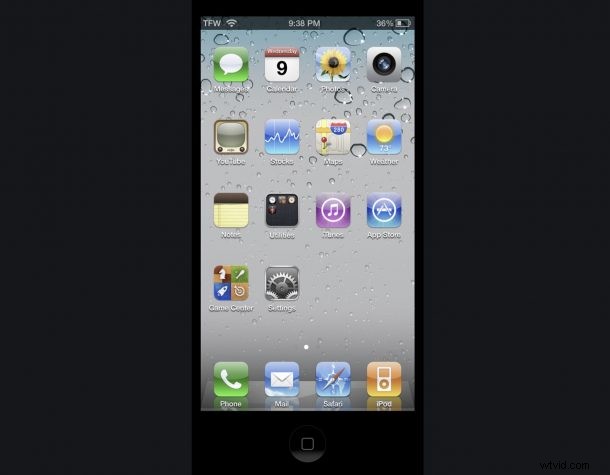
Do you long for the days of the skeuomorphic designs and tactile beauty of iOS 4? Do you wish you could run iOS 4 on your shiny new iPhone 12 Pro? Of course you do!
If you’re feeling that iOS 4 nostalgia, you won’t want to miss OldOS.
OldOS is basically iOS 4 recreated as an app, and it’s quite an impressive feat. Because of the nature of OldOS, you won’t be able to get it from the App Store, but you can download the OldOS app through TestFlight, or side-load it with Xcode by downloading the source from the projects Github repository.
If you want to try this out yourself, the easiest way to do so is to get TestFlight from the App Store, then use the TestFlight slot links below to join the OldOS beta testing program, which will place the OldOS app onto your iPhone home screen.
OldOS TestFlight links
OldOS is very popular already so don’t be surprised if you find the beta slots are full. Fortunately the developer has offered a second group of slots, so be sure to try both links once you have TestFlight on your iPhone:
- TestFlight OldOS Beta slots 1
- TestFlight OldOS Beta slots 2
OldOS is highly functional for being an entire OS recreated as an app, but not everything is working (yet anyway, it is beta after all). For example, while Music and Weather works, the Messages app does not, but that doesn’t mean you can’t have a good time playing around with the whole thing.
For now OldOS aims to recreate the iOS 4 experience on iPhone, but we certainly hope an OldOS version will debut for iPad too.
If you just want a quick glance at OldOS without running it yourself, the embedded Tweet via the developer includes a brief video showing off the project:
OldOS is yet another fun retro computing utility to geek out on, so if you’re into that kind of thing don’t miss this cool project.
Do you remember just how shockingly different the visual comparison was between iOS 7 and iOS 6? Years later, we’re still rocking iterations of what debuted with iOS 7, and nobody thinks twice about it anymore, but it was a major visual overhaul. Now running something like OldOS is perhaps just as jarring visually as that initial change, but there’s no denying it’s still beautiful, even if it’s a bit dated looking.