

Another day, another round of software updates! Apple has released iOS 13.1.1 and iPadOS 13.1.1 for all iPhone, iPad, and iPod touch devices compatible with iOS 13 and iPadOS 13.
The small point release update includes bug fixes and improvements, and is therefore recommended to all users who are actively running a prior iOS 13 or iPadOS 13 build.
The release notes for iOS 13.1.1 and iPadOS 13.1.1 mention resolving a bug that may have caused battery drain issues with iOS 13 battery life, a resolution to a restoring from backup issue, resolving a problem with Reminders syncing, and more. The full release notes accompanying the new software update are further below.
How to Update to iOS 13.1.1 / iPadOS 13.1.1
The easiest way to update to iOS 13.1.1 or iPadOS 13.1.1 is through the Software Update mechanism in the Settings app. Be sure to backup to iCloud or a computer before beginning any system software update.
- Open the Settings app, then go to “General” and to “Software Update”
- Choose to “Download & Install” when iOS 13.1.1 or iPadOS 13.1.1 shows as available on your device
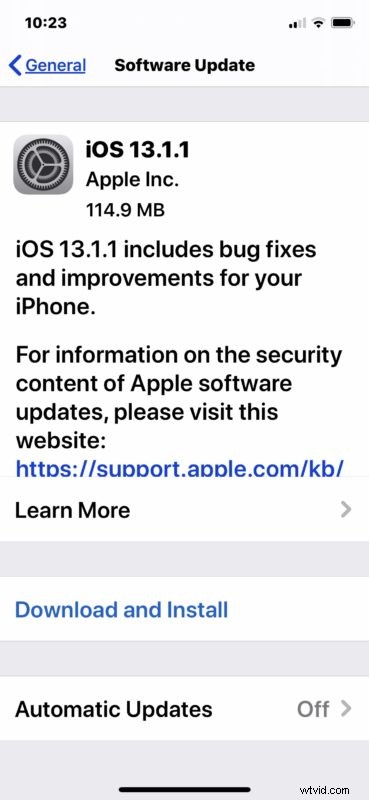
Users can also choose to update to iOS 13.1.1 or iPadOS 13.1.1 using a computer with the latest version of iTunes, or MacOS Catalina. Both requiring connecting the device to the computer with a USB cable.
iOS 13.1.1 and iPadOS 13.1.1 IPSW Download Links
Advanced users can choose to install the latest software updates through IPSW firmware files, which can be downloaded directly from Apple servers at the links below:
- Updating…
Release Notes for iOS 13.1.1 & iPadOS
Release notes accompanying the iOS 13.1.1 download are as follows:
Release notes for iPadOS 13.1.1 are basically the same, shown as follows:
If you haven’t yet updated to the latest iOS and iPadOS releases, you may want to take a few steps to prepare your device for iPadOS 13 or iOS 13.