
Do not buy used iPhone or phone without doing this first! For anyone shopping for a used iPhone or Android phone, your top priority should be to check to find out if the iPhone or phone has been stolen or reported as lost.
The reason is simple; a stolen iPhone or phone that has been reported as lost may not work at all if the cellular carrier has blocked the device from accessing a wireless network, this essentially means that buying a stolen iPhone or phone could be a waste of the money (not to mention engaging in the trade of stolen goods).
The good news is the CTIA, which represents the US wireless communications industry, has setup a super easy to use website that allows you to easily check to find out if any iPhone or any smart phone has been stolen or reported as lost.
The website is aptly named StolenPhoneChecker.org and it works by running an IMEI, MEID, or ESN number through the database and it will report back if a device has been reported as lost or stolen.
How to Check If You’re Buying a Stolen iPhone or Android Phone
This is a super easy two-step process, all you need is the phones IMEI number and you can run it against a central database setup by the phone companies:
- Get the IMEI number from the iPhone or Android phone, you can also do this by dialing *#06# on the phone
- Go to StolenPhoneChecker.org here to check and enter your IMEI number into the website
- If the iPhone or phone is reported as stolen or lost, you should strongly consider NOT buying it and instead finding a different device to buy
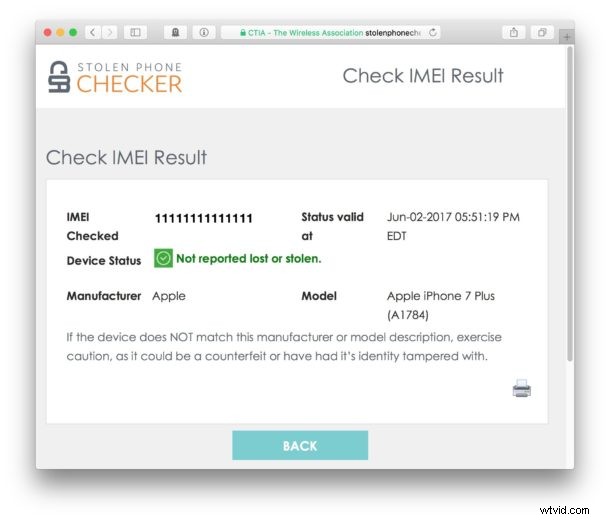
That’s all there is to it, you can check up to five devices IMEI numbers per day to see if they are stolen or lost or not.
Always do this before you buy a used phone!
To be clear, there is absolutely nothing wrong with buying a used iPhone or smartphone – I have personally bought used phones myself on multiple occasions. I usually aim for refurbished iPhones with a simple return policy where if it doesn’t work for whatever reason right away then it can be returned easily. The seemingly too-good-to-be-true deals that are found on auctions, eBay, or craigslist are almost always too good to be true, a recent model pre-owned iPhone will never realistically sell for $100 or some low sum. If the price is too good, or too cheap, or the seller is sketchy, be skeptical. Always check the IMEI first.
By the way, it’s not just our advice to check a used phone before buying it, the CTIA Wireless Association also recommends doing the same thing:
Makes sense, right? So don’t skip this if you’re in the used phone market, you could save yourself a real headache and a waste of money. It’s likely this service won’t detect every single lost or inappropriately owned phone, particularly if they have not been reported as missing yet, but it’s certainly worth running a check through just in case.
Oh and one more thing; if you’re buying a used iPhone then don’t forget to have the prior iPhone owner delete their iCloud account from the device and log out of iCloud on the device completely and then reset it to factory settings. While you can remotely remove iCloud activation lock it is more annoying and it’s much better handled by the owner in person. Apple used to offer a way to check this online but that page has been down for some time, perhaps it will return in the future. Almost all good phone refurbishing services and certified resellers will reset the devices and make sure they’re not locked down, but it’s always good to ask and be sure.
Do you have any other tips for avoiding stolen phones or lost phones? Any advice or experience? Let us know in the comments.