REC

Recommended: Video Production, Editing & Gear Maintenance Guide

 WTVID >> WTVID >  >> Video Editing >> Adobe Audition

How to Crossfade Audio in Adobe Audition: A Step‑by‑Step Guide

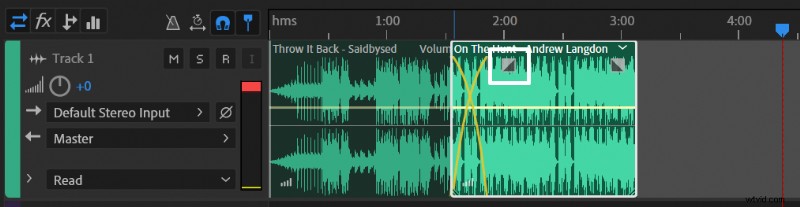
Adobe Audition’s Multitrack editor includes a powerful, built‑in crossfade effect. By simply dragging one clip over another, you can blend audio smoothly and avoid abrupt transitions.

Follow these expert steps to create a flawless crossfade:

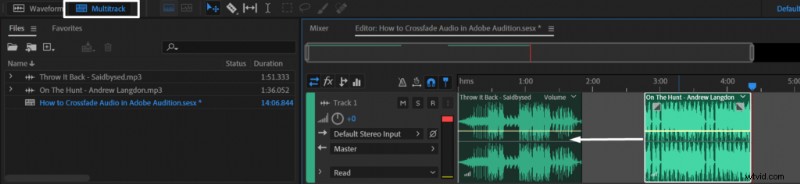
  1. Open the Multitrack editor (top‑left corner of the interface).
  2. Insert two or more clips onto the same track.
  3. Drag one clip so that it overlaps the other.
  4. Adjust the fade box that appears to control the blend’s start, peak, and end.
How to Crossfade Audio in Adobe Audition: A Step‑by‑Step GuideHow to Crossfade Audio in Adobe Audition: A Step‑by‑Step Guide

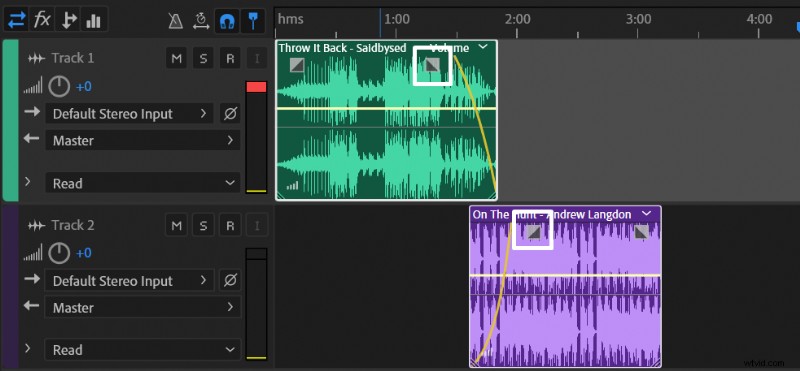
For more flexibility, place clips on separate tracks and apply fade‑in and fade‑out independently. This method is ideal when you need to layer multiple audio streams without altering each other’s timing.
How to Crossfade Audio in Adobe Audition: A Step‑by‑Step Guide

Result: A seamless, professional‑sounding crossfade that keeps listeners engaged.

  1. How to Convert Mono to Stereo in Adobe Audition: Step-by-Step Guide

  2. How to Develop a Deeper, More Masculine Voice: Proven Training Techniques

  3. How to Split Audio Tracks in Adobe Premiere Pro: Razor Tool Guide

  4. Audacity: Easily Switch Recording & Playback Devices - A Quick Guide

  5. How to Boost Audio Volume Without Distortion: Expert Guide in Adobe Audition

Adobe Audition
  1. Are Lightroom Presets Worth Buying? Pros, Cons & Expert Guide

  2. Master Backlight Photography: Pro Techniques for Stunning Contre-Jour Shots

  3. Top Sony Vegas Alternatives for Windows: Powerful Video Editors

  4. Master Grunge Effects: Transform Portraits in Lightroom – Step-by-Step Guide

  5. Master Dark, Moody Rembrandt-Style Portraits in Lightroom: Expert Guide

  6. Master Lightroom Tethering: Easy Step-by-Step Guide to Tethered Shooting

  7. Master Dark, Moody Rembrandt-Style Portraits in Lightroom: Step-by-Step Guide

  8. Elevate Your Portraits: How to Use a Small Softbox with Off-Camera Flash