
Premiere Pro has similar audio editing tools integrated as Audition, which is Adobe’s dedicated audio editing software. While the audio editing process might be slightly less convenient in Premiere Pro, you can achieve the same or similar results and attempting muffled audio is no hard task.
Muffling your audio in Premiere Pro is useful when mimicking sounds coming through some kind of barrier, for example, duvets, other rooms, cars and so on.
To make your audio sound muffled, your best option is to use an equalizer effect named Scientific Filter. Follow these steps:
- Go to the Effects menu and look for Scientific Filter
- Drag the Scientific Filter effect onto your audio track
- Go to the Effect Controls menu and click Edit button at Custom Setup
- I like to use Chebychev type EQ, but Bessel and Butterworth would work as well
- Choose LowPass mode
- Adjust the Cutoff to your liking. A lower Cutoff will make your audio sound more muffled.
Check audio samples below for reference regarding how different Cutoff settings make your audio sound.
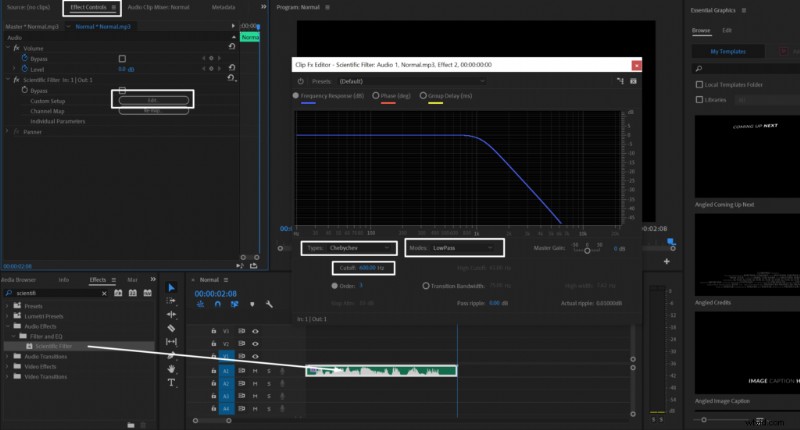 Applying Scientific Filter in Adobe Audition to make your audio sound muffled.
Normal:
1200Hz Cutoff Low pass:
900Hz Cutoff Low pass:
600Hz Cutoff Low pass: