REC

Recommended: Video Production, Editing & Gear Maintenance Guide

 WTVID >> WTVID >  >> Video Editing >> Adobe Audition

Synchronize Audio and Video in Premiere Pro: A Step‑by‑Step Guide

Separately recording audio and video necessitates precise synchronization to align the footage with its corresponding sound. This scenario commonly arises when a dedicated camera captures video while audio is recorded on an external microphone.

Premiere Pro simplifies this process with a built‑in synchronization feature that aligns audio and video with a single click. Follow this step‑by‑step tutorial to master the technique.

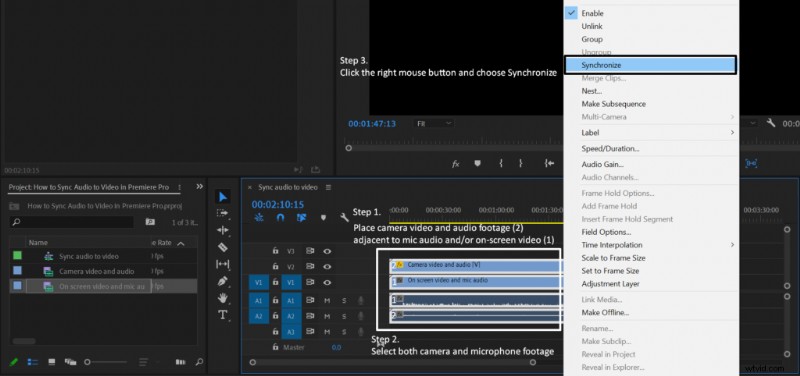
  1. Drag your audio and video files onto the timeline.
  2. Place the camera footage and the microphone audio on separate tracks.
  3. Align the camera clip next to the microphone clip so they start at the same time.
  4. Select both the camera clip and the microphone audio.
  5. Right‑click and choose Synchronize.
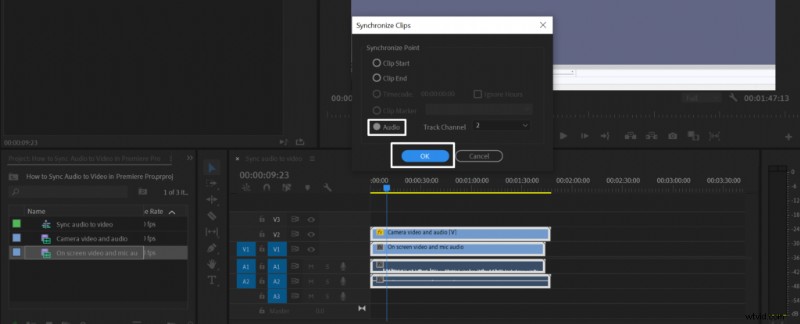
  6. In the dialog, pick Audio as the Synchronize Point and click OK.
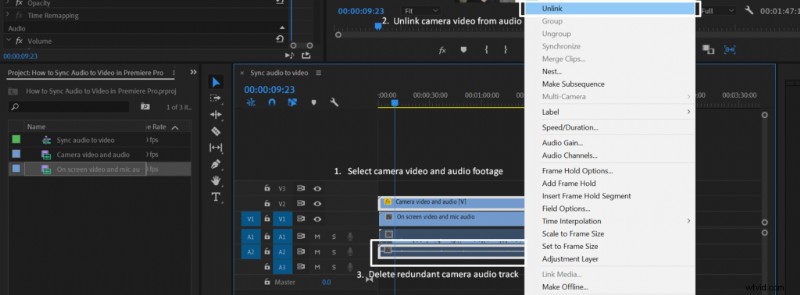
  7. After the clips are linked, right‑click the camera clip and select Unlink.
  8. Delete the redundant camera audio track.
Synchronize Audio and Video in Premiere Pro: A Step‑by‑Step Guide Synchronize Audio and Video in Premiere Pro: A Step‑by‑Step Guide Synchronize Audio and Video in Premiere Pro: A Step‑by‑Step Guide Synchronize Audio and Video in Premiere Pro: A Step‑by‑Step Guide

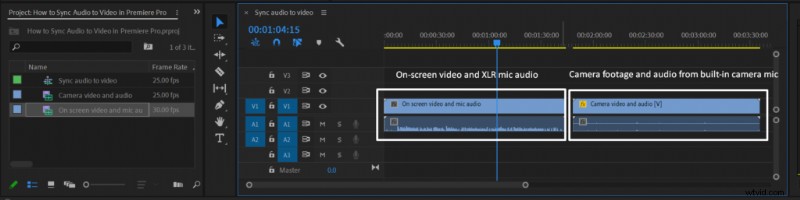
Once the clips are synchronized, Premiere Pro automatically links the audio and video. To keep the timeline clean, unlink the camera’s audio track and remove it, preserving only the video.

  1. How to Remove Echo in Adobe Audition: 3 Proven Methods

  2. Master Composition: Essential Lessons from Anime Storytelling

  3. Audacity Safety & Security: A Comprehensive Review for Voice Over Artists

  4. How to Compress Audio Files Without Losing Quality: Proven Tips

  5. How to Create a Demonic Voice Effect in Adobe Premiere Pro: Step-by-Step Guide

Adobe Audition
  1. Ultimate Beginner's Guide to Mastering Your First DSLR Camera

  2. Top Photo Editing Apps for Android & iPhone: Pro Results on the Go

  3. Master Colored Gels: Create Stunning, Unique Portrait Photography

  4. Master 'Room with a View' Portraits: Window Blinds Shadows Anywhere

  5. Transform Your Portraits: How to Use a Small Softbox with Flash for Pro Results

  6. 5 Expert Tips to Set Up a Home Studio for Stunning Dramatic Portraits

  7. Expert Home Video Editing Tips: Create Stunning Family Movies

  8. Enhance Portraits with Creative Overlays: Easy Photoshop Tutorial for Beginners