
At this point, taking the time to add subtitles to a video is no longer just a cool option or an added bonus — it’s a necessity when it comes to marketing success. Why is that? Well, for one thing, research has shown that 80% of social media videos are watched on mute. That means that, if you’re not adding subtitles, the majority of your audience might scroll right past your video.
Oftentimes, content creators skip the subtitles because they think it’s going to take too much time or too much money (or both). And it’s true that there are plenty of methods for adding subtitles that can be confusing, laborious, or expensive. But we’ve got a way for you to add subtitles to your video for free.
How to Add Subtitles to Video (Free!)
To add subtitles to your video for free, you just need the right tool. With Zubtitle’s simple online video editor, you can add subtitles with just a few clicks. Follow this easy walkthrough to see how it’s done:
1. Upload Your Video
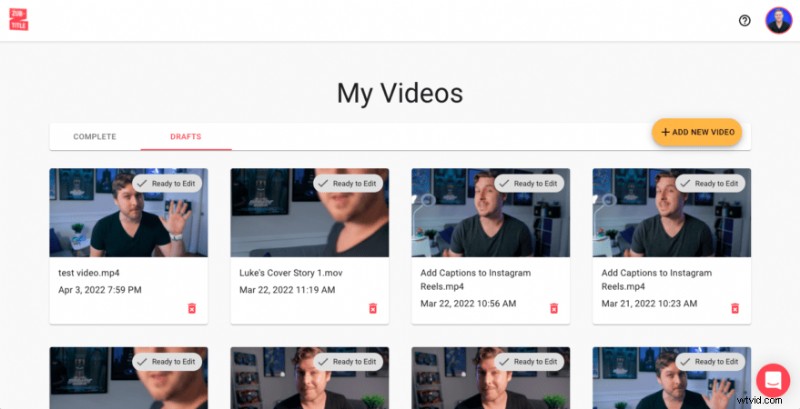
To get started, you’ll need to sign up for our free account (or log in to your existing account). Once you’re in, you can upload your video by clicking the yellow “Add New Video” button on the right-hand side of the screen.
2. Edit Your Subtitles
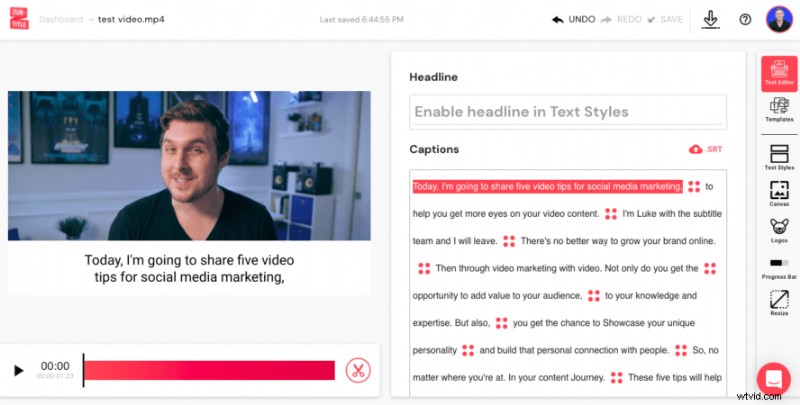
After uploading your video, Zubtitle’s state-of-the-art software will automatically transcribe your audio and convert it into timed captions. Now, all you have to do is scan through the captions to make sure everything looks perfect. You can make any spelling/grammatical edits or change the timing of the captions by simply pointing and clicking directly in the editor.
3. Style Your Subtitles
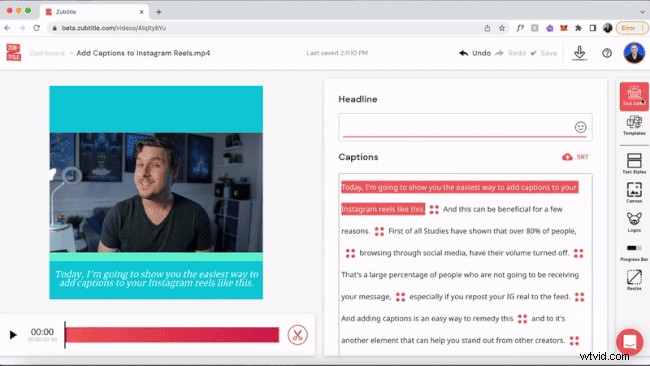
Only one step left — and it’s the fun part. It’s time to style your captions and video. You’re welcome to customize everything by choosing the font and colors for your captions, adjusting the background color, adding a logo & progress bar, manually resizing, etc. Or you can style your entire video with one click by selecting a pre-made template (you’ll find them in the Templates menu). Once you’re all done, it’s time to render your new subtitled video (for free)!
Do you want to add subtitles to your video for free?
With our free plan, you can add subtitles to two videos per month. To create up to 10 videos per month (and remove the Zubtitle watermark), check out our standard plan.
Sign up for a free account today to start creating!