Since its emergence in 2006, the HTML5 format has made its mark on the Web, becoming the standard video format in place of Adobe Flash Player (which has ended).
If today numerous software easily embed your videos, encoding them manually in HTML5 offers endless customization and hosting possibilities on your website.

In particular, this enables you to optimize the accessibility settings of your video according to your needs, by adding the subtitles you want.
Here’s how to correctly encode subtitles on HTML5.
How to correctly implement your HTML5 video?
First, a little reminder of the basic rules for implementing a video in HTML5.
The code is based on adding a <video> tag in your HTML. The controls tag ensures that your video player displays playback options if you enable it. You can also set the resolution of the video with width and height. To reference your video, you need to add the source tag src, specifying the format of your video with type.
As a general rule, the MP4 format is supported by all browsers. But you can add an OGG format to make sure your video is readable by everyone.
As for the rest, the id tag identifies your video, and adding a text inside the video tag ensures that the user is warned of a display error.
Here’s what an implementation of your video might look like:

HTML5 subtitles: where to get them?
Now, how do you display subtitles on your video? The only subtitle format supported by HTML5 is VTT. That’s why you either have to create it from the transcript or use an automatic subtitle generator.
In the first case, here is the format to rely on:

In the second case, you can use our VTT file generator. With speech-to-text technologies, you can create subtitles much faster. You can also give your project to our subtitle experts if you have a larger volume.
Here’s how to get started quickly:

Upload your video on the interface. Select the original language and the one you want to get.
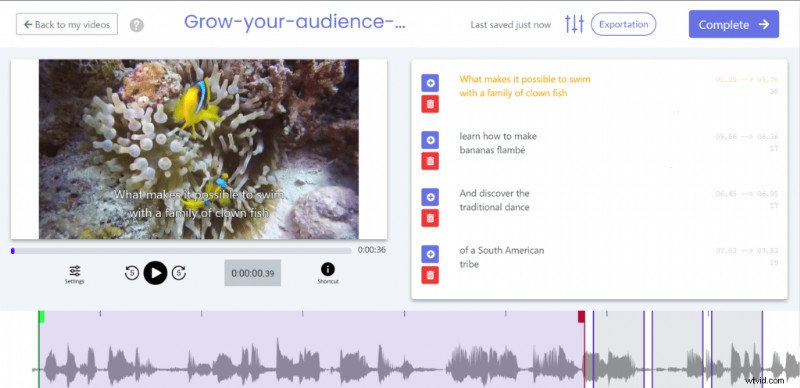
When the transcription process is over, you can access the subtitle editor and optimize the result.
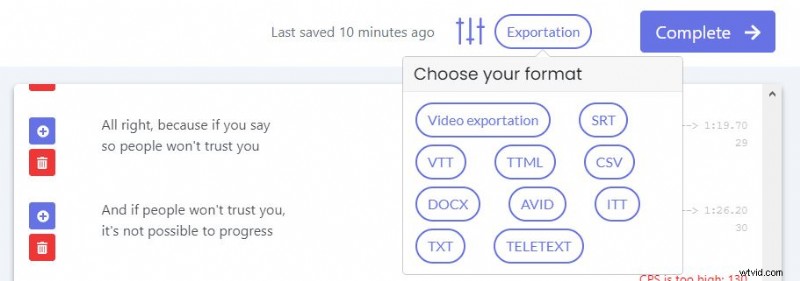
When your work is over, you can then export the subtitle file by clicking on “Exportation” and download the .vtt file.
How to encode subtitles in your HTML5 video?
After that, to implement the subtitle in the HTML5 code, you need to add a <track> tag as follows :

The label tag gives the title of your subtitle, kind identifies if it’s subtle or captions, srclang defines the language, and src the localization of your file.
You can then add this code like this :

The video will then be displayed automatically. Note also that you can add as many languages as you want by adding a tag.
How can I customize the style of my HTML5 subtitles?
Manual HTML5 is interesting in its many possibilities to customize the appearance of your subtitles.
To set their style, add a <style> CSS tag, then add #grow_audience : : cue { },
Within cue {}, Here are all the tags you can use:
- font-family : “Arial”, or all the other google fonts
- font-size : 30px
- background-color, back-ground image
- color :
- opacity :
- text-decoration :
- text-shadow :
Here’s how it looks like :
With this, you can get the subtitles that perfectly fit your needs. We hope we have helped you through the intricacies of HTML5 code.