
Learn how to automatically add captions to your videos with custom font styles, sizing, padding, and more.
Our latest product development updates come with some exciting changes for those that are looking to customize the styling of the video captions that are automatically generated by Zubtitle.
Zubtitle now offers the ability to fully customize the styling of your captions. You can customize your video captions by changing the font family, font style, font size, background color, padding, and more.
1. Click Text Styles
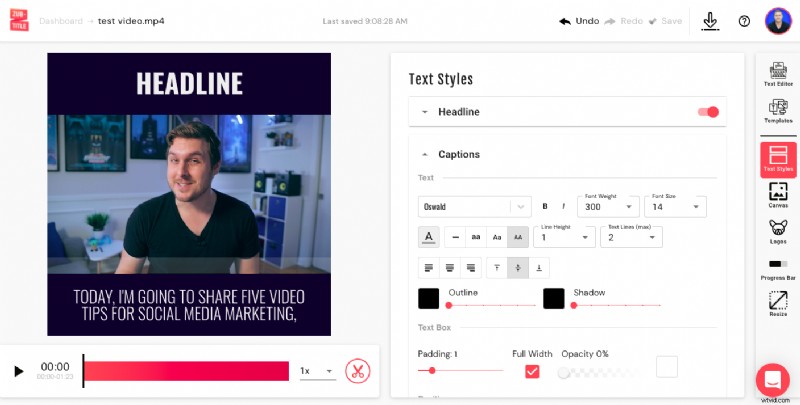
To get started, simply upload a video and allow the automatic transcription to generate. Once it does, you can view the right-hand menu to see all of your different video editing options. To start editing your captions, simply click the Text Styles menu.
2. Choose A Font (Or Add Your Own)
When you get to the Text Styles menu and select Captions, the first option you'll have is to choose a font style. You're welcome to choose from the extensive list available. Or you can upload your own custom font! To do this, just scroll down in the Text Styles menu until you get to the Custom Fonts section. Here, you can easily upload your own font.
3. Style Your Captions
After you've selected your font, there are plenty of other caption styling features that you can adjust. These include:
- Font color
- Font size
- Font weight
- Line height
- Outline
- Shadow
- Text box padding
- Opacity
- Positioning
- And more!
4. Edit Your Captions
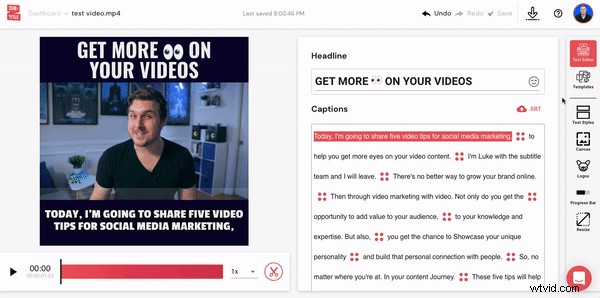
Even though our speech-to-text technology may seem like magic, it’s not infallible. So make sure you review the subtitles on your video for inaccuracies. It’s easy — just use the Text Editor (top option on the right-hand menu) to make changes, add new caption breaks, or change the timing of your captions.
5. Download Your New Video
Just select the download button in the upper-right hand corner to render your new video and download it to your computer or device.
Ready to add custom styled captions to your video?
Sign up for a free Zubtitle account today to get started! With our free plan, you can create two videos per month. To create up to 10 videos per month (and remove the Zubtitle watermark), check out our standard plan.