
A good graduation slideshow cranks your graduation up a notch. Learn from this guide a free and easy method to make a graduation slideshow with music.
The day of your graduation is one of the greatest days in your puberty, as it’s the beginning of a brand new page of life – not to mention the prom that basically everyone look forward to. The word commencement in English means start, thus the true sense of your commencement speech is the expectations you have for yourself and say to your grads at the important turning point, the start of the next leg of journey in your life.
Congrats to you all and it’s time to celebrate, let us make some gorgeous graduation ceremony slideshows to make your graduation even shinier.
Do not miss: Best 7 Free Slideshow Makers, How to Make Wedding Slideshows
Best Free Graduation Slideshow Maker You Need
FilmForth Slideshow Maker is the best graduation slideshow maker to make astounding ceremony slideshows for your graduation. FilmForth Slideshow Maker enables you to make any type of slideshows with music and pictures for free. It is free to use, it doesn’t export with watermarks, and it doesn’t require any editing skills for making high-quality slideshows.
With so many video editing features such as adding transitions, adding animations, and merging videos, FilmForth helps to make graduation slides as your needs.
It is as good as it seems. Now hit the download button below to get FilmForth Slideshow Maker from Microsoft store for free!

How to Make Graduation Slideshows with Music and Pictures
Step 1. Start a New Project
To make a graduation slideshow with FilmForth, when FilmForth is fully installed, launch it from the Windows start menu, and hit New Project button in the middle. The Fast Video section to the left offers great video templates.
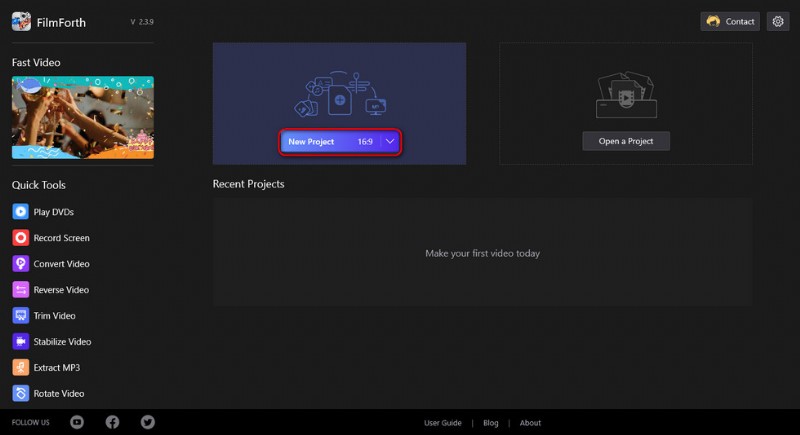
Create a New Project
Step 2. Create Graduation Slideshow with Pictures
Drag and drop the files into the program or click ADD VIDEO/PHOTO CLIPS button to load the graduation photos you intend to create a slideshow with. Then you’ll be led to the slideshow editing screen where your pictures are lined up in the timeline.
You can drag and drop in the timeline to reposition graduation images, and hit the Duration button to adjust durations for each image. Additionally, adding transition effects between images is a great way to make your graduation slideshow smoother, which can be implemented by hitting the conjunctive buttons on the sides of adjacent video clips/photos.
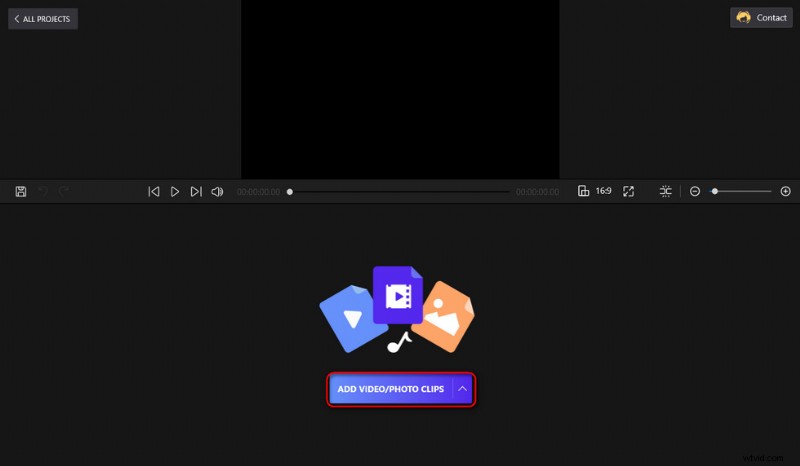
Import Graduation Pictures
Step 3. Add Music to Graduation Slideshows
Adding correct music is a good way to give a graduation slideshow a touching feel. To do so, click on the audio track in the timeline and click Add audio. Then you can choose to add your own music, the voice of your own, or music from our ready-made music library. Meanwhile, you can drag the handlebar on the audio track to quick trim the audio.
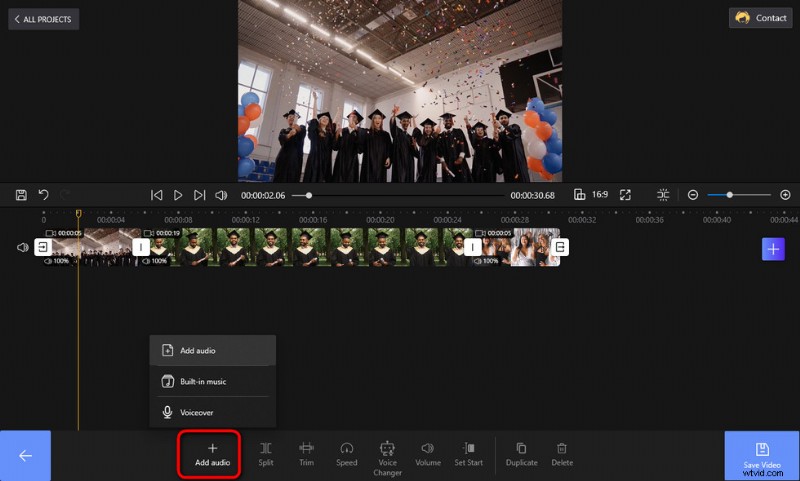
Add Music to Graduation Slideshow
Step 4. Add Text to Graduation Slideshows
Any words or thoughts you want to share with your audience? Let’s put them in your graduation slideshow! To demonstrate, I’ve added “Dream big and just go for it” to the graduation slideshow I’m making, as you can see from the snapshot shown below. Doesn’t it look great?
FilmForth allows you to add customizable text to the slideshow. To do so, click to select the text track and hit the Text button below.
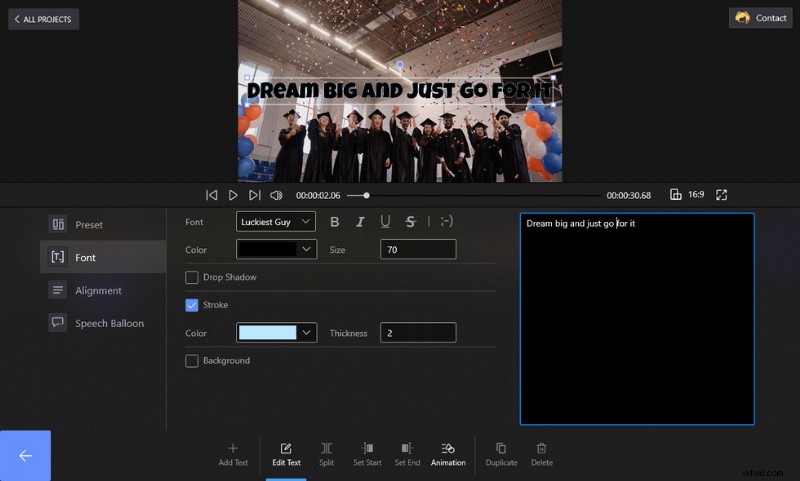
Add Text to the Slideshows
Step 5. Save and Export Graduation Slideshow
Since we’re here, the graduation slideshow is almost ready! Hit the Save video button from the lower-right side of the slideshow editing workplace, then select the slideshow quality and output file folder and export the slideshow.
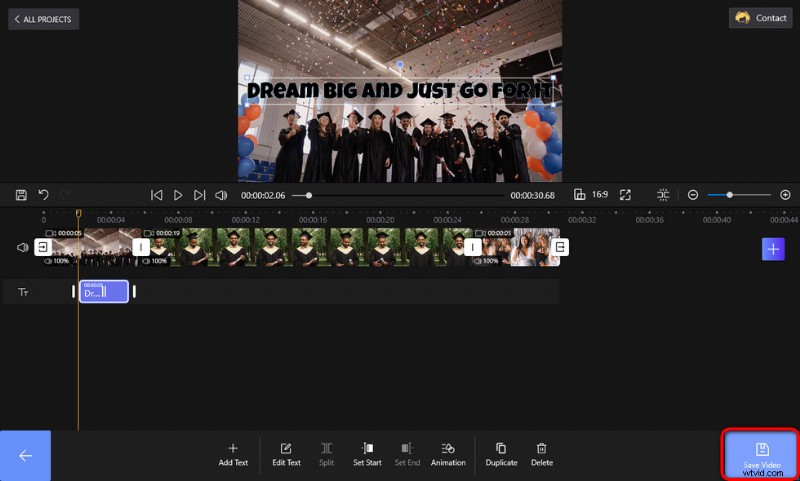
Export Graduation Slideshow
Graduation Slideshow FAQs
What is the best Slideshow Maker?
FilmForth Slideshow Maker is the best graduation slideshow maker for you. It’s completely free, it’s practical, and it doesn’t have watermarks. Don’t hesitate to give it a try!
What goes into a graduation slideshow?
There’re some key elements that should go into a graduation slideshow, they include memorable photos, narrative lines, touching music, and more.
What are good songs for a graduation slideshow?
Since graduation is all about congratulating the grads, cheerful and stirring songs and music would work great with a graduation slideshow, such as Alice Cooper – School’s Out.
How do I make a senior slideshow with music?
To make a senior slideshow with music, just prepare some senior pictures and the music you intend to use for the slideshow, load the pictures into FilmForth, and follow the tutorials above to make senior slides.
What do you say in a graduation slideshow?
Some inspirational and heartfelt graduation quotes would be perfect for you to say to your grad to show your care, such as “Education is the most powerful weapon you can use to change the world.” – Nelson Mandela. Here you’ll find more great graduation quotes.
How Long Should a Graduation Slideshow Be?
The length of the graduation slideshow depends largely on the number of images you’d like to show to your grads. A fair amount of time for a graduation slideshow is around 10 – 20 minutes, which can be adjusted by increasing/reducing the number of photos or the duration of each photo.
At Last
Have you successfully made your own graduation slideshow? I hope you do. Aside from graduation slides, FilmForth slideshow maker allows you to do more. Additionally, if you’re looking for a way to make simple slideshows, our guide on how to make slideshows on PowerPoint can be of help. And if you look to create other types of slideshows such as birthday slideshows, wedding slideshows, and Christmas slideshows, FilmForth can also be quite helpful.
More Related Articles
- 7 Best Free YouTube Video Editors
- Final Cut Pro Review – Is It Worth it?
- Top 3 Apps to Convert YouTube to MP3 for iPhone
- How to Edit or Create a GIF Free and Easily
- How to Add Music to a Video for Free