
How to make a slideshow with music and pictures for free
Our slideshow maker is the best way to create a slideshow. And it's super easy-to-use, so you don't need to learn a complex program. All you do is upload your images, videos and audio, select a few options, and you're done!
Best of all, it's totally free. No need to download an expensive app to get started.
Let's take a look at how to use this tool to make a picture slideshow with music. We'll go through the three steps you need with an example of each one to make it easy.
Add a file
First, head to Online Slideshow Maker by Clideo. Click "Choose files" to pick photos, videos, GIFs from your computer, iPhone or Android device. It is also possible to choose items from your Dropbox or Google Drive account. Just click the arrow next to the blue button to see your options.
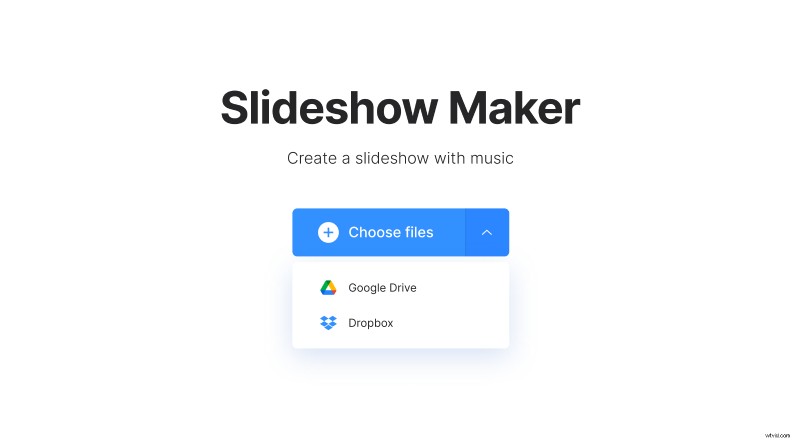
The tool supports a variety of formats, including JPG, PNG, TIFF, MPEG, MP4, WMV, GIF and more.
Choose as many images and clips as you want to include in your slideshow. If you forgot to upload one, you can always add it later.
Create your slideshow
Once you've uploaded all of your files, just drag and drop them into the desired order. Then add a song if you want to and make its length equal to the video length: loop or trim it.
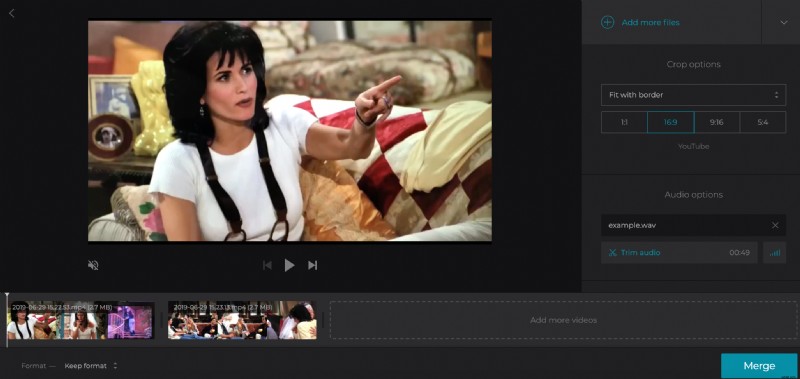
From here, you can make some tweaks, including cropping and setting image duration. If everything looks good, you can save your project to your device. Just click "Create" to finalize the changes you've made.
Wasn't that easy?
Download the result
You can preview your cool slideshow here to make sure it looks exactly how you want it to.
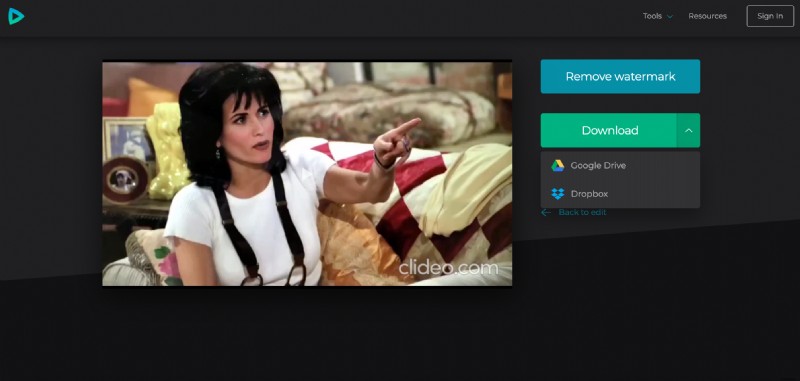
Then click "Download" and choose a destination for saving. It will also be automatically saved to your Clideo account if you have one. If you don't, you can sign up for one at this point.
Share your masterpiece with the world
Now you know how to make a slideshow on Mac, PC, or any mobile device and can share it with anyone you want: post it on Facebook, Instagram, or YouTube, send it via email.