
On LinkedIn, an increasing number of businesses use video as a marketing tool and most of them get the rewards of their investment. Whether you’re new to LinkedIn videos or an experienced LinkedIn video marketer, you should know everything about LinkedIn video specs to make better marketing.
This post will provide an ultimate guide on LinkedIn video types, LinkedIn video specs, and how to post a video on LinkedIn. And if you need a free LinkedIn video editor, you can use MiniTool MovieMaker.
LinkedIn Video Types
Here’re three types of LinkedIn videos: embedded video, native video, and video ads.
Embedded Video
Before users were not allowed to share videos to LinkedIn, they would post videos on YouTube or Vimeo, then share the video link on LinkedIn. Still, many brands use embedding video as a marketing tool.
LinkedIn Native Video
LinkedIn native video refers to the video that is directly uploaded to LinkedIn and the video produced by the platform itself. And this functionality enables you to share videos on LinkedIn directly.
LinkedIn Video Ads
LinkedIn video ads are the of LinkedIn’s sponsors and these videos show in the LinkedIn feed. And video ads play a positive role in business prosperity.
LinkedIn Video Specs
This section will offer everything you need to know about LinkedIn video specs, including native videos and video ads.
LinkedIn Native Video Specs
- LinkedIn video length: 3 seconds to 10 minutes (LinkedIn mobile app), 3 seconds to 15 minutes (desktop)
- LinkedIn video format: ASF, AVI, FLV, MPEG-1, MPEG-4, MKV, QuickTime, WebM, H264/AVC, MP4, VP8, VP9, WMV2, and WMV3
- LinkedIn video size: 75KB to 5GB
- Video resolution: 256x144 to 4096x2304
- Video aspect ratio: 1:2.4 - 2.4:1
- Frame rates: 10fps – 60fps
- Bite rate: 192 kbps – 30 Mbps
- Close caption formats: VTT, SRT
- Audio extensions: AAC, MP3, Vorbis
Note:
Currently, LinkedIn does not enable you to upload MP3 audio. You should convert MP3 to MP4 to upload.
If your video file format is not supported by LinkedIn, you can try MiniTool Video Converter to convert it to one of the supported formats like MP4, AVI, FLV, etc.
LinkedIn Video Ad Specs
- Video length: 3 seconds to 30 minutes
- Video format: MP4
- Video size: 75 KB to 200 MB
- Code format: H.264 or VP8
- Maximum frame rate: 30 FPS
- Audio format: AAC, MPEG4
- Audio size: less than 64KHz
- Video caption format: SRT
- Video resolution: width 640 to 1920 pixels, height 360 to 1920 pixels, aspect ratio 1.778 to 0.5652
- Video thumbnail: JPG, PNG, GIF, less than 2 MB
Note:
Vertical videos are only compatible with mobile devices that support vertical video players.
How to Post a Video on LinkedIn
After learning LinkedIn video specs like LinkedIn video length, LinkedIn video format, let’s follow the detailed steps below to learn how to post a video on LinkedIn.
How to Post a Video on LinkedIn on Desktop
Step 1. Go to the LinkedIn website and log in with your account.
Step 2. Tap the Video beneath the Start a post, then choose your video, and click the Open.
Step 3. Click the Select Thumbnail to upload a thumbnail for your video, and tap the Select Caption to add the SRT file.
Step 4. Then type your words and add hashtags for your video, and click the Post to start uploading.
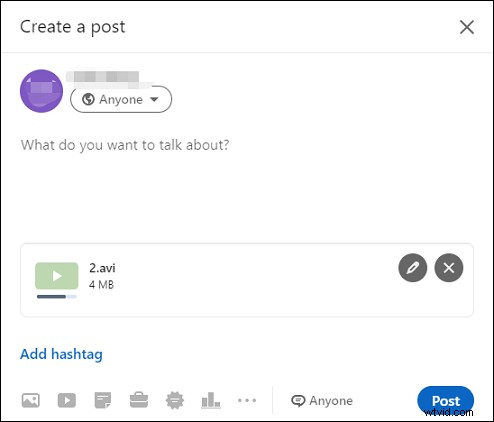
How to Post a Video on LinkedIn on Mobile App
Step 1. Open the LinkedIn app on your phone and sign in.
Step 2. Click the post button at the bottom or click the Video icon on the iOS device. Then you can upload or record a video.
Step 3. Then you can add stickers and add text to the video, and add descriptions and tags. Tap the Post to share the video on LinkedIn.
Conclusion
That’s all about LinkedIn video specs. This post offers compressive requirements to LinkedIn native video ad specs and LinkedIn video ad specs. And it also gives detailed steps on how to post a video on LinkedIn. I hope this post is useful for you.