
When AI first entered the conversation space, simple scripted bots were hailed as technological breakthroughs. Today, AI agents—fully autonomous assistants built on large language models—are redefining what automated support can do. This guide clarifies the differences, showcases real‑world use cases, and offers actionable tips so you can choose the right tool for your organization.
Table of Contents
- Chatbots, Agents, and LLMs
- Key Differences Between AI Agents and Chatbots
- Chatbot Use Cases
- Agent Use Cases
- Best Practices for Working with AI Tools
- Risks, Limitations, and Important Notes
- Will AI Agents Replace Chatbots or Humans?
- Frequently Asked Questions
- Conclusion
Chatbots, Agents, and LLMs
AI chatbots are the next‑generation of scripted assistants that rely on predefined knowledge bases and decision trees. They scan user queries, retrieve matching answers, and hand off the conversation to a human when a solution is unavailable. While they appear to understand language, they actually perform pattern matching rather than true comprehension.
Typical examples include:
- ChatGPT, Claude, Deepseek, and other LLM‑based conversational models
- Company‑hosted customer support bots
- Embedded in‑app AI assistants that offer quick help
AI agents operate at a higher level of autonomy. They can analyze context, execute complex workflows, and initiate actions on behalf of users—such as drafting a marketing email and sending it to a specific customer segment. When properly configured, agents reduce the need for live agent intervention and improve customer experience.
Examples of agents include:
- Microsoft Copilot
- Autoclaw
- ClickUp
- Salesforce Agentforce
Both chatbots and agents are powered by large language models (LLMs). LLMs provide the ability to understand natural‑language requests, summarize content, answer questions, and perform other advanced tasks.
Key Differences Between AI Agents and Chatbots
Although chatbots and agents can complement each other, understanding their distinct capabilities is essential for effective deployment.
Autonomy
- Chatbots: Operate within preset scripts; limited to basic question‑answering.
- Agents: Capable of executing multi‑step workflows without human input.
Approach
- Chatbots: Reactive—respond to user prompts only.
- Agents: Proactive—can initiate follow‑ups or new actions.
Memory
- Chatbots: Typically retain context only for the current session.
- Agents: Maintain context across multi‑step tasks, enabling more coherent interactions.
Technology Stack
- Chatbots: Depend on knowledge bases, structured data, and scripted logic.
- Agents: Leverage APIs, real‑time web data, and advanced retrieval systems.
- Both rely on natural language processing (NLP) to interpret user input.
Primary Purpose
- Chatbots: Deliver information and answer queries.
- Agents: Perform complex tasks on behalf of users.
Benefits and Drawbacks of Chatbots
Advantages:
- Low cost and quick to deploy.
- Reduces human workload and operating expenses.
- Available 24/7 and can support multiple languages.
Drawbacks:
- Human intervention is required for unsupported queries.
- Unsuitable for decision‑making in complex scenarios.
- Potential for hallucinations or inaccurate answers.
Benefits and Drawbacks of AI Agents
Advantages:
- Proactively engages users and initiates actions.
- Handles multi‑step, context‑rich requests.
- Significantly cuts operational costs and frees up staff.
Drawbacks:
- Setup and tuning can take weeks.
- Requires more experienced staff for maintenance.
Chatbot Use Cases
Below are practical scenarios where chatbots add value—especially for video‑editing businesses.
Pre‑Production
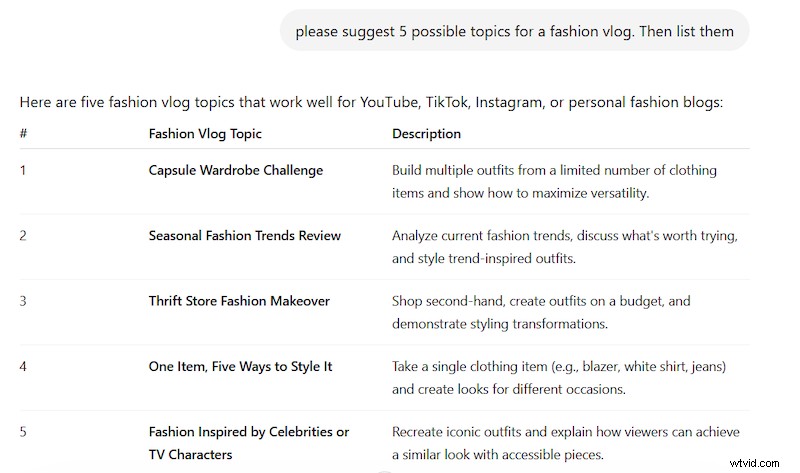
- Generate topic ideas: e.g., “Suggest 5 potential themes for a fashion vlog.”
- Review existing scripts for clarity, formatting, and platform‑specific requirements.
During Editing
- Create or proofread subtitles and captions.
- Offer shot suggestions, clip descriptions, or editing techniques.
Post‑Production
- Check export specifications such as aspect ratio and file format.
- Recommend optimal publishing times based on audience behavior analytics.
AI Agent Use Cases
Agents can execute tasks on behalf of users, allowing for end‑to‑end automation.
Pre‑Production
- Generate a detailed visual storyboard with scene plans.
- Identify and assign outsourced tasks (e.g., voice‑over, caption creation).
During Editing
- Detect peak moments in raw footage and auto‑create highlight reels.
- Trim filler words or repetitive phrases in audio tracks.
Post‑Production
- Apply color‑grade presets based on scene detection.
- Translate subtitles and auto‑lip‑sync in a new language.
Regardless of the tool, consistency, clear task definition, and rich context are essential for optimal performance.
Tips for Working with Chatbots
- Write detailed, unambiguous prompts; missing context leads to subpar output.
- Always verify the information; hallucinations remain a risk.
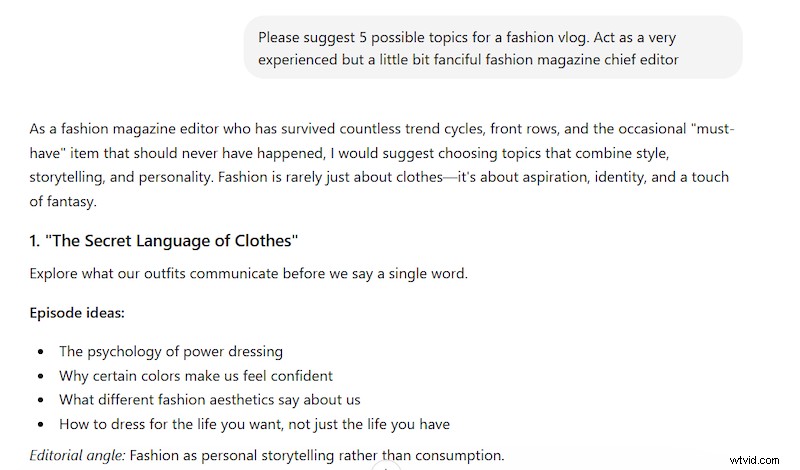
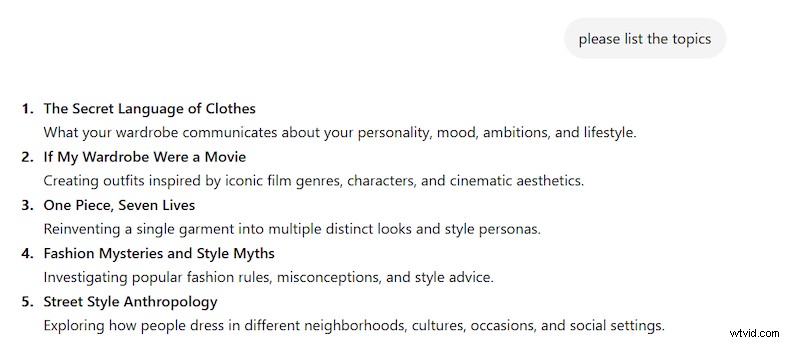
- Role‑play the bot (e.g., “You are a senior customer support rep”) to improve relevance.
Example with role:
Example without role:
Tips for Working with AI Agents
- Break complex tasks into clear stages.
- Define specific, measurable goals upfront.
- Start with small, repetitive workflows to test reliability.
Clear guidance and iterative testing are the keys to dependable agent performance.
Risks, Limitations, and Important Notes
- Hallucinations and illogical outputs can still occur; human review is essential for critical tasks.
- AI agents require tool integrations that may raise privacy or security concerns.
- Biases and regulatory constraints can affect output quality; evaluate multiple vendors.
- Performance depends heavily on prompt quality; poor prompts lead to poor results.
Use AI as a starting point, not a final answer—especially when accuracy, privacy, or fairness matter.
Will AI Agents Replace Chatbots or Humans?
Current trends suggest that AI agents will complement, not replace, chatbots or human agents in the near term. Their advanced capabilities will augment workflows, but human oversight remains critical.
Frequently Asked Questions
What is an AI chatbot and what is it best for?
An AI chatbot answers questions, offers step‑by‑step guidance, and generates ideas but cannot perform complex tasks independently.
What is an AI agent and what is it best for?
An AI agent automates multi‑step workflows—such as filling forms, sending emails, or performing routine tasks—on behalf of users.
How do I decide whether to use a chatbot or an AI agent?
Choose a chatbot for quick, straightforward information requests; opt for an agent when the task involves a complex, multi‑step workflow.
Can I combine chatbots and AI agents in the same workflow?
Yes—use a chatbot to gather data, then hand off the structured information to an agent for execution.
Can an AI agent edit a full video without human input?
Agents can automate many editing steps, but human review is still recommended to ensure quality.
Online Video Editor
Effortlessly create or modify videos by adding text, music, transitions, stickers, emojis, and more. Record your own voice or generate AI voice‑overs.
Conclusion
Distinguishing between AI chatbots and agents is crucial for strategic implementation. While definitions evolve, the practical approach is to experiment, align tools with specific business goals, and continually refine workflows. Our team is ready to help you navigate this transition.