
Twitter video size limit
- Possible video size for Twitter reaches 512 MB only. If your recording is bigger, you can compress it – for example, using the Online Video Compressor by Clideo.
- Resolution should be no lower than 32 x 32 pixels, its max is 1920 x 1200 pixels.
- Video duration shouldn’t exceed 140 seconds, as Twitter especially recognizes the value of laconism. If your film is longer – just use the Clideo’s Cutting tool.
- Twitter tolerates only two extensions: MP4 and MOV.
- There are two possible video styles: Portrait and Landscape. Their recommended aspect ratios are between 1:2.39 and 2.39:1.
The easiest and fastest way to meet size and format requirements is using a free and online Video Resizer by Clideo. Follow the steps:
Open the resizing tool in any browser
Tap or click on the big blue button to get the list of all the uploading options. You may either choose a recording from your personal device or pick it from your cloud storage account (Google Drive or Dropbox).
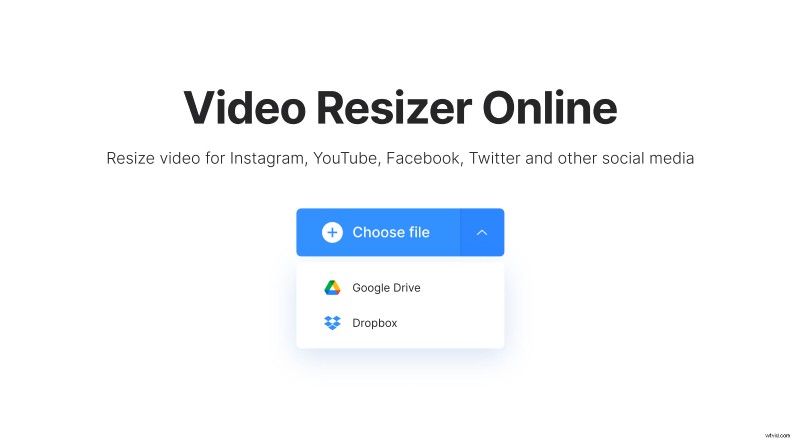
The tool deals with all the popular and not video formats: VOB, AVI, MP4, PMG etc.
Choose ready preset
There are two options for Twitter: Portrait or Landscape. Hitting them, you don’t need to alter anything or keep editing, but you may zoom your clip or change its position.
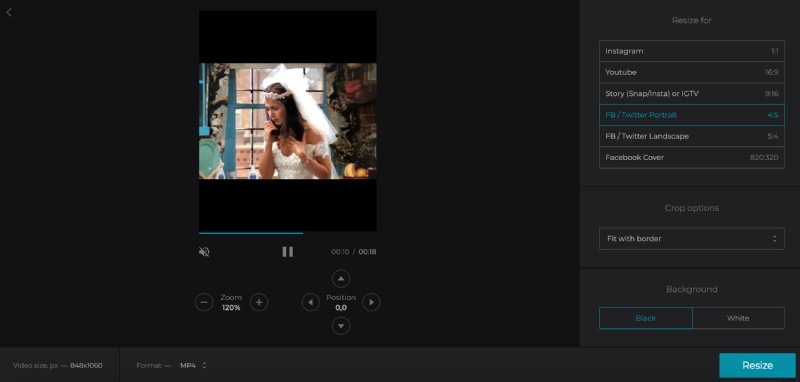
Don’t forget to choose a preferred output format. Keep in mind that.
Save the clip
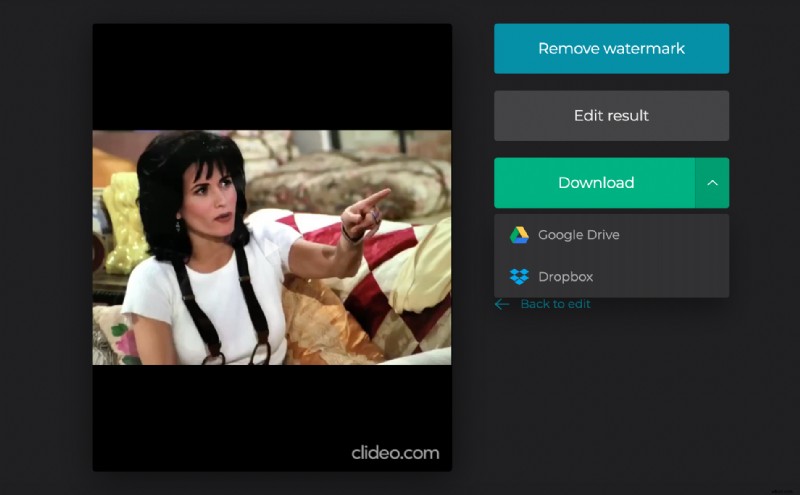
When you are happy with the result, click “Resize” and wait several seconds. Take a quick preview to be sure that you got what you wanted. If something went wrong – click “back to editing”. If everything is perfect – download the film to your personal device or upload it to the cloud.