
Video specifications and dimensions depend on the type of post:
- Regular In-Feed Posts
- Stories
- IGTV
- In-Feed and Explore Ads
- Story Ads
- Carousel In-Feed
- Native Stories Carousel
- Expandable Stories Carousel
- How to Make Your Video Fit an Instagram Size
Regular In-Feed Posts
For the regular organic posting, the max file size for Instagram video depends on the orientation:
- Square: 1800 x 1800 px, aspect ratio 1:1;
- Vertical: 1080 x 1350 px, aspect ratio 4:5;
- Video length: 3 - 60 sec;
- File size: 4 GB;
- Supported formats: MP4 and MOV only.
Stories
There are some essential differences between an In-Feed post and a Story:
- The min Instagram Story video size is 600 x 1067 px;
- The best-recommended one is 1080 x 1920 px;
- Aspect ratio: 9:16;
- Length: 15 sec.
IGTV
IGTV stands for Instagram Television:
- Aspect ratio: 9:16;
- The minimum resolution is 720 x 1280;
- Video length depends on a way of uploading: 15 minutes max if a recording is imported from a mobile device, up to 60 minutes for web uploads;
- File size: 650 MB - 3.6 GB;
- Frame rate: 30 fps;
- Format: MP4 only.
In-Feed and Explore Ads
- Landscape: minimum 500 x 281 px, aspect ratio 16:9;
- Square: minimum 500 x 500 px, aspect ratio 1:1;
- Portrait: minimum 500 x 625 px, aspect ratio 4:5;
- Video length: 1 - 120 sec;
- File size: 30 MB.
Story Ads
- Aspect ratio: 9:16;
- The minimum resolution: 500 x 889;
- Length: 1 - 120 sec;
- File size: 30 MB.
Carousel Ads
When it comes to a Carousel – a series of 2-10 short clips – the situation changes.
Carousel In-Feed
- Aspect ratio: 1:1;
- It consists of square frames only, the Instagram square video size in this case will be 1080 x 1080 px;
- File size: 4 GB;
- Max length: 60 sec;
- Formats: MP4, MOV.
Native Stories Carousel
- Aspect ratio: 9:16;
- Resolution: 1080 x 1920 px;
- File size: 4 GB;
- Max length: 15 sec;
- Formats: MP4, MOV.
Expandable Stories Carousel
- Aspect ratio: 1:1;
- Resolution: 1080 x 1080 px;
- File size: 4 GB;
- Max length: 15 sec;
- Formats: MP4, MOV.
Making your recording meet all those complicated specifications can be a tiresome task but there is a tool with ready presets for all those types of Instagram posts and ads that can help you.
How to Make Your Video Fit an Instagram Size
Upload a recording
Open Online Video Resizer by Clideo in any browser. Click or tap a big blue button to import files from your device.
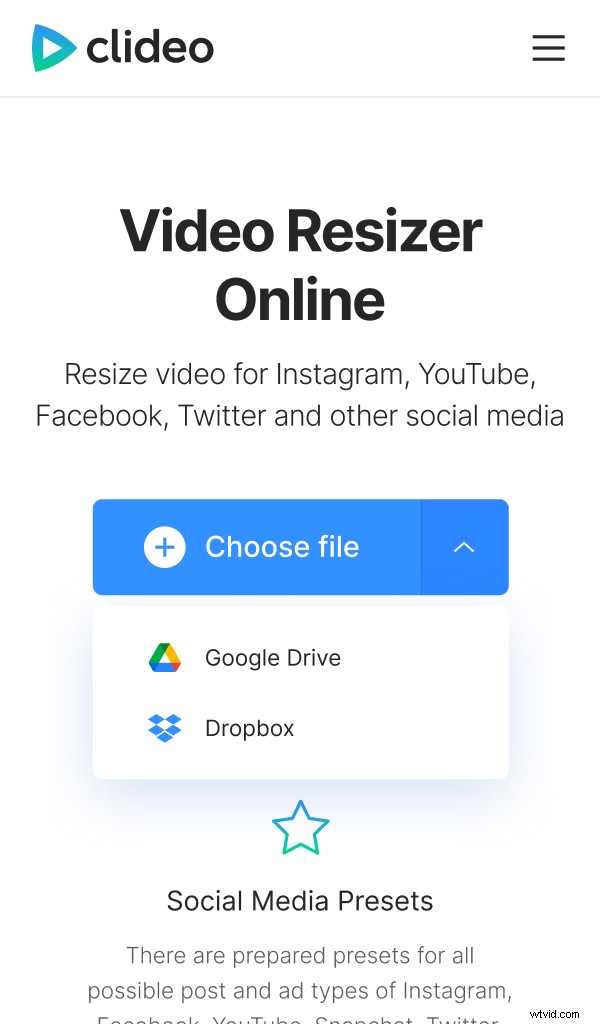
Call a drop-down menu to select clips from Google Drive or Dropbox.
Resize the video
Choose a ready preset for any type of social media post you need: Instagram, Youtube, Snapchat, Facebook or Twitter. Zoom the frame and change its position if you want. Choose the background color or blur it.
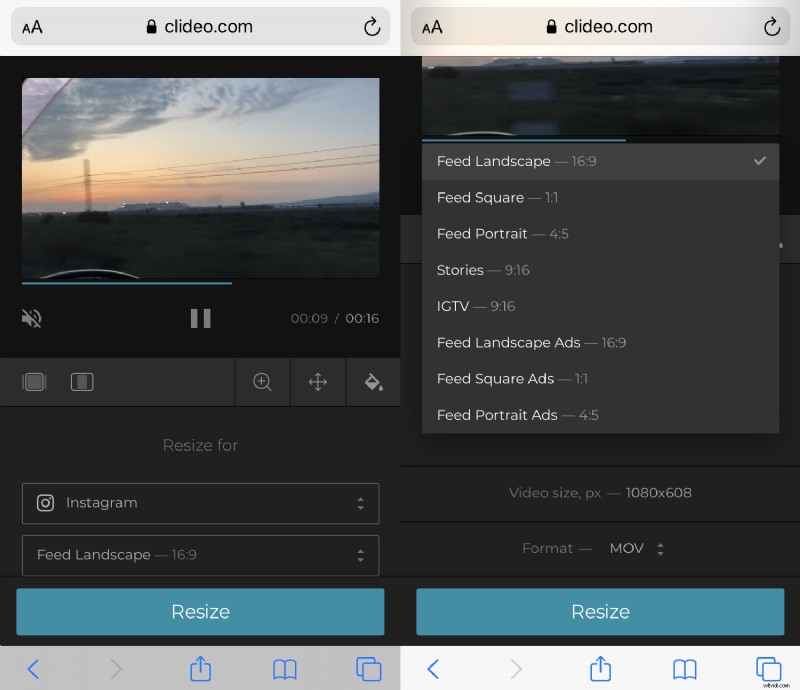
Don’t forget to select an output format – we recommend sticking to MP4 as it’s the most supported one.
When you are done, click “Resize”.
Save the result
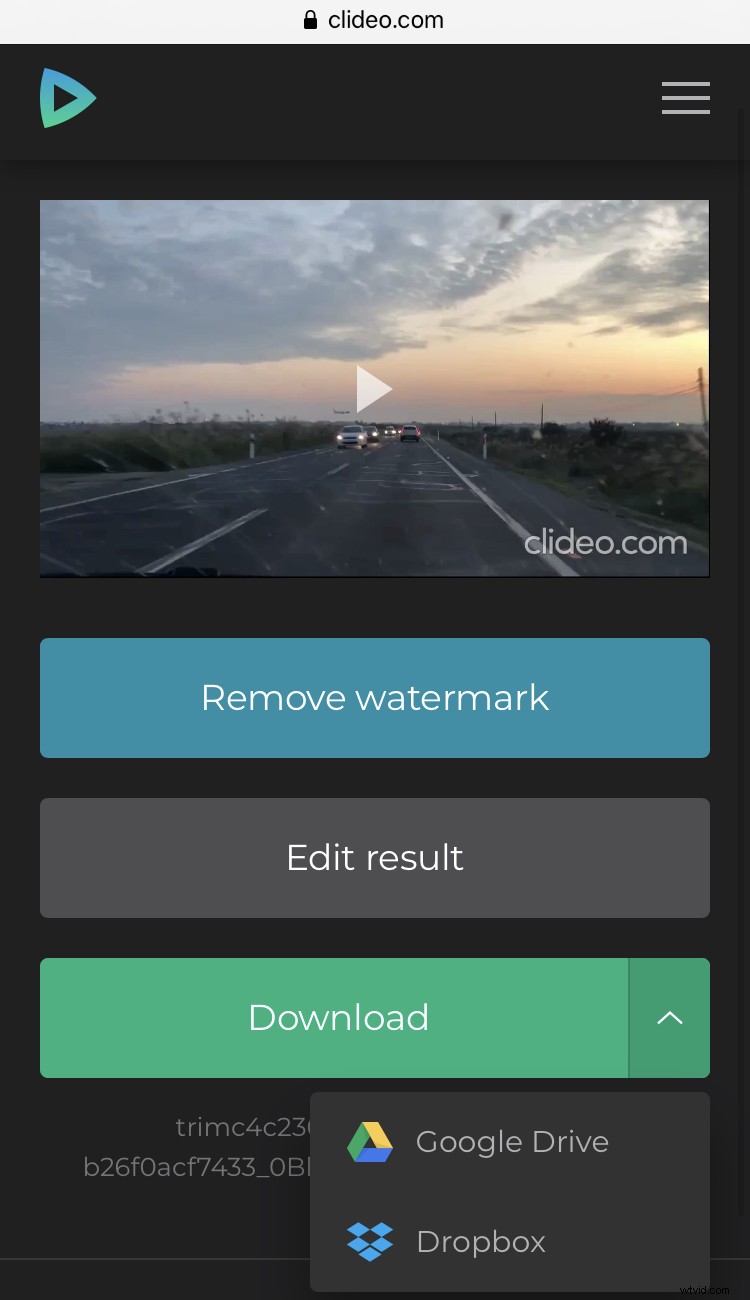
Have a quick preview and save the resized video to your personal device or cloud storage. If you feel like continuing editing, click an arrow “Back to edit”.