
Facebook cover video specs
Luckily, Facebook cover video specs are as simple as ABC:
- The minimum resolution is 820 x 312 pixels, the recommended one is a little bit larger – 820 x 462 pixels;
- The minimum length – 20 seconds, the maximum one – 90 secs.
Luckily again, Clideo provides lots of free online tools for video editing. They are user-friendly, fast and handy, work in any browser and at any platform – iOS, Android, Windows, Mac, Linux.
To make your film shorter, use a special Cutter, to cut off the unnecessary sidebars – a Cropper. Don’t have any video at all? Make it from GIFs, photos or other clips with a Video Maker!
Note: Facebook will accept all the files you want to upload – it will just crop them automatically if the size doesn’t fit, and the result may be… unpredictable. So you’d better take care of your recording by yourself. Here Video Resizer by Clideo will come in handy.
Upload the recording
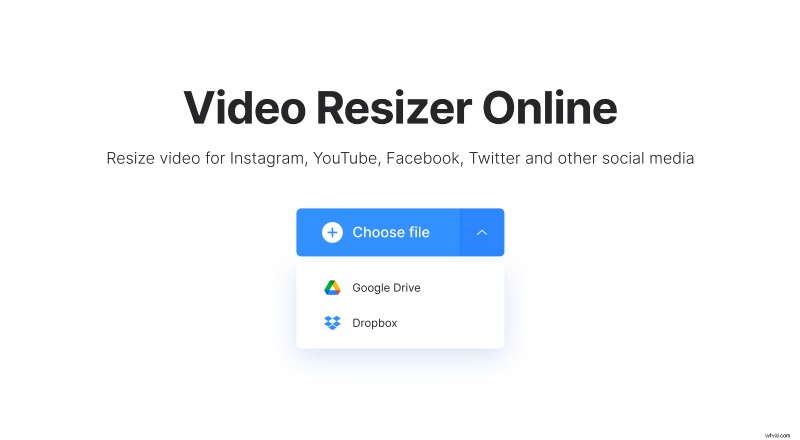
Open the tool in your favourite browser and choose a file from your camera roll or folders (a big blue button in the centre). To pick a file from Dropbox/Google Drive, click an arrow on the right side of the pane.
Resize your video for Facebook cover
The tool has a number of ready presets – just select the one you need. The default video size for Facebook cover is 820:320, you may also zoom the visual or change its position. Most probably, your resized film will get brand new elegant sidebars. You may decide on their colour – black or white.
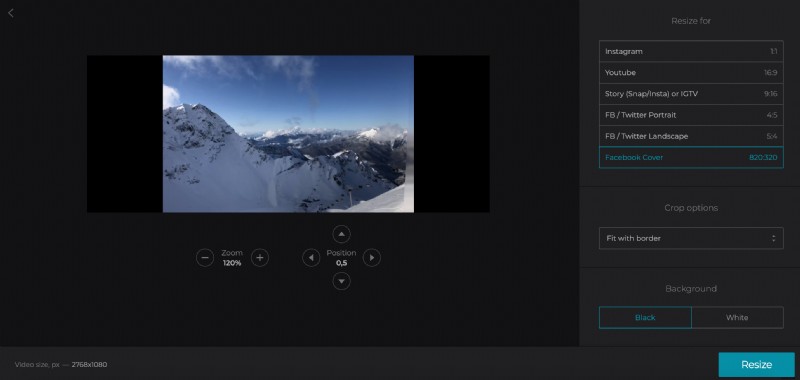
When you are done, choose the output format, press “Resize” and wait for several seconds.
Download the result
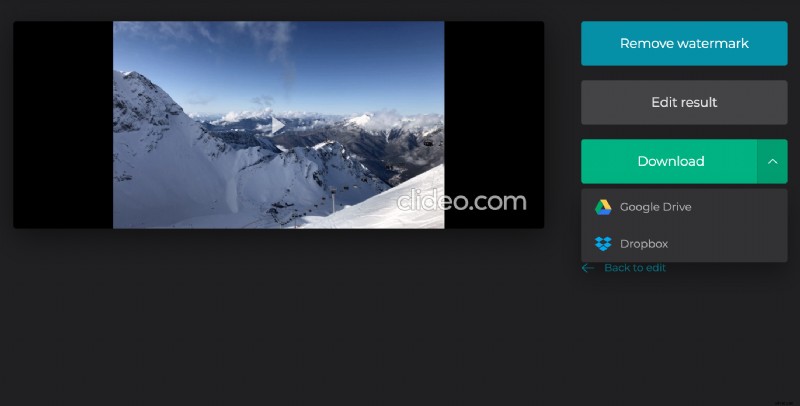
Have a preview and if you got what you wanted – download the film to your personal device or save it to the cloud storage. If any amendments are needed – hit “Back to edit” and keep enhancing the video.