
This week Adobe lifted the veil on their latest round of Creative Cloud updates, and far and away the coolest new feature is Team Projects.
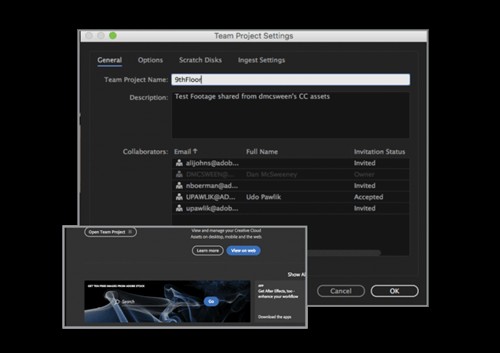
What are Team Projects, you’re probably asking? Apart from the fact that it allows you to create an Adobe Premiere team project, it might be best to think of it as a native version of a cloud service like Frame.io or Wipster, but built directly into Premiere, After Effects, and Prelude. Here’s the official description from the company’s press release:
In many ways, it seems like Adobe is bringing some of the enterprise-level solutions in Adobe Anywhere (their suite of remote collaboration tools) to a wider audience and making them more accessible. In fact, the “smart versioning and conflict resolution” language in this press release comes directly from the Anywhere website, which makes me think the two services are built on the same foundation, even if they end up being different in terms of scalability and power.
As for that Frame.io and Wipster comparison at the front of this article, it’s still too early to say if that’s who Adobe is taking aim at with this new feature. While both Frame.io and Wipster really excel at making the client review and feedback process smoother, Adobe’s new offering seems more geared towards helping creatives collaborate on the same project in real-time, even when they’re not working off a shared server or something similar.
All in all, this is an exciting mid-year update that makes Adobe Premiere team project creation a lot easier. It also bodes well for the future of remote collaboration with their Creative Cloud tools. By NAB next year, I fully expect this to be fleshed out more, and even more powerful.