
In this showdown, we look at how these two powerhouse programs affect the user, specifically in regards to how much each program costs.
If you read that headline four years ago, it would’ve been easy to assume that I have no idea what I’m talking about — or that this was a paid promotion. Come 2019, however, and Resolve is undoubtedly ready to step into the ring with Premiere — and it may even walk away a winner.
In approaching this showdown, I didn’t want to focus on the standard comparisons between the two nonlinear editors — such as how the edit tools perform, the responsiveness of the editing, media support, and so on. All that appears in every comparison article, and honestly, Zebra Zone spectacularly covers all of that information in the following video.
Instead, over the course of several articles, I want to focus on how DaVinci Resolve and Premiere Pro affect the user. We’ll begin with the cost.
The Cost
When you hear that something is free, especially software, you know there’s a catch. Usually, it’s something like you can edit a fifteen-minute clip, but you can only export five minutes. Or you can import and work on a 4K timeline but you can only deliver in 1080p — and to use these features, you must buy the product. The worst case is when it seems like the company has given you complete software freedom for the trial period, but when you export the video file, there’s a watermark splashed across the center of the image.
This isn’t the case with Resolve. It’s completely free. “But doesn’t Resolve cost $299?” Yes, there’s a paid studio version, but the free version is entirely unrestrained, bar a few plug-ins and professional features. You can access 99.9 percent of the software’s features.
So, what are the features in the studio version?
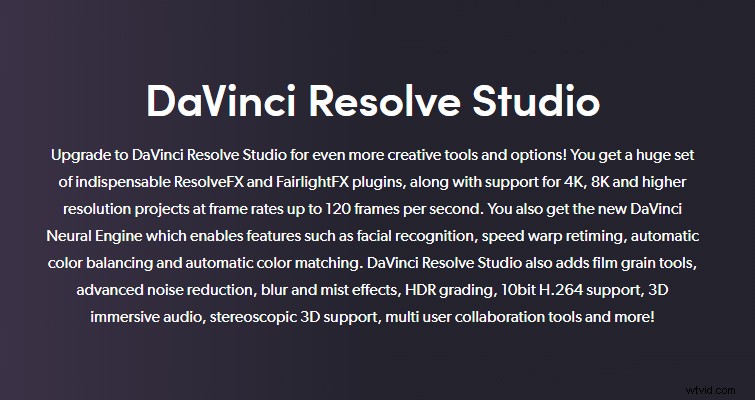
When we look at the premium features, you can see that it’s unlikely that (unless you’re on a high-profile job) you’ll actually need these features. Who’s going to need group editing for a YouTube upload? Or HDR color grading for your travel vlog? Film grain? Well, it’s not that good anyway, as I demonstrated in my write-up here. And you can download several real grain overlays from our handy guide here.
If, at some point, you do need access to the studio features, you can always purchase the software. We’ve already established that the studio version costs $299, but it’s also free when you buy one of Blackmagic’s many cameras. The Pocket 4K is $1,295.00. However, look at it from the perspective that, after Resolve, it’s only $996. Whether you buy the activation card or dongle from a retailer, or purchase a spare copy from eBay, it’s a one-off purchase. Forever. You can order a 12.5 studio version dongle and still install Resolve 16.
Adobe, on the other hand, only offers subscription services for their software. Meaning you can’t make a one-and-done purchase to keep the software for however long you like.
Typically, there are three subscription models:
- Annual contract, paid monthly
- Annual contract, prepaid
- Month-to-month
If you’re only after Premiere Pro, you could subscribe to the service for a year for $239.88 — $12 cheaper than paying each month, and $137.52 cheaper than paying for the month-to-month at $31.49, which adds up $377.40 for the year. Alternatively, you could subscribe to the entire line of Adobe apps for $599.88, prepaid (the other models are also available for the all-apps package).
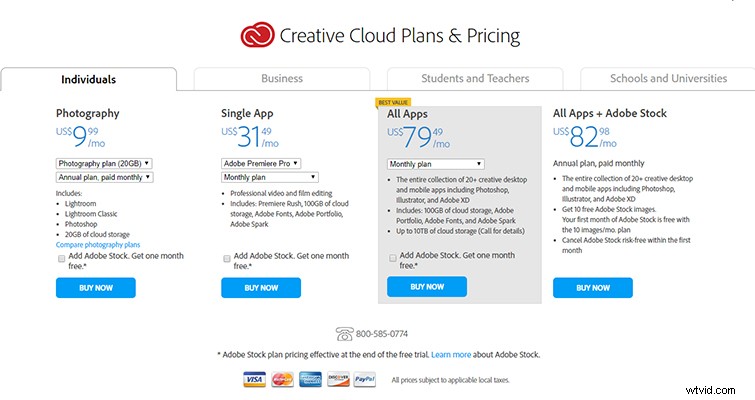
At face value, Premiere (for the year) is $60 cheaper than Resolve, and initially, it may seem like the better choice. However, as soon as you pass that first-year threshold, Premiere starts to become expensive. Four years after purchasing Resolve Studio, you’d have paid a total of $299. After four years of Premiere, you’d have paid out $959.52. Adobe also recently increased the Creative Cloud price plan, so you may have to account for subtle increases.
It’s a big difference, and it’s one we can’t ignore. Of course, there are variables to the Adobe subscription service for students and businesses. And depending on which country you reside in, you can claim the subscription fee as a business expense. But still, in a world where software and services are increasingly moving toward a subscription platform, to know that you’ve made a one-and-done purchase for life is liberating.
A Multitude of Applications vs. A Multitude of Programs
One could argue that with Adobe’s Creative Cloud subscription, you’re getting a diverse number of applications, and as such, the price is justified. However, since 2014 (and every year after) several new pages have been added to Resolve, and each page exists as its application: from Fairlight Audio to Fusion Effects, the Cut page, and of course, the Color page, for which Resolve is known. But what’s the kicker here? These pages are included in the free version.
For someone on a tight budget, there really shouldn’t be a contest when comparing $599 vs. $0.
It honestly seems like however you try to paint Premiere Pro as the winner, Resolve comes back with a hook. Only need editing software for one month? Get the $31.49 monthly Premiere service. Alternatively, you could use Resolve for free.
(In the next showdown, we’ll be looking at Resolve’s GPU usage vs. Premiere’s CPU dependability.)