
One of the worst gut wrenching feelings any content producer can face is opening up a memory card only to find that a file is corrupt or missing altogether. Recently we sold most of our Nikon gear and switched over to the new Panasonic GH5 cameras because of their better video features, superior image stabilization, and overall smaller size. Unfortunately we have found that unlike our Nikon cameras, the GH5 can corrupt files pretty easily if you are using their battery grip. In this video, I show you how these files can easily corrupt as well as a few software options you can use to recover any files corrupted during a loss of power.
Let me first give a disclaimer that I am in no was a specialist in data recovery. I consider myself pretty experienced with electronics, computers, and cameras but by no means do I understand all the ins and outs of how data is recorded to camera buffers and transferred to flash memory cards. Recently while filming our video on How to Build The Best PC for Photo and Video Editing, I accidentally corrupted a long, one hour take by trying to hotswap a dying battery in one of our GH5 cameras. This process of hotswapping batteries was never a problem with any of our Nikon cameras (Canon grips unfortunately place both batteries in the grip tray so hotswapping isn't an option at all), and as you can imagine, I was horrified to find out the hard way that the Panasonic GH5 cameras are not capable of saving files to the memory card if the grip battery is removed before power is transferred to the internal camera battery. Whoops, my bad guys!
This file corruption wasn't the first time we experienced a lost file on the new Panasonic GH5 system. We actually have lost about three files total in the first 60 days we have owned the new cameras. They have all been related to abrupt power loss, and all of those power losses have been related to a loose connection between the camera and the battery grip or a premature ejection of the battery inside the grip. Upon investigating if these files could be recovered, I found that many Panasonic users have experienced corrupt files in one form or another, and the problem dates back to the older GH4 as well. Unfortunately very few of the forums I found offered any helpful advice on how to recover these files, but after reading dozens of threads, I have come up with two of the best solutions if you find yourself in the sticky situation of having lost footage.
Panasonic's Software
The first place to start seemed obvious. Let's see what Panasonic offers in terms of data recovery. I searched through their website and tried to find a OEM software solution for these corrupt files but that path lead no where. A few message boards pointed to some software called Panasonic AVCCAM Restorer and AVCCAM SD Card File Recovery (located under the Software tab). Panasonic's website claims that this software can help restore footage that has been accidentally deleted from an SD memory card. Now keep in mind that the GH5 camera is not an AVCCAM camera but since this link showed up multiple times on forums about GH4/5 corruption, I figured it would be worth noting it here and testing it out. Again, my files were not caused by a memory card corruption but rather a loss of power from the camera itself. Panasonic also has another piece of software on this page called AVCCAM Restorer which is "software for restoring inconsistencies in video data recorded on an SD card." The GH5 does allow you to record in the AVCHD format which is mentioned on the software page, but from my tests neither of these pieces of software did anything with the SD card from a GH5. I'm not exactly sure why this software was recommended so many times since it appears to only be useful for the more professional AVCCAM cameras, but it was the most obvious place to start.
Aeroquartet's Treasured Service
The next piece of software that was highly recommended wasn't actually software itself but rather a recovery service offered by the company Aeroquartet. Their recovery software solution is called Treasured. By visiting their website you can actually upload corrupted .mdt files straight to their server and get a quick idea if the file can be recovered by the Aeroquartet team. Since this is a service and not a stand alone piece of software you do have to pay for each recovery session. I've included a screen shot of their prices which vary depending on the amount of files needed to be recovered as well as the type of file or container the original video file was saved as. If your footage is from a cell phone you are going to pay less than if the footage was shot on a much more professional video camera.
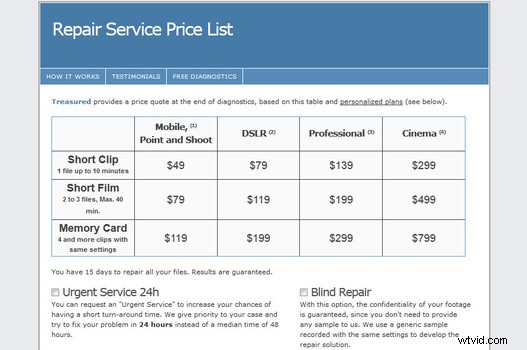
This service seemed to work well, but I did not actually pay to have any of my files recovered in their entirety. As I mention in the video above, several of my corrupted files were showing up as 0KB, and I of course tried to upload those files to Aeroquartet's servers. Since the files register as too small to recover, I thought it would be interesting to reach out to the Aeroquartet team and see if they thought any of my 0KB files could be recovered at all. To my surprise they actually had a solution for these files.
The actual process of salvaging these files was pretty complicated and it involved using a piece of software called Chrysocome. The guys from Aeroquartet were able to remotely log into my computer, run the software which basically performs a Deep Media Scan on the SD card itself, and save an image file of the raw data from the card to my desktop. Using this .IMG file, the team was then able to upload a large portion of the memory card into their Treasured software and successfully recover one of my files that initially read as being 0KB on the card. For me the whole process took a few hours, but if you have a large memory card larger than 16GB it might take up to a full day to produce the necessary image file needed to recover the video files. All in all, I can't speak highly enough of my experience with Aeroquartet's customer service but the service itself is pretty pricey. However, depending on the project you are working on, it may ultimately be a very small price to pay in order recover any crucial files needed for your video production.
GRAU GmbH - Video Repair Software
The final software option might be the best because you can actually buy it and use it over and over. This software, simply called Video Repair Software, allows you to recover a variety of file formats and codecs (Mov, mp4, avc, H264, AVC, ProRes, etc), and much to my surprise it actually was able to recover the .MDT files from our Panasonic GH5 cameras (at least the ones with file sizes associated with the .mdt file). Once you download and run the software, you can browse your computer for the corrupt file you need to recover. Once you have located the corrupted file, you also need to point the software to a reference movie. This reference movie is basically a working file that was shot on the same camera using the same settings. So if you know your file was shot at 4k in 60fps and saved as .mp4, you need to make sure your reference file was also shot in those exact settings. Once you hit scan, the software will then try to repair the corrupt footage by using the reference file as a guide.
In testing this software, I ran about 12 different files through it, and about 90% of the time the program was able to spit out a recovered file. The recovered file wasn't always able to play smoothly on my computer, but I was able to throw this file into Premiere and use it within my timeline. As I show in the video above, Premiere sometimes had trouble playing back the file too, but I was able to solve the glitchy playback by either exporting the file from Premiere and re importing it into my timeline or by simply rendering the recovered file. Like I said before, not every file I tried was able to be successfully recovered, and sometimes I found that the Video Repair Software was able to recover a file on one computer but then could not recover the same file on another computer. I also did not attempt to recover video files with audio so your results may vary when it comes to recovering both video and audio in a single file.
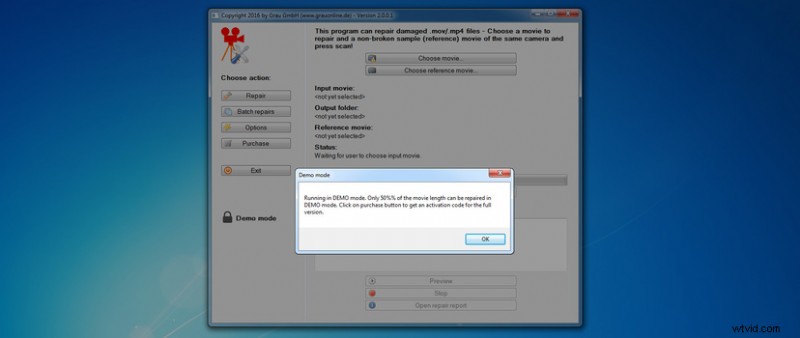
So what is the big catch? Well, there are never any free lunches and that is true with Video Repair Software too. The good news is you can download this software for free and recover 50% of your file with absolutely not costs. However, if you want to recover the entire file you have to pony up about $110 to license the unlocked software. There used to be a hack where you could double the size of your file and successfully recover all of the footage but that hack apparently has since been fixed. However, I feel like $110 for software that might be used a few times in dire situations is a price I am willing to pay. It's also a lot cheaper than hiring Aeroquartet, but as I found out, the service Aeroquartet offers is much more thorough and in many cases they can recover footage that VRS might fail to recognize such as the 0KB files.
A Real Solution
With all digital technology, we are bound to find ourselves disappointed or SOL at some point in time. Unfortunately for GH5 users though, it's actually pretty easy to corrupt video files when using the extra battery grip on the camera which is a shame. Lee Morris recently addressed this issue in his video Top 12 Firmware Wishes for the Panasonic Gh5, and I really hope this is something that can be fixed with software. If not, maybe there is a chance a hardware update on the Panasonic DMW-BGGh5 Battery Grip could be issued since the grip was just released a few weeks ago (and I'm sure recalling a grip would be easier than fixing a hardware issue on the camera itself). If this problem cannot be fixed with a firmware update, I hope this article can at least help all GH5 users become aware of how easily files can become corrupt when using the battery grip and take extra precautions to make sure their grips are locked tightly to the body and the grip batteries are never removed before the power is transferred to the camera. My only experience with battery grips like this are with the Nikon, Canon, and Panasonic systems so I am also interested to know how the battery system works with other camera systems like Olympus, Sony, and Fuji (we've used Fuji's with grips but not enough to notice the power transfer from grip to camera).
If you're passionate about taking your photography to the next level but aren't sure where to dive in, check out the Well-Rounded Photographer tutorial where you can learn eight different genres of photography in one place. If you purchase it now, or any of our other tutorials, you can save a 15% by using "ARTICLE" at checkout.