Adopting new features is fun because you get to see them evolve in real time 👀 That’s the case for Clipchamp Teams adopters, who will experience its first major update since it launched in February, on Monday July 19th.
On the flip side, if you’re yet to explore Clipchamp Teams, there’s never been a better time to do it. Let’s jump into this update and explain why it’s now even easier to manage your team in Clipchamp.
Centralized payment

Pay the bill for an entire team from one payment source like a credit card or PayPal account. Say goodbye to keeping up with endless reimbursements and hello to streamlined transactions.
Personalized permissions

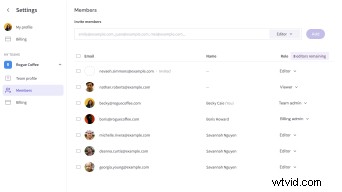
Get control over how your team works. Allocate levelled permissions to team members including:
Team admin
View, create, and copy videos.
Invite team members in any role.
Allocate roles to team members.
Upgrade team plans.
Manage centralized payment.
Billing admin
Invite team members in any role.
Allocate roles to team members.
Upgrade team plans.
Manage centralized payment.
Editor
View, create and copy videos.
Invite team members as viewers.
Viewer
View videos.
Invite team members as viewers.
Team-only accounts
With centralized payment set up, team members who don’t need a separate personal plan can simply cancel it and edit videos exclusively in their team space.
Team plans
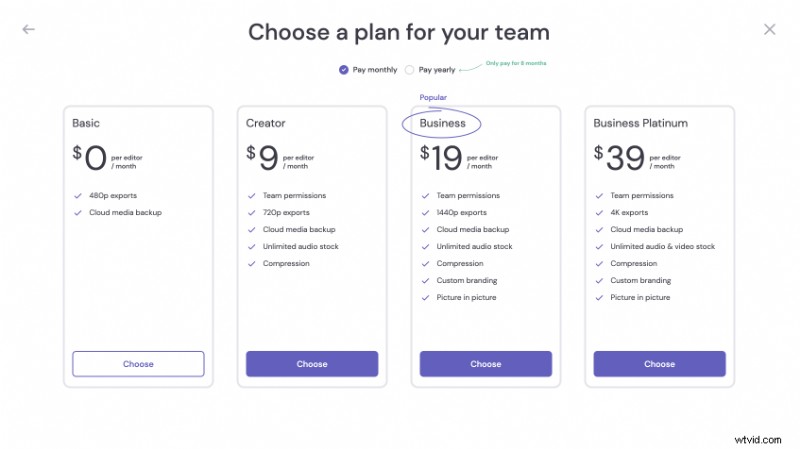
To enable centralized payments, we’re downgrading all existing teams to the free experience. From here, you can upgrade your team to Creator, Business or Business platinum and enjoy the features you’re already a pro at using on your personal plan.
These plans are separate from your personal account. For example, if you subscribe to a Business plan on your personal account, this won’t extend to your team unless you’ve also subscribed your team to a Business plan.
To begin, new teams will be allocated to a free plan, but you can upgrade at any time. Why upgrade? Good question. Creator, Business and Business Platinum plans for teams will offer:
Pro editing features
Give your team access to the best video editing tools for the job. Think unlimited stock video, music and SFX, picture in picture, and cloud storage. Team plans give everyone in your team access to the same pro features offered in Creator, Business and Business Platinum plans on personal accounts.
One last thing — a new-look home page

Our team has tweaked the design of the homepage to make it easier to manage teams. You’ll notice a redesigned sidebar where you can toggle between your personal and team spaces.

Plus, we’ve added a new settings tab to the side-bar (just look for the ⚙️ icon at the bottom), where you can manage your personal details, team members and billing in one place.