
When Pinterest launched in 2010, it took classic creative activities like mood boarding and scrapbooking and brought them online. Soon enough, Pinterest became the world’s most clickable visual search engine. Then, in 2016, as the internet went video-centric, Pinterest introduced a video feature to its previously static platform. Pinners embraced video Pins – a fun, content-rich feature that couldn’t be replicated offline. In fact, video Pins views grew six-fold between 2018 and 2019, and saw a 240 percent increase in video views year over year in 2020.
Now, video Pins are a favorite of creators and businesses alike. For businesses on Pinterest in particular, video offers major opportunities to convert. 82 percent of weekly active users on Pinterest say they’ve purchased products based on a brands’ content on the platform.
No matter why you’re interested in video Pins, we’re committed to helping our everyday editors share their videos. This is why we’ve integrated with Pinterest and become an official Pinterest Partner, allowing you to share videos made in Clipchamp to your Pinterest Business account in an instant.
How to create and share video pins with Clipchamp
Step 1. Create a video pin in Clipchamp using a template
After you’ve signed into Clipchamp, you can start creating your video Pin. Suppose you’re like us and love getting a head-start. In that case, you can begin with a Pinterest video template. We’ve created a whole collection within our new 2:3 aspect ratio based on Pinterest’s 2021 trend report, Pinterest Predicts.

Step 2. Optimize your video for Pinterest and export
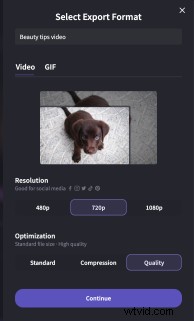
When you’re ready to share your video Pin, click the Export button in the top right-hand corner of your screen. We recommend 720p as the best resolution for Pinterest, you also have the option to Compress your video to decrease its file size without losing quality.
Step 3. Share your video pin to Pinterest
When you reach the Export page, you’ll notice all of our Save to buttons. To share your video Pin on Pinterest, click on the Save to Pinterest button, and follow the prompts to connect to your Pinterest Business account. If you don’t already have a Pinterest Business account, it’s easy and free to make the switch.

You’ll need to authorize Clipchamp to access your Pinterest Business account.

Step 4. Edit your video pin details
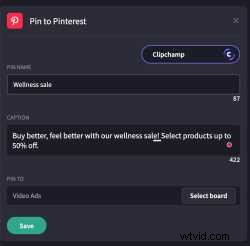
The Save to Pinterest button will expand when you click it. Add a title and a description to help surface your content across Pinterest. Ensure copy is concise and relevant - Pinterest recommends Pin descriptions are 1-2 sentences max.
Step 5. You’ve got a video Pin!
Once your video Pin has successfully been shared to Pinterest, you’ll see a green confirmation tick, plus a link to your video Pin. Click Open to go and take a look. If you need to make any further changes, you can make them in Pinterest.


Start creating video Pins
That’s all there is to it. We’re excited to make creating and sharing video Pins with Clipchamp easier than ever. With more users watching video Pins than ever before, there’s never been a better time to explore this part of the platform and get all eyes on your content.
Media Contact: Lana Sciasci - press@clipchamp.com