

Apple has released MacOS Tahoe 26.4.1 as a software update for Mac users running the Tahoe operating system. The update includes unspecified bug fixes, making it recommended for all Tahoe users to install.
The MacOS Tahoe 26.4.1 update is particularly important for users of the new M5 MacBook Air and M5 MacBook Pro series to install, as it apparently resolves a wi-fi connectivity issue known to impact those computers.
Separately, Apple also released iOS 26.4.1 and iPadOS 26.4.1 also with unspecified bug fixes.
How to Download & Install MacOS Tahoe 26.4.1 Update for Mac
Be sure you backup the Mac with Time Machine before starting software updates:
- From the Apple menu, select “System Settings”
- Go to “General” and then “Software Update”
- Choose “Update Now” to download and install macOS Tahoe 26.4.1 update
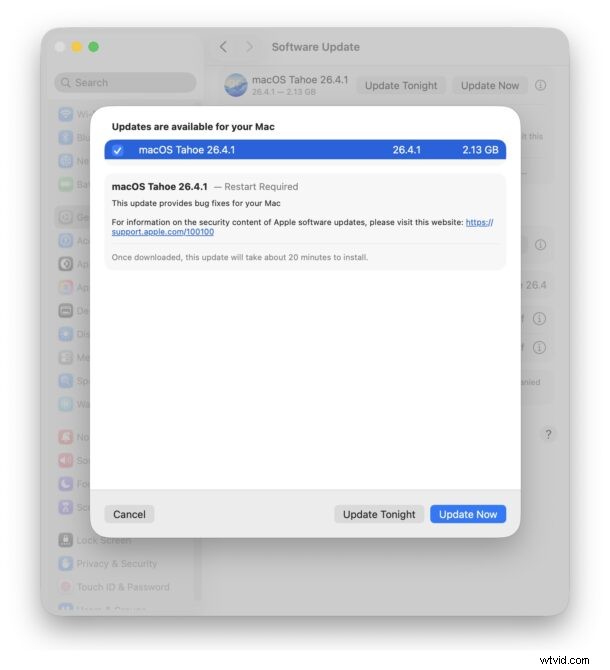
The macOS Tahoe 26.4.1 update weighs around 3GB-8GB depending on the Mac being installed on, and will require a reboot to complete installation.
macOS Tahoe 26.4.1 Direct Download Links
You can download the full macOS Tahoe 26.4.1 installer package and the macOS Tahoe 26.4.1 IPSW firmware file below hosted on Apple’s CDN servers:
- MacOS Tahoe 26.4.1 InstallAssistant.pkg
- MacOS Tahoe 26.4.1 IPSW – UniversalMac_26.4.1_Restore.ipsw
Mac IPSW and package installers can be used for things like creating a bootable MacOS Tahoe installer drive, updating multiple Macs, virtual machine setups, clean installs, archival purposes, and more.
macOS Tahoe 26.4.1 Release Notes
Release notes included with MacOS Tahoe 26.4.1 are brief and nonspecific:
macOS Tahoe 26.4.1
This update provides bug fixes for your Mac
For information on the security content of Apple software updates, please visit this website: https:// support.apple.com/100100
Once downloaded, this update will take about 20 minutes to install.
Separate notes from enterprise and developers are where some limited details are presented as the Tahoe 26.4.1 update “resolves an issue where MacBook Air with M5 and MacBook Pro with M5 Pro or M5 Max failed to join 802.1X Wi-Fi networks while using content filter extensions.” This highlights the importance of those particular machines to install the update.
After you update your Macs to the latest Tahoe release, don’t forget to also update iOS 26.4.1 on iPhone, and iPadOS 26.4.1 on iPad to install bug fixes for those devices too.