
Apple has released iOS 26.4.1 for iPhone, along with ipadOS 26.4.1 for iPad, both to address unspecified bug fixes. Because no specific bug fixes are mentioned in the release notes or with the download, it’s unclear as of now what exactly has been addressed, but obviously Apple felt it important enough to issue a software update to fix whatever bug(s) have been patched.
This is the only fresh software update released today, meaning the most recent available versions of system software for other Apple devices are still MacOS Tahoe 26.4, watchOS 26.4, and tvOS 26.4.
How to Download & Install iOS 26.4.1 and iPadOS 26.4.1 Update
Always backup iPhone or iPad to iCloud before starting software update:
- Open the “Settings” app on iPhone or iPad
- Go to “General” and then go to “Software Update”
- Select “Update Now” to download and install the iOS 26.4.1 update for iPhone or iPadOS 26.4.1 update for iPad
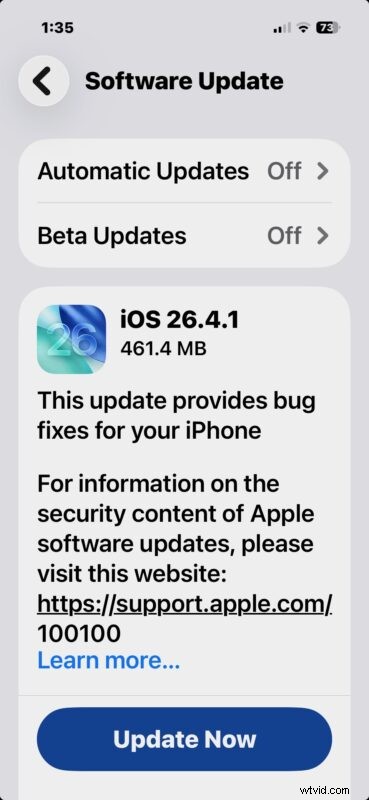
Installing the update is pretty quick for most users, but does require the iPhone or iPad to restart.
While Settings > Software Update is the simplest way to update, you can also install the iOS 26.4.1 update through a computer, or with IPSW files manually.
iOS 26.4.1 IPSW Firmware Download Links
If you wish to use IPSW to manually update, the following links point to Apple CDN servers for firmware files:
- Updating…
iPadOS 26.4.1 IPSW Firmware Files
- Updating…
iOS 26.4.1 Release Notes
Release notes for iOS 26.4.1 for iPhone are terse and unspecific, and while many of us enjoy as much detail as possible for things like this, that’s not what we have at the moment. Here are the release notes that you’ll find accompanying the download;
This update provides bug fixes for your iPhone
For information on the security content of Apple software updates, please visit this website:
https://support.apple.com/100100
iPadOS 26.4.1 Release Notes
Release notes for iPadOS 26.4.1 for iPad are just as brief:
This update provides bug fixes for your iPad
For information on the security content of Apple software updates, please visit this website:
https://support.apple.com/100100
If you update your iPhone and/or iPad and notice anything significant, or discover a bug that has been resolved, share it with us in the comments below.
With so many other software updates released over the last few weeks, it’s always a good idea to check your other Apple devices to see if they have updates available too.