
REC

Recommended: Video Production, Editing & Gear Maintenance Guide

 WTVID >> WTVID >  >> Video Editing >> Adobe Audition

Master Noise Reduction in Premiere Pro: Top Alternatives to Adaptive

Adobe Premiere Pro used to have something called Adaptive Noise Reduction but now it is no more!

Frankly, I’m glad it’s not there anymore(!) because it wasn’t that great. It always left a little sample at the start of your audio before the noise reduction kicked in, and just wasn’t working very well on videos in general.

So, let’s look at how we can replace that effect and do even better than we could did before.

Previously, you’d have gone into your Effects rack and selected Adaptive Noise Reduction, but now the simplest replacement is to go into the audio workspace, select the Dialogue track, go into the Repair area, and select Reduce Noise.
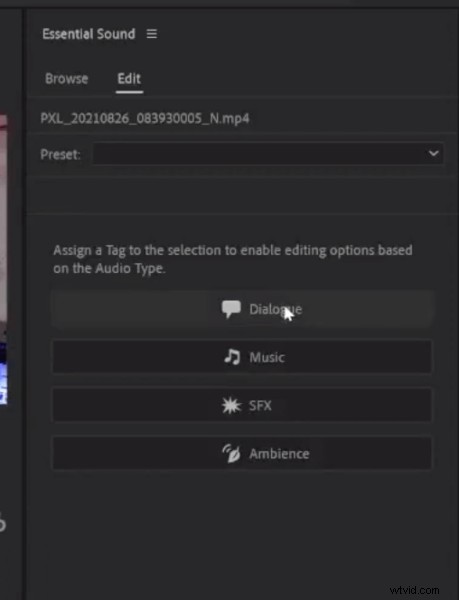
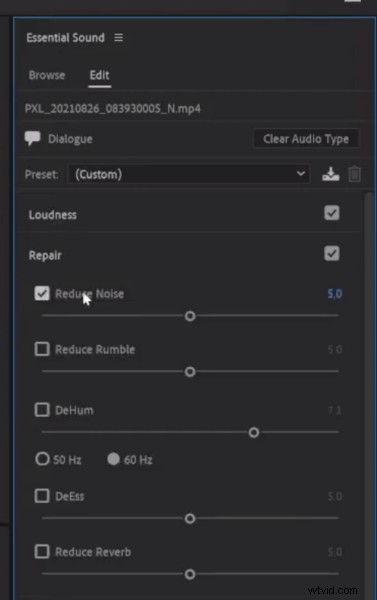
Master Noise Reduction in Premiere Pro: Top Alternatives to Adaptive Master Noise Reduction in Premiere Pro: Top Alternatives to Adaptive

This essentially replaces Adaptive Noise Reduction and it’s that simple!

The Reduce Noise tool inside the audio workspace when you’ve selected your track as Dialogue, works much better than Adaptive Noise Reduction did in Adobe Premiere Pro.

If you do, for some reason, need Adaptive Noise Reduction, you can still get it in Adobe Audition.

Learn More Editing Tips For Premiere Pro

  • How To Fade Out Audio in Premiere Pro
  • Essential Sound Panel in Premiere Pro vs The Audio Mixer
  • How To Adjust Volume In Premiere Pro
  • How to Make Dialogue Sound Better in Premiere Pro

Premiere Pro Presets

If you are looking to take your audio to the next level, take a look at our Premiere Pro Audio Presets.


No
  1. Master Motion Tracking in Adobe Premiere Pro: Easy Step-by-Step Guide

  2. Master Proxies in Premiere Pro: Edit 4K Videos Smoothly Without Lag

  3. How to Easily Stabilize Shaky Footage with Warp Stabilizer in Premiere Pro

  4. Master J-Cut Transitions in Adobe Premiere Pro: Step-by-Step Guide

  5. How to Easily Add Audio in Adobe Premiere Pro: Step-by-Step Guide

Adobe Audition
  1. Master Color Correction in Premiere Pro and Filmora: Step-by-Step Guide

  2. Master the Audio Track Mixer in Adobe Premiere Pro: Step-by-Step Guide

  3. Master Adobe Premiere Pro Keyboard Shortcuts: Using the Shortcut Map Guide

  4. How to Boost Audio Volume in Adobe Premiere Pro: Easy Step-by-Step Guide

  5. How to Apply Audio Distortion in Adobe Premiere Pro: Step-by-Step Guide

  6. How to Effortlessly Remove Audio Clicks in Adobe Premiere Pro: Step-by-Step Guide

  7. How to Use Noise Gate in Adobe Audition: Step-by-Step Guide

  8. How to Add Echo Effects in Adobe Premiere Pro: Step-by-Step Guide