
If you have an image in WebP format and you want to convert it to PNG format, using an online WebP to PNG converter is the simplest way to do it. Fortunately, after comparison, here list 6 best online WebP to PNG converters for your reference.
How to convert WebP to PNG? The following will show you 6 methods to finish the task. Let’s get started. If you want to make a cool video or an interesting GIF with the converted PNG images, try MiniTool MovieMaker.
1. Convertio
Convertio is one of the best online WebP to PNG converter. You can process up to 2 SWF files simultaneously. It also provides other tools like MP3 Cutter, Video Cutter, Compress Video, etc.
- Open Convertio on your browser.
- Upload your WebP file to the program from the 4 available options – Choose Files, From Dropbox, From Google Drive, and URL.
- Select PNG as the output format and click the Convert button.
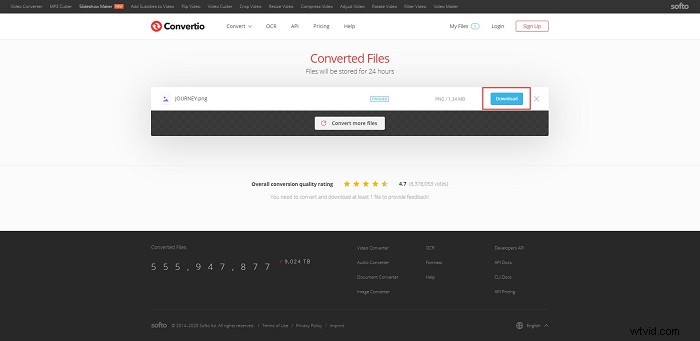
- After conversion, click Download to save the converted PNG image.
2. Online-Convert
Now it comes to Online-Convert. It is a free online converter with a simplified interface, and you can complete conversions of files like document, image, audio, video, and so on.
- Go to online-convert.com on your web browser.
- Click the Select target format down arrow at the Image converter section, select Convert to PNG from the list, and then hit the Go button.
- Upload the WebP file that you want to convert to the PNG image.
- Set some advanced parameters for the output file and then click Start conversion.
Related article: WebP to JPG
3. CloudConvert
CloudConvert is another powerful online WebP to PNG converter. Better yet, this online tool supports batch conversion to save time and energy.
- Open the Select Files dropdown list and choose a preferred method to upload your WebP file.
- Select PNG as the output format.
- Click the wrench icon to customize the output PNG image.
- Hit the Convert button to start the conversion.
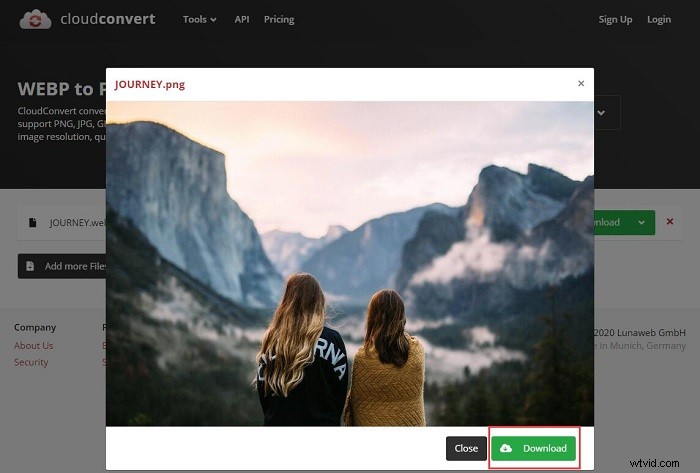
- Once completed, click the blue Download button.
4. Zamzar
Without Zamzar, the list of the best online WebP to PNG converter is incomplete. It is a free online video converter, audio converter, image converter, and eBook converter.
- Open your web browser and visit the Zamzar website.
- Click Add Files to import the WebP file you want to convert to PNG. You can also choose select link to paste the online URL.
- Once the WebP image is uploaded, select PNG from the Convert to dropdown list.
- Enter your email address and click the Convert Now button to start the conversion.
You might be interested in: How to Crop Images at Ease (Windows/Mac/Online)
5. Anyconv
AnyConv is a 100% free online WebP to PNG converter. With this web program, you can convert documents, images, audio and video files, eBooks, and archives.
- Visit the AnyConv site and select PNG Converter under IMAGE.
- Choose WEBP To PNG under the Convert to PNG section.
- Click the CHOOSE FILE button to import the WebP file from your computer.
- Tap on the CONVERT button to start the conversion.
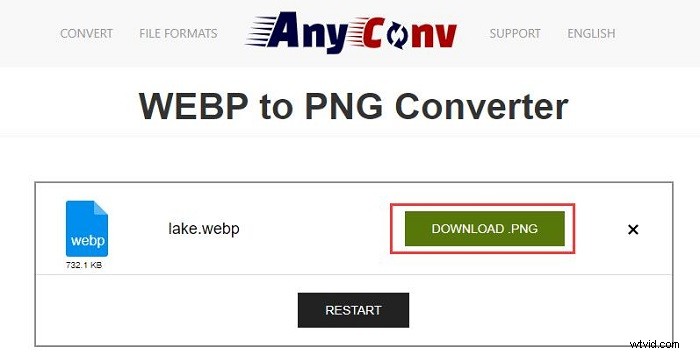
- Once finished, you can download the PNG image by clicking DOWNLOAD.
6. OnlineConvertFree
OnlineConvertFree is a simple but practical WebP to PNG converter and supports multitasking. With it, you can convert any file - document, image, audio, and video formats for free.
- Go to the OnlineConvertFree site and select PNG converter under the Images section.
- Click CHOOSE FILE to upload your WebP file to the program or drag and drop it onto the page.
- Tap on the blue Convert button.
- Wait till your WebP file be converted to PNG and then click Download.
Bottom Line
The above have introduced 6 best online WebP to PNG converters and the specific steps on how to convert WebP to PNG with them. It’s your time to have a try. If you have any questions or suggestions about it, please let us know via admin@wtvid.com or share them in the comments section below.