
Through Facebook events, you can easily connect with friends and family, or make business marketing on social media. However, Facebook has many kinds of dimensions for different posting ways. This article will get you through Facebook event photo size and other size limits. Want to create an amazing video to share on Facebook? try MiniTool Moviemaker.
Appropriate event photo size is the key to make your post stand out on Facebook. And as long as you make the right photo size and concise description, you can make your event post impressive to promote your business. The below contents would list out some important things about Facebook dimensions to help you make use of it better.
What Is the Ideal Facebook Event Photo Size
Since Facebook has updated its new layout in 2020, the previous aspect ratio 16:9 and dimension 1920 x 1080 has changed into 1920 x 1005 pixels size with the aspect ratio of 1.91:1, and the minimum Facebook event photo size is 1200 x 628 pixels. If your photo size is not in proportion of 1.91:1, Facebook will automatically crop it.
Thus, the ideal Facebook event photo size should fit with the 1.91:1 aspect ratio, the minimum is 1280 x 628 and the recommended size is 1920 x 1005.
The Other Facebook Post Size You Should Know
Apart from the event photo size, Facebook has other dimension limits you should have an idea of. Armed with the necessary information about Facebook size limits, you can avoid many troubles and share high-quality images with subscribers on Facebook. The following tablet list some major Facebook cover photo dimensions.
|
Type |
Facebook Profile Picture Size |
Facebook Cover Photo Size (profile) |
Facebook Page Cover Photo Size |
Facebook Event Photo Size |
Facebook Group Cover Photo Size |
|
Max size |
2048 x 2048 |
2037 x 754 |
1958 x 1958 |
1920 x 1005 |
1640 x 922 |
|
Minimum size |
168 x 168 |
851 x 851 |
820 x 312 |
1200 x 628 |
820 x 461 |
|
Aspect ratio |
1:1 |
2.7:1 |
2.63:1 |
1.91:1 |
1.78:1 |
How to Create a Facebook Event
As to how to create an impressive Facebook event, there are many social media templates for options on Canva – a design website that provides oceans of fancy templates with users. You can choose various templates according to the social media platform, including Facebook, Instagram, Twitter, etc.
With Canva’s templates, you don’t need to consider Facebook size limits only to choose the relevant picture you will use. Let’s take creating a Facebook event photo as an example.
Step 1. Go to Canva, and type “Facebook event” into the search box to find the relevant templates.
Step 2. Choose one template you want, and click the use the template button to enter the editing page.
Step 3. Editing the event cover on the template.
- Add animated texts and a heading to the picture. There are many optional fonts and styles to change.
- Add some pictures, stickers, frames to your Facebook event cover in the Element tab of the left-side toolbar, and adjust their size to put in the proper position.
- Add a preset short video to make the event cover animated.
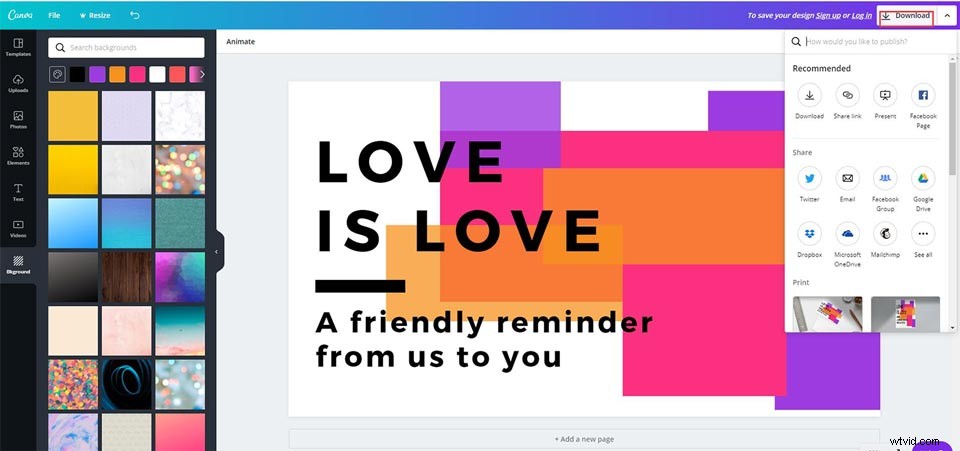
- Change the background of the photo if you want to stand out your Facebook event post better.
Step 4. Click the Download button or click the Up icon to directly share on Facebook Page.
Related article: How to Download Facebook Live Videos | 2 Methods
Bottom Line
The above information about Facebook dimension limits would let you create posts more smoothly and no longer worry that Facebook crops the important part of your Facebook event post. Moreover, Canva’s templates make it easy to create an impressive event post.
If you have any questions or suggestions about it, please let us know via admin@wtvid.comor share them in the comments section below.